VxRail: Plattformservice kann nicht initialisiert werden
Zusammenfassung: Der VxRail-Plattformservice erscheint aktiv, kann aber nicht initialisiert werden, da das vpxuser-Konto keinen Shell-Zugriff hat, was zu Berechtigungsfehlern in platform_svc.log und hostd.log führt. ...
Dieser Artikel gilt für
Dieser Artikel gilt nicht für
Dieser Artikel ist nicht an ein bestimmtes Produkt gebunden.
In diesem Artikel werden nicht alle Produktversionen aufgeführt.
Symptome
Der Plattformservice meldet, dass er ausgeführt wird, kann aber nicht initialisiert werden.
platform_svc.log:
vxpsvc_ptagent_op -p ******************************** -c ********************************" failed with:
2024-12-10T03:42:04Z Er(11)[+] platform_svc:
2024-12-10T03:42:04Z Er(11)[+] platform_svc: OUT:
2024-12-10T03:42:04Z Er(11)[+] platform_svc: b''ERR:
2024-12-10T03:42:04Z Er(11)[+] platform_svc: b'Errors:
 Access to perform the operation was denied.
 Only users with shell access can make these changes.'
2024-12-10T03:42:04Z Er(11) platform_svc: [ThreadPoolExecutor-0_0] ERROR - Esxcli command excution error
2024-12-10T03:42:04Z Er(11) platform_svc: [ThreadPoolExecutor-0_0] ERROR -   Traceback (most recent call last):
2024-12-10T03:42:04Z Er(11) platform_svc: [ThreadPoolExecutor-0_0] ERROR -     File "/opt/vxrail/bin/platforms/dell/plugin/misc.py", line 52, in set_up_temporary_account
2024-12-10T03:42:04Z Er(11) platform_svc: [ThreadPoolExecutor-0_0] ERROR -       esxcli('system account set --id {0} -p {1} -c {1}'.format(self.username, self.password), sensitive=self.password)
2024-12-10T03:42:04Z Er(11) platform_svc: [ThreadPoolExecutor-0_0] ERROR -     File "/opt/vxrail/bin/utility/host.py", line 88, in __call__
2024-12-10T03:42:04Z Er(11) platform_svc: [ThreadPoolExecutor-0_0] ERROR -       return self.execute(cmdstr, sensitive)
2024-12-10T03:42:04Z Er(11) platform_svc: [ThreadPoolExecutor-0_0] ERROR -     File "/opt/vxrail/bin/utility/host.py", line 83, in execute
2024-12-10T03:42:04Z Er(11) platform_svc: [ThreadPoolExecutor-0_0] ERROR -       result = run_command('localcli --formatter=python ' + cmdstr,
2024-12-10T03:42:04Z Er(11) platform_svc: [ThreadPoolExecutor-0_0] ERROR -     File "/opt/vxrail/bin/utility/__init__.py", line 162, in run_command
2024-12-10T03:42:04Z Er(11) platform_svc: [ThreadPoolExecutor-0_0] ERROR -       raise CalledProcessError(proc.returncode, cmd_id or cmdstr, err)
2024-12-10T03:42:04Z Er(11) platform_svc: [ThreadPoolExecutor-0_0] ERROR -   utility.CalledProcessError: ESXi command failed with 1
2024-12-10T03:42:04Z Wa(12) platform_svc: [ThreadPoolExecutor-0_0] WARNING - sleep 5s to retry!
2024-12-10T03:42:10Z Er(11) platform_svc: [ThreadPoolExecutor-0_0] ERROR - Command "localcli --formatter=python system account set --id vxpsvc_ptagent_op -p ******************************** -c ********************************" failed with:
2024-12-10T03:42:10Z Er(11)[+] platform_svc:
2024-12-10T03:42:10Z Er(11)[+] platform_svc: OUT:
2024-12-10T03:42:10Z Er(11)[+] platform_svc: b''ERR:
2024-12-10T03:42:10Z Er(11)[+] platform_svc: b'Errors:
 Access to perform the operation was denied.
 Only users with shell access can make these changes.'
2024-12-10T03:42:10Z Er(11) platform_svc: [ThreadPoolExecutor-0_0] ERROR - Esxcli command excution error
2024-12-10T03:42:10Z Er(11) platform_svc: [ThreadPoolExecutor-0_0] ERROR -   Traceback (most recent call last):
2024-12-10T03:42:10Z Er(11) platform_svc: [ThreadPoolExecutor-0_0] ERROR -     File "/opt/vxrail/bin/platforms/dell/plugin/misc.py", line 52, in set_up_temporary_account
hostd.log:
2024-12-10T05:41:21.057Z Er(163) Hostd[2242456]: [Originator@6876 sub=Vimsvc.HaUserManager opID=esxcli-system.account.set-9e-4310 sid=52eadfba user=vpxuser] Caller must have shell access
2024-12-10T05:41:27.080Z Er(163) Hostd[2242449]: [Originator@6876 sub=Vimsvc.HaUserManager opID=esxcli-system.account.set-92-4339 sid=52bc5aec user=vpxuser] Caller must have shell access
2024-12-10T05:41:33.157Z Er(163) Hostd[2242453]: [Originator@6876 sub=Vimsvc.HaUserManager opID=esxcli-system.account.set-8f-4368 sid=5287fa7d user=vpxuser] Caller must have shell access
2024-12-10T05:41:39.180Z Er(163) Hostd[2241613]: [Originator@6876 sub=Vimsvc.HaUserManager opID=esxcli-system.account.set-d5-43b1 sid=5281ac0e user=vpxuser] Caller must have shell access
2024-12-10T05:41:45.234Z Er(163) Hostd[2242420]: [Originator@6876 sub=Vimsvc.HaUserManager opID=esxcli-system.account.set-3d-43ee sid=52976516 user=vpxuser] Caller must have shell access
2024-12-10T05:41:51.322Z Er(163) Hostd[2242445]: [Originator@6876 sub=Vimsvc.HaUserManager opID=esxcli-system.account.set-5c-442a sid=5248beba user=vpxuser] Caller must have shell access
2024-12-10T05:42:00.152Z Er(163) Hostd[2242458]: [Originator@6876 sub=Vimsvc.HaUserManager opID=esxcli-system.account.set-ef-446f sid=524c1434 user=vpxuser] Caller must have shell access
2024-12-10T05:42:06.185Z Er(163) Hostd[2241696]: [Originator@6876 sub=Vimsvc.HaUserManager opID=esxcli-system.account.set-fa-44ae sid=5229aaf9 user=vpxuser] Caller must have shell access
Ursache
Der Plattformdienst versucht, ein temporäres Konto zu erstellen (vxpsvc_ptagent_op) mithilfe der esxcli system account set verwenden. Das Zielkonto vpxuser hat keinen Shell-Zugriff, was dazu führt, dass der Befehl abgelehnt wird.
Beweise
- Protokolleinträge anzeigen
Caller must have shell accessFehler - Plattformdienstprotokolle enthalten die Meldung "Zugriff zur Durchführung des Vorgangs wurde verweigert. Nur Benutzer mit Shell-Zugriff können diese Änderungen vornehmen."
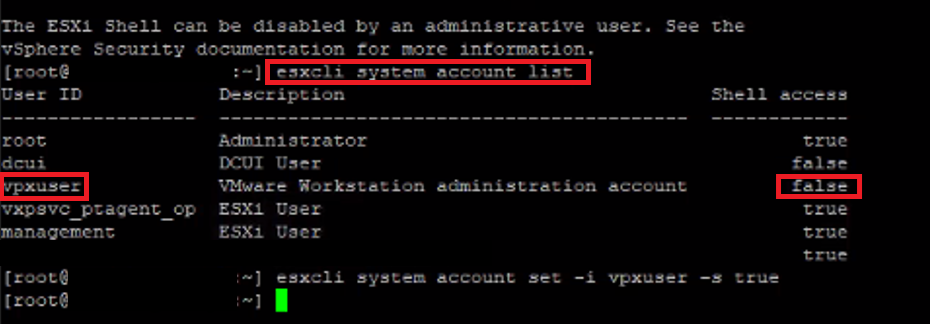
Ausgeführt esxcli system account list Bestätigt, dass vpxuser Shell-Zugriff ist eingestellt auf false.
Lösung
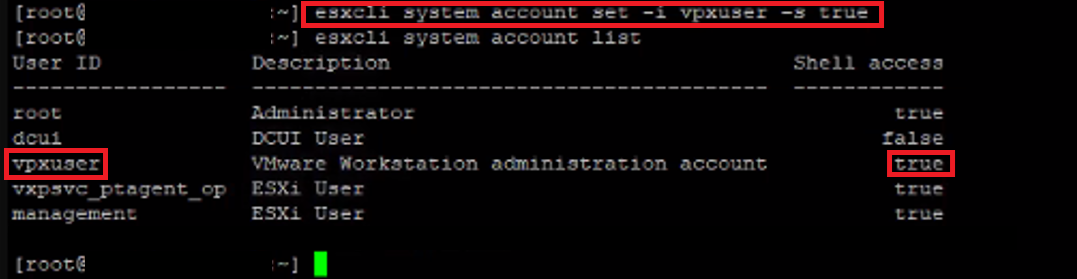
Aktivieren Sie den Shell-Zugriff für vpxuser Konto
- Führen Sie den folgenden Befehl auf dem ESXi-Host aus:
- ESXCLI-Systemkonto set -i vpxuser -s true
- Überprüfen Sie, ob das Konto jetzt über Shell-Zugriff verfügt:
-
ESXCLI-Systemkontoliste
Betroffene Produkte
VxRail, VxRail Appliance Series, VxRail G Series Nodes, VxRail D Series Nodes, VxRail D560, VxRail D560F, VxRail E Series Nodes, VxRail E460, VxRail E560, VxRail E560F, VxRail E560N, VxRail E660, VxRail E660F, VxRail E660N, VxRail E665, VxRail E665F
, VxRail E665N, VxRail G560, VxRail G560F, VxRail P Series Nodes, VxRail P470, VxRail P570, VxRail P570F, VxRail P580N, VxRail P670F, VxRail P670N, VxRail P675F, VxRail P675N, VxRail S Series Nodes, VxRail S470, VxRail S570, VxRail S670, VxRail Software, VxRail V Series Nodes, VxRail V470, VxRail V570, VxRail V570F, VXRAIL V670F, VxRail VD-4510C, VxRail VD-4520C, VxRail VD Series Nodes, VxRail VE-660, VxRail VE-6615, VxRail VE-670, VxRail VP-760, VxRail VP-7625, VxRail VP-770, VxRail VS-760
...
Produkte
VxRail, VMware, VxRail 460 and 470 Nodes, VxRail Appliance Series, VxRail G Series Nodes, VxRail D Series Nodes, VxRail D560, VxRail D560F, VxRail E Series Nodes, VxRail E460, VxRail E560, VxRail E560 VCF, VxRail E560F, VxRail E560F VCF, VxRail E560N
, VxRail E560N VCF, VxRail E660, VxRail E660F, VxRail E660N, VxRail E665, VxRail E665F, VxRail E665N, VxRail G560, VxRail G560 VCF, VxRail G560F, VxRail G560F VCF, VxRail P Series Nodes, VxRail P470, VxRail P570, VxRail P570 VCF, VxRail P570F, VxRail P570F VCF, VxRail P580N, VxRail P580N VCF, VxRail P670F, VxRail P670N, VxRail P675F, VxRail P675N, VxRail S Series Nodes, VxRail S470, VxRail S570, VxRail S570 VCF, VxRail S670, VxRail Software, VxRail V Series Nodes, VxRail V470, VxRail V570, VxRail V570 VCF, VxRail V570F, VxRail V570F VCF, VXRAIL V670F, VxRail VD-4000R, VxRail VD-4000W, VxRail VD-4000Z, VxRail VD-4510C, VxRail VD-4520C, VxRail VD Series Nodes, VxRail VE-660, VxRail VE-6615, VxRail VP-760, VxRail VP-7625, VxRail VS-760
...
Artikeleigenschaften
Artikelnummer: 000258607
Artikeltyp: Solution
Zuletzt geändert: 20 Juli 2026
Version: 2
Antworten auf Ihre Fragen erhalten Sie von anderen Dell NutzerInnen
Support Services
Prüfen Sie, ob Ihr Gerät durch Support Services abgedeckt ist.