O Alienware Command Center é instalado automaticamente em um computador que não seja Alienware
Zusammenfassung: O artigo a seguir fornece informações sobre o processo de instalação do Alienware Command Center (AWCC) quando um periférico Alienware é instalado em um dispositivo não Alienware.
Dieser Artikel gilt für
Dieser Artikel gilt nicht für
Dieser Artikel ist nicht an ein bestimmtes Produkt gebunden.
In diesem Artikel werden nicht alle Produktversionen aufgeführt.
Weisungen
Instalação automática do aplicativo Alienware Command Center
Este artigo aborda por que o aplicativo AWCC é instalado em um dispositivo que não seja Alienware.
Nota: O processo de identificação automática (ID) do Windows impulsiona a instalação do aplicativo.
Este artigo oferece suporte aos seguintes periféricos:
- Teclado gamer sem fio Alienware Pro
- Mouse gamer Alienware Pro sem fio
- Teclado gamer Alienware TKL (AW420K)
- Headset gamer sem fio Alienware (AW920H)
- Headset gamer sem fio Alienware Dual-Mode (AW720H)
- Mouse gamer sem fio Alienware (AW720M)
- Mouse gamer com fio da Alienware (AW320M)
- Mouse gamer Alienware com ou sem fio (AW610M)
- Teclado gamer mecânico RGB de baixo perfil Alienware (AW510K)
- Teclado gamer mecânico RGB Alienware (AW410K)
- Mouse gamer sem fio Alienware (AW310M)
- Mouse gamer Alienware (AW510M)
- Teclado gamer mecânico Alienware (AW310K)
- Teclado gamer Alienware Tri-Mode sem fio (AW920K)
- Headset gamer Alienware (AW520H)
- Headset gamer Alienware Tri-Mode sem fio (AW725H)
- Headset gamer Alienware Pro sem fio
- Mouse gamer sem fio Alienware (AW620M)
Este artigo é compatível com os seguintes monitores:
- Monitor gamer Alienware de 27" (AW2725DM)
- Monitor gamer Alienware de 32" (AW3225DM)
- Monitor gamer Alienware de 34" (AW3425DWM)
- Monitor gamer Alienware de 27" (AW2720HFA)
- Monitor gamer Alienware de 27" (AW2720HF)
- Monitor gamer curvo Alienware de 34" (AW3420DW)
- Monitor OLED Alienware de 55" (AW5520QF)
- Monitor gamer Alienware de 25" (lado negro da lua) (AW2521HF)
- Monitor gamer Alienware de 25" (Lunar Light) (AW2521HFL)
- Monitor gamer Alienware de 25" (Lunar Light) (AW2521HFLA)
- Monitor gamer Alienware de 25" (AW2521H)
- Monitor gamer Alienware de 25" (Lunar Light) (AW2521HFA)
- Monitor gamer curvo Alienware de 38" (AW3821DW)
- Monitor gamer Alienware de 27" (AW2721D)
- Monitor gamer curvo OLED Alienware de 34" (AW3423DWF)
- Monitor gamer Alienware de 25" (AW2523HF)
- Monitor gamer Alienware de 27" (AW2723DF)
- Monitor gamer curvo OLED Alienware de 34" (AW3423DW)
- Monitor gamer Alienware de 25" (AW2524H)
- Monitor gamer Alienware de 27" (AW2724DM)
- Monitor gamer Alienware de 27" (AW2724HF)
- Monitor gamer Alienware de 25" (AW2524HF)
- Monitor gamer curvo Alienware de 32" (AW3225QF)
- Monitor gamer Alienware de 27" (AW2725DF)
- Monitor gamer Alienware de 27" (AW2725QF)
- Monitor gamer Alienware QD-OLED de 34" e 240 Hz (AW3425DW)
Os periféricos e monitores Alienware são usados com computadores Alienware, bem como com outros produtos Dell e dispositivos de terceiros. Para ajudar a utilizar todo o potencial do hardware adquirido, o Windows instala o AWCC depois de identificar periféricos e/ou monitores Alienware. O aplicativo AWCC contém recursos adicionais que o hardware Alienware pode usar. (Por exemplo: Controle de cores RGB, perfis, macros e assim por diante)
O AWCC é instalado automaticamente no computador assim que o hardware da Alienware é identificado para proporcionar a experiência mais tranquila que proporciona.
A Dell adicionou uma mensagem na tela perguntando se o aplicativo AWCC deve ser instalado em seu sistema operacional ou não.
A Dell fez essa adição com o AWCC versão 6.6.x.x.
Agora que o Windows está enviando a versão mais recente do aplicativo AWCC, você pode escolher se deseja ou não instalar o aplicativo.
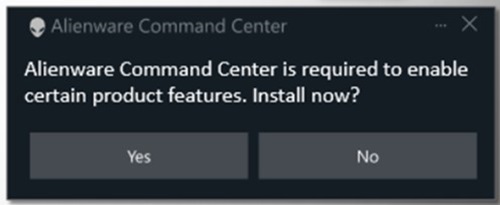
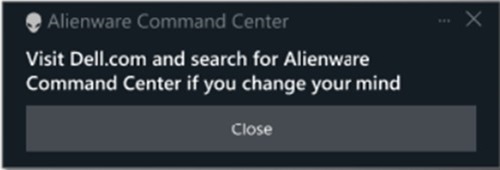
Escolher Não exibe outra mensagem na tela que aconselha visitar Dell.com se você mudar de ideia.
Nota: Essa opção não é aplicável a versões mais antigas do aplicativo AWCC. A versão 5.x.x.x do aplicativo AWCC não está mais em desenvolvimento para atualizações.
A equipe da Alienware está trabalhando constantemente para melhorar o novo aplicativo AWCC e está trabalhando para implementar o aplicativo AWCC mais recente em dispositivos mais antigos.
Para obter mais informações, consulte o seguinte guia:
- Documentos e manuais da Dell: Guia do usuário do Alienware Command Center
Betroffene Produkte
Alienware Mechanical Gaming Keyboard | AW310K, Alienware RGB Mechanical Gaming Keyboard AW410K, Alienware Tenkeyless Gaming Keyboard AW420K, Alienware Wireless Gaming Mouse AW310M, Alienware RGB Gaming Mouse AW510M
, Alienware Wired/Wireless Gaming Mouse AW610M, Alienware Tri-Mode Wireless Gaming Mouse AW720M, Alienware, Dell All-in-One, Dell Pro All-in-One, Dell Pro Max Micro, Dell Pro Max Slim, Dell Pro Max Tower, Dell Pro Micro, Dell Pro Slim, Dell Pro Tower, Dell Slim, Dell Tower, Inspiron, OptiPlex, Vostro, XPS, G Series, G Series, Alienware, Dell Laptops, Dell Plus, Dell Pro, Dell Pro Max, Dell Pro Plus, Dell Pro Premium, Inspiron, Latitude, Dell Pro Rugged, Vostro, XPS, Fixed Workstations, Mobile Workstations, Alienware Pro Wireless Gaming Headset, Alienware Tri-Mode Wireless Gaming Headset AW725H, Alienware Tri-Mode Wireless Gaming Headset AW920H, Alienware Wired Gaming Mouse AW320M, Alienware Pro Wireless Gaming Keyboard, Alienware Pro Wireless Gaming Mouse, Alienware Tri-Mode Wireless Gaming Keyboard AW920K, Alienware Wired Gaming Headset AW520H, Alienware Dual Mode Wireless Gaming Headset AW720H, Alienware Wireless Gaming Mouse AW620M, Alienware 27 Gaming Monitor AW2723DF, Alienware 27 Gaming Monitor AW2724DM, Alienware 27 Gaming Monitor AW2724HF, Alienware 27 360Hz QD OLED Gaming Monitor AW2725DF, Alienware 27 4K Dual-Resolution Gaming Monitor AW2725QF, Alienware 32 Gaming Monitor AW3225DM, Alienware 32 4K QD OLED Gaming Monitor AW3225QF, Alienware 34 Curved OLED Monitor AW3423DW, Alienware 34 Curved QD OLED Gaming Monitor AW3423DWF, Alienware 34 240Hz QD-OLED Gaming Monitor AW3425DW, Alienware 34 Gaming Monitor AW3425DWM, Alienware 25 Gaming Monitor AW2521H, Alienware 25 Gaming Monitor AW2521HF, Alienware 25 Gaming Monitor AW2521HFA, Alienware 25 Gaming Monitor AW2521HFL, Alienware 25 Gaming Monitor AW2521HFLA, Alienware 27 Gaming Monitor AW2720HF, Alienware 27 Gaming Monitor AW2720HFA, Alienware 27 Gaming Monitor AW2721D, Alienware AW3420DW, Alienware 38 Curved Gaming Monitor AW3821DW, Alienware 55 OLED Monitor AW5520QF, Dell Pro Max Micro XE FCM2250
...
Artikeleigenschaften
Artikelnummer: 000325948
Artikeltyp: How To
Zuletzt geändert: 23 Mai 2026
Version: 2
Antworten auf Ihre Fragen erhalten Sie von anderen Dell NutzerInnen
Support Services
Prüfen Sie, ob Ihr Gerät durch Support Services abgedeckt ist.