PowerProtect:ノードのレポート作成に関する問題のトラブルシューティング方法
Zusammenfassung: この記事では、PowerProtect Data Manager (PPDM)レポートの問題の初期分析に取り組む方法について説明します。
Dieser Artikel gilt für
Dieser Artikel gilt nicht für
Dieser Artikel ist nicht an ein bestimmtes Produkt gebunden.
In diesem Artikel werden nicht alle Produktversionen aufgeführt.
Weisungen
ログの場所
19.17より前のバージョン:
ベース ログの場所: /opt/emc/dpa/
エージェント ログ: /opt/emc/dpa/agent/dpaagent.log
サーバー ログ: //opt/emc/dpa/services/server.logs
データストア ログ: /opt/emc/dpa/services/datastore*.logs
レポート管理: /opt/emc/dpa/reporting/reportingmgmt.log
バージョン19.17以降:
ベース ログの場所: /var/log/dellemc/reporting
Reporting Data Collector(エージェント): /var/log/dellemc/reporting/reporting-data-collector/reporting-data-collector.log
レポート作成サービス: /var/log/dellemc/reporting/reporting-service/reporting-service.log
PostgresSQL: /var/log/dellemc/reporting/postgresql/postgresql*.log
レポート管理: /var/log/dellemc/reporting/reportingmgmt/reportingmgmt.log
バージョン19.17以降のバージョンでログ レベルを変更するには、次の手順を実行します。
- 構成場所:
/var/lib/dellemc/reporting/config/logback-config.xml - サービス固有のログ レベル:
<service-name>.log.level
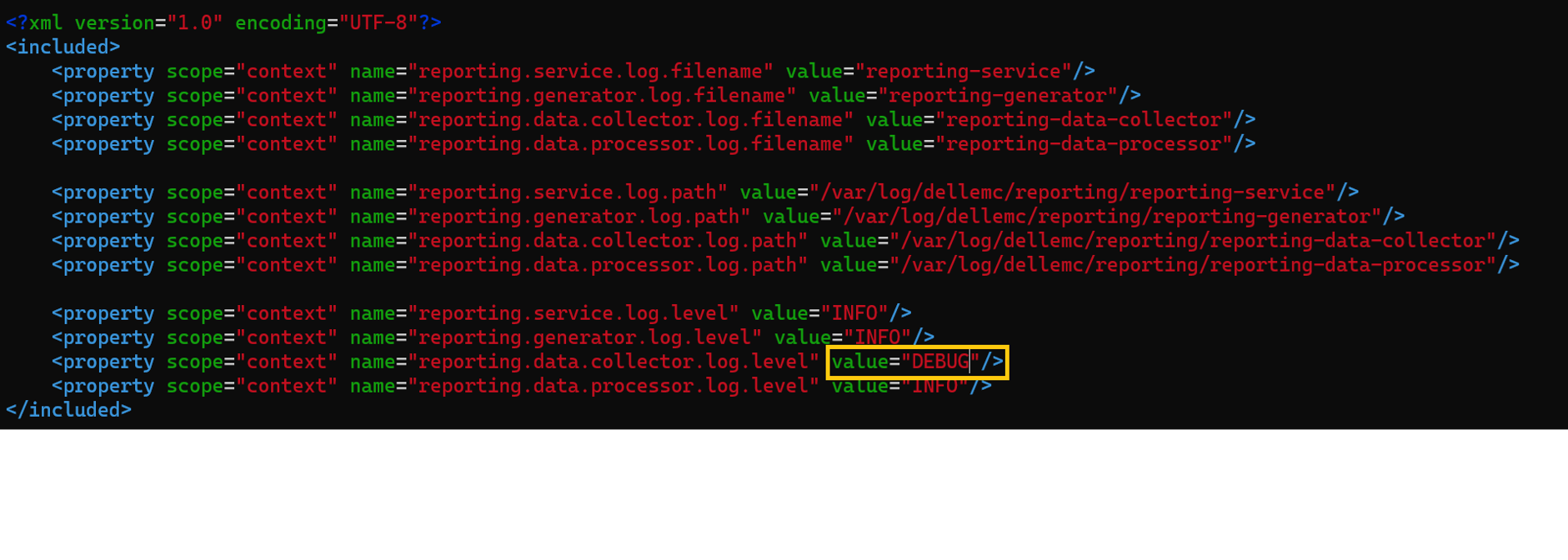
レポート サービスの管理
19.17より前のバージョン:
コマンド形式:
ベースの場所: /opt/emc/dpa/services/bin
dpa.sh <service> <operation>
Operation: start, stop, restart
サービス: svc, app, ds, agent
Example: dpa.sh svc start
バージョン19.17以降:
コマンド形式: systemclt <operation> <service name>
Operation: start, stop, restart, status
サービス:
レポート サービス: reporting-service, reporting-data-collector, reporting-generator, reporting-data-processor
外部サービス: postgresql , rabbitmq-server
Example: systemclt restart reporting-service
各サービスは個別に管理されます。
既知の問題/トラブルシューティング
導入/アップグレードの失敗: Reporting Engine を正常にデプロイするには、ネットワーク構成が正しいことを確認してください。正引き参照と逆引き参照はどちらも、PPDMホストに対して、およびPPDMからレポート エンジン ホストに対して解決される必要があります。
観察されたエラー:Error : InfrastructureNodeSessions unsuccessful during initialization. Unable to deploy node <Reporting/Search_Engine_FQDN>. Unable to determine the state of node VM '<Reporting/Search_Engine_FQDN>' or the 'vProxy Agent' agent running on it. Unable to connect to Node VM: dial tcp: lookup <Reporting/Search_Engine_FQDN> on <DNS_Server>:53: no such host
名前解決を確認します。nslookup PPDM FQDNnslookup PPDM IPnslookup reporting node FQDNnslookup reporting node IP
19.18より前のバージョンでは、複数のドメイン ネーム システム(DNS)ホストが構成されているためにアップデートに失敗するという問題が報告されていました。この問題を解決するには、次の記事を参照してください。PowerProtect Data Manager Reporting Engineの導入または19.17 Reporting Engineへのアップグレードが失敗することがある
19.20以降のバージョンにアップグレードした後、レポート ノードがメンテナンス モードでスタックする:
この reportingmgmt.log これを示しています data-migration エラーが発生します。
2025-08-11T12:54:33.434+09:30: reportingmgmt: data-migration: ERROR: Error while checking if data is present: relation "reportdata.client_config_tmp" does not exist
LINE 1: SELECT COUNT(1) FROM reportdata.client_config_tmp次のKB記事の回避策に従ってください。Powerprotect Data Manager: アップグレード後にレポート エンジンがメンテナンス モードでスタックする
証明書エラーにより、レポート ノード サービスの開始に失敗します。
レポート サービス ログ /opt/dell/reporting/log/reporting-service/reporting-service.log には、次のものが表示されます。 missing required certificates 。
2025-03-04T00:00:06.416Z ERROR [17574] [main] [c.e.c.s.CoreStartupApplication.init(39)] -  Not able to initialize services, missing required certificates.
2025-03-04T00:00:06.418Z ERROR [17574] [main] [c.e.c.s.CoreStartupApplication.init(43)] -  Error in initializing services
java.lang.IllegalArgumentException: Context must not be null

以下のKBの回避策に従って証明書を再生成します
KB記事「 PowerProtect Data Manager: 証明書エラーにより、レポート作成サービスを開始できませんでした
レポート ノードがEメールを送信できません:
レポート ノードからメール サーバーに接続し、名前解決を確認します。
で、 reporting-service.log 同様のエラーが表示されます。
2024-02-05 15:32: 37010 エラー [com. emc. dpa. command. NotificationSenderMDB] (Thread-131073) 電子メール通知の送信中に問題が発生しました: com.sun.mail.smtp.SMTPSendFailedException: 451 5.7.3 メールの送信には STARTTLS が必要です [MailServer 2024-02-05T08:32: 36.994Z 08DC257F199B3AC5]
このKB記事に従って、レポート ノードでTLSスイッチの開始を手動で有効にします。PowerProtect:Data Managerレポート ブラウザーで、StartTLSが有効になっているSMTPサーバーを使用してEメール レポートを送信できません。
バージョン19.20以降のバージョンでは、SMTP構成ページのUIのスイッチにより、TLS起動が有効になります。
Betroffene Produkte
PowerProtect Data ManagerArtikeleigenschaften
Artikelnummer: 000392915
Artikeltyp: How To
Zuletzt geändert: 19 Dez. 2025
Version: 1
Antworten auf Ihre Fragen erhalten Sie von anderen Dell NutzerInnen
Support Services
Prüfen Sie, ob Ihr Gerät durch Support Services abgedeckt ist.