PowerProtect:如何針對報告節點問題進行故障診斷
Zusammenfassung: 本文概述如何對 PowerProtect Data Manager (PPDM) 報告問題進行初步分析。
Dieser Artikel gilt für
Dieser Artikel gilt nicht für
Dieser Artikel ist nicht an ein bestimmtes Produkt gebunden.
In diesem Artikel werden nicht alle Produktversionen aufgeführt.
Weisungen
記錄位置
19.17 之前的版本:
基本記錄位置: /opt/emc/dpa/
代理程式記錄: /opt/emc/dpa/agent/dpaagent.log
伺服器記錄: //opt/emc/dpa/services/server.logs
資料存放區記錄: /opt/emc/dpa/services/datastore*.logs
報告管理: /opt/emc/dpa/reporting/reportingmgmt.log
版本 19.17 及更新版本:
基本記錄位置: /var/log/dellemc/reporting
報告資料收集器 (代理程式): /var/log/dellemc/reporting/reporting-data-collector/reporting-data-collector.log
報告服務: /var/log/dellemc/reporting/reporting-service/reporting-service.log
PostgresSQL: /var/log/dellemc/reporting/postgresql/postgresql*.log
報告管理: /var/log/dellemc/reporting/reportingmgmt/reportingmgmt.log
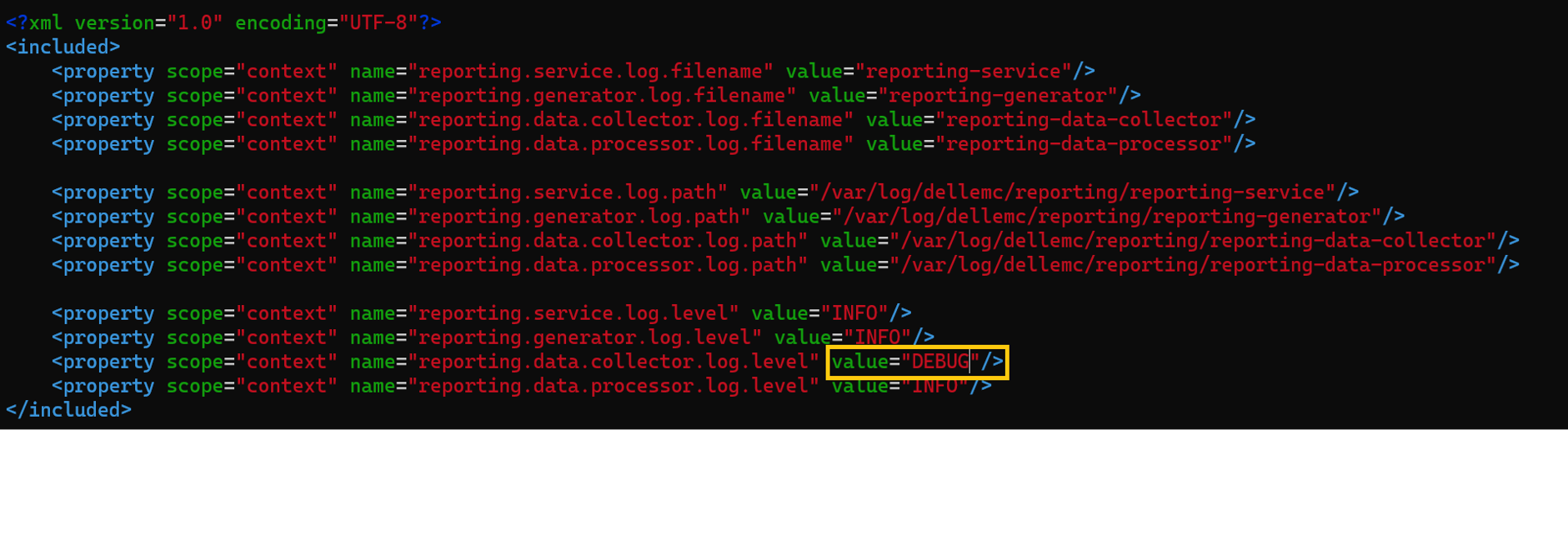
變更版本 19.17 及更新版本的記錄層級:
- 設定位置位於:
/var/lib/dellemc/reporting/config/logback-config.xml - 特定於服務的紀錄記錄等級:
<service-name>.log.level
管理報告服務
19.17 之前的版本:
命令格式:
基礎位置: /opt/emc/dpa/services/bin
dpa.sh <service> <operation>
操作: start, stop, restart
服務: svc, app, ds, agent
範例: dpa.sh svc start
版本 19.17 及更新版本:
命令格式: systemclt <operation> <service name>
操作: start, stop, restart, status
服務:
報告服務: reporting-service, reporting-data-collector, reporting-generator, reporting-data-processor
外部服務: postgresql , rabbitmq-server
範例: systemclt restart reporting-service
每項服務都需要單獨管理。
已知問題/疑難排解
部署/升級失敗:要成功部署報表引擎,請確保網路配置正確。正向和反向查詢都應解析至 PPDM 主機,以及從 PPDM 解析至報告引擎主機。
觀察到的錯誤:Error : InfrastructureNodeSessions unsuccessful during initialization. Unable to deploy node <Reporting/Search_Engine_FQDN>. Unable to determine the state of node VM '<Reporting/Search_Engine_FQDN>' or the 'vProxy Agent' agent running on it. Unable to connect to Node VM: dial tcp: lookup <Reporting/Search_Engine_FQDN> on <DNS_Server>:53: no such host
檢查名稱解析:nslookup PPDM FQDNnslookup PPDM IPnslookup reporting node FQDNnslookup reporting node IP
在 19.18 之前的版本中,由於配置了多個域名系統 (DNS) 主機,因此會出現更新失敗的問題。請參閱本文以修正問題:將 PowerProtect Data Manager 報告引擎部署或升級至 19.17 報告引擎可能會失敗
報告節點在升級至 19.20 及更新版本後停滯在維護模式:
的 reportingmgmt.log 顯示這個 data-migration 錯誤:
2025-08-11T12:54:33.434+09:30: reportingmgmt: data-migration: ERROR: Error while checking if data is present: relation "reportdata.client_config_tmp" does not exist
LINE 1: SELECT COUNT(1) FROM reportdata.client_config_tmp
請遵循本 KB 文章中的因應措施:Powerprotect Data Manager: 報告引擎在升級後停滯在維護模式
由於憑證錯誤,報告節點服務無法啟動:
報告服務記錄 /opt/dell/reporting/log/reporting-service/reporting-service.log 顯示以下內容 missing required certificates 錯誤。
2025-03-04T00:00:06.416Z ERROR [17574] [main] [c.e.c.s.CoreStartupApplication.init(39)] -  Not able to initialize services, missing required certificates.
2025-03-04T00:00:06.418Z ERROR [17574] [main] [c.e.c.s.CoreStartupApplication.init(43)] -  Error in initializing services
java.lang.IllegalArgumentException: Context must not be null

請遵循下列 KB 中的因應措施重新產生憑證
請參閱 KB 文章 PowerProtect Data Manager:由於憑證錯誤,無法開始報告服務
報告節點無法傳送電子郵件:
從報告節點連接到郵件伺服器並檢查名稱解析。
在 reporting-service.log 出現類似的錯誤:
2024-02-05 15:32:37,010 錯誤 [com.emc.dpa.command.notification.NotificationSenderMDB] (Thread-131073) 傳送電子郵件通知時發生問題:com.sun.mail.smtp.SMTPSendFailedException:451 5.7.3 傳送郵件需要 STARTTLS [MailServer 2024-02-05T08:32:36.994Z 08DC257F199B3AC5]
請遵循此 KB 文章,在報告節點上手動啟用啟動 TLS 切換:PowerProtect:Data Manager 報告瀏覽器無法使用已啟用 StartTLS 的 SMTP 伺服器傳送電子郵件報告。
從版本 19.20 及更新版本開始,SMTP 組態頁面 UI 上的交換器會啟用 TLS 啟動。
Betroffene Produkte
PowerProtect Data ManagerArtikeleigenschaften
Artikelnummer: 000392915
Artikeltyp: How To
Zuletzt geändert: 19 Dez. 2025
Version: 1
Antworten auf Ihre Fragen erhalten Sie von anderen Dell NutzerInnen
Support Services
Prüfen Sie, ob Ihr Gerät durch Support Services abgedeckt ist.