Efectos de Windows Studio faltantes en una laptop Dell
Zusammenfassung: Obtenga información sobre cómo restaurar Windows Studio Effects que faltan en una laptop Dell.
Dieser Artikel gilt für
Dieser Artikel gilt nicht für
Dieser Artikel ist nicht an ein bestimmtes Produkt gebunden.
In diesem Artikel werden nicht alle Produktversionen aufgeführt.
Symptome
Es posible que falten opciones de Windows Studio Effects en la sección Dispositivo de video USB en Configuración.
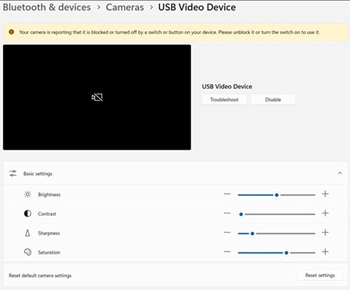
Plataformas afectadas:
- Dell 14 DC14255
- Dell Pro 14 Essential PV14255
- Dell Pro 14 PC14255
- Dell Pro 16 PC16255
Ursache
No hay información disponible sobre la causa.
Lösung
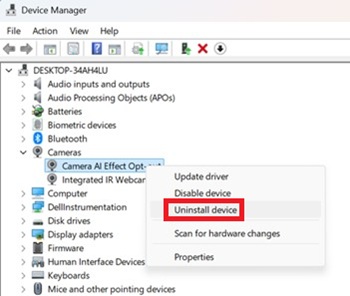
- Abra el Administrador de dispositivos. Haga clic con el botón secundario en Camera AI Effect Opt-out y seleccione Uninstall device.
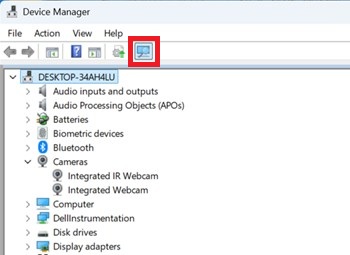
- Presione el botón de escaneo para asegurarse de que exista la cámara web IR integrada .
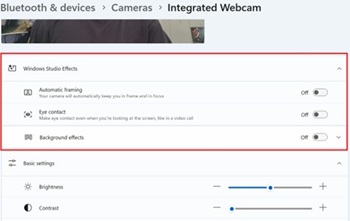
- Confirme si las opciones de Windows Studio Effects están disponibles en Configuración.
Betroffene Produkte
Dell 14 DC14255, Dell Pro 14 PC14255, Dell Pro 16 PC16255, Dell Pro 14 Essential PV14255Artikeleigenschaften
Artikelnummer: 000407521
Artikeltyp: Solution
Zuletzt geändert: 24 Mai 2026
Version: 2
Antworten auf Ihre Fragen erhalten Sie von anderen Dell NutzerInnen
Support Services
Prüfen Sie, ob Ihr Gerät durch Support Services abgedeckt ist.