Data Domain: Registry key config_master.support.cyber_security doesn’t exist when enabling CloudIQ
Zusammenfassung: Data Domain (DD) running Operating System (OS) 8.3.x and later cannot enable “Share Data with CloudIQ”; Graphical User Interface (GUI) shows error “Registry key config_master.support.cyber_security doesn’t exist”. SupportAssist was fixed by creating a new access key and disabling directFailoverEnabled, but CloudIQ remained disabled (config_master.support.cloudiq_enabled=0). ...
Dieser Artikel gilt für
Dieser Artikel gilt nicht für
Dieser Artikel ist nicht an ein bestimmtes Produkt gebunden.
In diesem Artikel werden nicht alle Produktversionen aufgeführt.
Symptome
Issue Observed
Attempt to enable CloudIQ data sharing fails.
GUI Error
The GUI displays the following error when enabling CloudIQ:
Error: Registry key config_master.support.cyber_security doesn’t exist
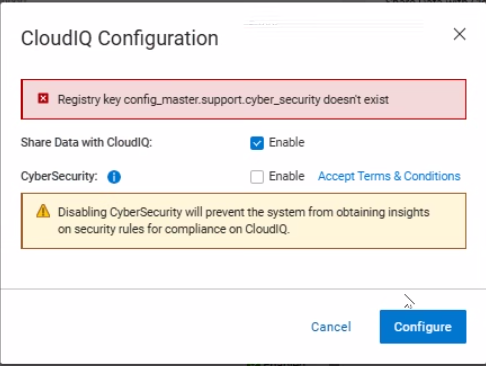
Registry Settings
- config_master.support.cloudiq_enabled = 0 (CloudIQ disabled)
- Missing registry key: config_master.support.cyber_security
Telemetry Activity
No telemetry data is being sent to CloudIQ; the dd_telemetry_collector logs show no attempts to transmit data.
Ursache
Missing Registry Key Preventing CloudIQ Enablement
The CloudIQ enable operation fails because the required registry key config_master.support.cyber_security does not exist in the system registry. The absence of this key aborts the registry transaction during the CloudIQ configuration step, resulting in the error message “Registry key config_master.support.cyber_security doesn’t exist”.
09/29 12:53:42.050013 [14050fa0] sms_cloudiq_set_info_job:(ddr/sm/sms/sms_support.c:3393): Registry key config_master.support.cyber_security doesn't exist
09/29 12:53:42.050045 [14050fa0] ERROR: sms_cloudiq_set_info_job: Aborting registry trasaction
- The key is required for the CloudIQ and cyber‑security integration path.
- When the key is missing, the SMS service aborts the CloudIQ enable request.
Software Bug Causing Registry Key Omission
During fresh installations and upgrades of DDOS 8.3.x, the installation scripts do not create the config_master.support.cyber_security registry entry.
Lösung
Enable CloudIQ Data Sharing on PowerProtect DD
Prerequisites
- Administrative access to the DD OS command line.
- SupportAssist must be successfully configured and operational.
Step‑by‑Step Resolution (CLI or GUI)
Cli:
- Create the missing cyber‑security registry key. This key is required for the CloudIQ enable operation.
reg set config_master.support.cyber_security 0Caution: Setting the value to0disables the cyber‑security telemetry flag, which is the default for most DD deployments.
GUI:
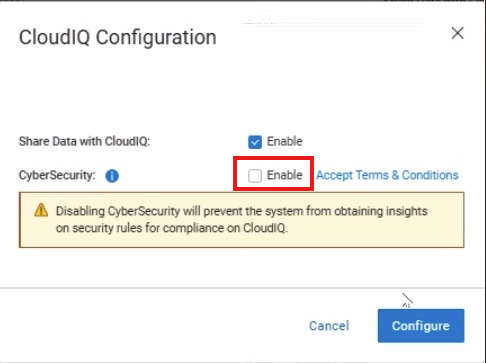
- During CloudIQ configuration, select "CyberSecurity" option to enable
- Complete configuration, this will create the registry entry.
- If needed, edit the configuration and unselect "CyberSecurity" to disable.
Note: If the issue persists after completing the steps, contact Dell Support.
Betroffene Produkte
Data DomainArtikeleigenschaften
Artikelnummer: 000420107
Artikeltyp: Solution
Zuletzt geändert: 26 Jan. 2026
Version: 1
Antworten auf Ihre Fragen erhalten Sie von anderen Dell NutzerInnen
Support Services
Prüfen Sie, ob Ihr Gerät durch Support Services abgedeckt ist.