NetWorker: Unable to install NMC server software on Windows NetWorker server or dedicated NMC server
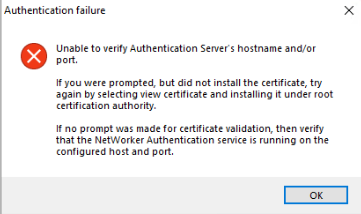
Zusammenfassung: Unable to install or upgrade NetWorker Management Console (NMC) server on a Windows host. The NMC install wizard shows "Unable to verify Authentication Server's hostname and/or port."
Dieser Artikel gilt für
Dieser Artikel gilt nicht für
Dieser Artikel ist nicht an ein bestimmtes Produkt gebunden.
In diesem Artikel werden nicht alle Produktversionen aufgeführt.
Symptome
- The NetWorker Management Console (NMC) is installed (or being installed), on a Windows host.
- The installation wizard attempts to verify the NetWorker authentication server that is to be used for NetWorker authentication.
- The installation fails to validate the authentication server.
Unable to verify Authentication Server's hostname and/or port.

If you were prompted, but did not install the certificate, try again by selecting view certificate and installing it under root certification authority.

In no prompt was made for certificate validation, then verify that the NetWorker Authentication service is running on the configured host and port.
The NMC server can resolve the authentication server and connect to the authentication port (default 9090). Powershell command:
tnc AUTHC_HOSTNAME -p 9090
Manually installing the AUTHC server certificate does not resolve the problem: NMC: Installation Fails with Error "Unable to Verify Authentication Server's Hostname or Port"
The authentication server's authc-server.log shows:
- Linux:
/nsr/authc/logs/authc-server.log - Windows (Default):
C:\Program Files\EMC NetWorker\nsr\authc-server\tomcat\logs\authc-server.log
ERROR Context initialization failed org.springframework.beans.factory.BeanCreationException: Error creating bean with name 'dataSourceInitializer' defined in class path resource [serviceConfig.xml]: Invocation of init method failed; nested exception is org.h2.jdbc.JdbcSQLNonTransientConnectionException: Unsupported database file version or invalid file header in file "C:/Program Files/EMC NetWorker/nsr/authc-server/tomcat/data/authcdb.mv.db"
Ursache
NetWorker AUTHC corruption. The specific error observed in the authc-server.log can occur if NetWorker is upgraded by performing an uninstall, then install of a new version, instead of using the "upgrade" option. The upgrade of the AUTHC files was not handled correctly by using this upgrade method.
NOTE: in this scenario, it is possible to observe no other issues. For example, NetWorker is operational, NetWorker Web User Interface (NWUI) installation and authentication is successful. The only impact is that the NMC installation fails to validate the Authentication server.
Lösung
Reinstall NetWorker with a new AUTHC folder to force it to replace the existing one.
These steps do not remove the NetWorker configuration or databases, there is no risk to historical backups.
- Shut Down NetWorker:
net stop nsrexecd /y - Uninstall NetWorker (and NMC, if on the same server)
- Rename the
C:\Program Files\EMC NetWorker\nsr\authc-serverfolder - Install NetWorker (this creates a new AUTHC configuration
- Install NMC
Once complete, the services should start, and NMC login can be tested.
If the previous NMC Administrator password does not work, follow the steps in to reset it. NetWorker: How to reset the Administrator password
Weitere Informationen
If you previously replaced AUTHC certificates or integrated AD/LDAP with the AUTHC server, these settings must be reconfigured:
Betroffene Produkte
NetWorker, NetWorker Management ConsoleProdukte
NetWorker FamilyArtikeleigenschaften
Artikelnummer: 000452997
Artikeltyp: Solution
Zuletzt geändert: 15 Apr. 2026
Version: 1
Antworten auf Ihre Fragen erhalten Sie von anderen Dell NutzerInnen
Support Services
Prüfen Sie, ob Ihr Gerät durch Support Services abgedeckt ist.