PowerFlex: UEFI Error in POST, HWC8010 or HWC8011
Zusammenfassung: HWC8010 or HWC8011 UEFI Errors in POST for iDRAC Hardware configuration validation typically occurs due to firmware updates, and the addition or removal of hardware components. It is recommended to review logs and investigate any recent changes before applying this solution. ...
Dieser Artikel gilt für
Dieser Artikel gilt nicht für
Dieser Artikel ist nicht an ein bestimmtes Produkt gebunden.
In diesem Artikel werden nicht alle Produktversionen aufgeführt.
Symptome
This article aims to guide you to troubleshoot the following error message on the PowerEdge R650, R750 to provide a solution for the
HWC8010 UEFI Error in POST for iDRAC Hardware Configuration Validation. The symptoms listed are the most common indicators of this issue.
HWC8010orHWC8011UEFIErrors in POST for iDRAC Hardware Configuration Validation- The system is unable to boot and displays the
HWC8010error code. - Error occurs after a firmware update, and the addition or removal of hardware components.
- Error persists after rebooting the system.
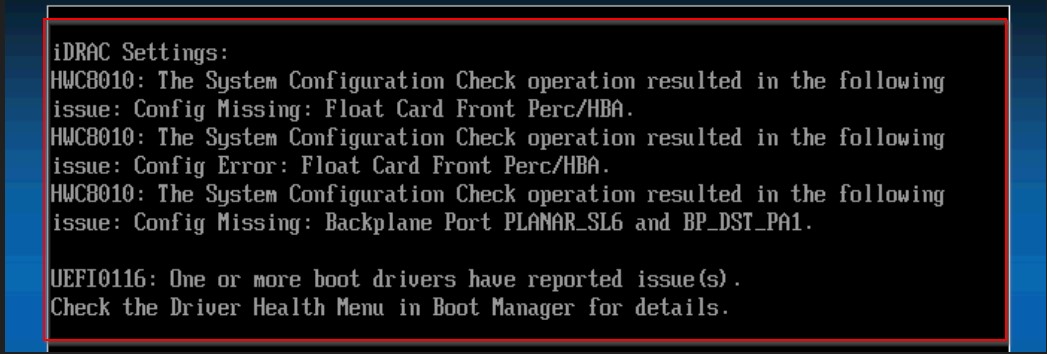
Error as seen in TSR logs:

Related Video: UEFI Error
HWC8010 or HWC8011 on POST
Ursache
- This error can be caused by a hardware failure, firmware upgrade, or a false alert.
- Changes in the system's hardware or firmware configuration primarily cause
HWC8010 UEFIError in POST for iDRAC Hardware Configuration Validation. - External factors, such as environmental conditions or user actions can also contribute to the issue. For example, an interrupted firmware update process or unauthorized hardware modifications can trigger the error.
- Specific error messages or codes, such as the
HWC8010code, are associated with the cause and can be found in the system logs. - Often, the error is a result of a firmware update, with no hardware changes made to the system.
Lösung
Scenario 1:
- Review the system logs to identify any recent firmware updates, hardware changes, or chassis openings.
- If a firmware update was initiated prior to the error, settings should be adjusted in the system
setrebootto F2 > iDRAC Settings > Hardware Configuration Validation and change the option to Yes to accept the current configuration as valid, select Save, and Exit.
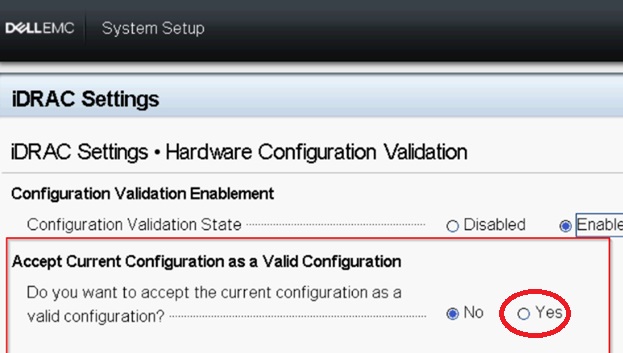
Scenario 2:
- Disable the validation state, Exit, and Reboot.
- Clear the system event log (SEL) in the iDRAC. PowerEdge: How to View or Clear the System event log
- Once the system is healthy, Enable the option again and Reboot.
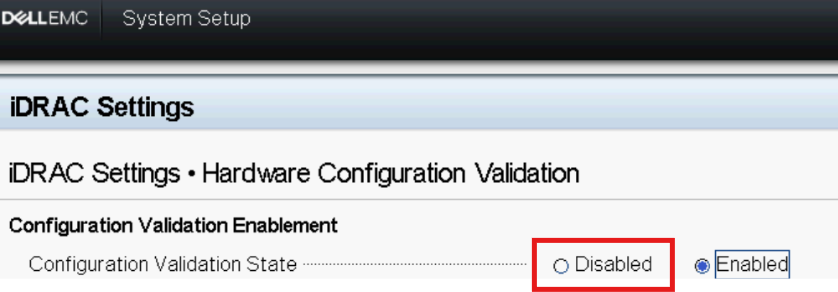
Weitere Informationen
Understand that this issue may not always be a genuine hardware issue. A proper of review of logs and understanding of the background is essential to resolve the issue.
Betroffene Produkte
OEMR R650, OEMR R750, PowerEdge R650, PowerEdge R750, PowerFlex appliance R650, Powerflex appliance R750, Dell EMC vSAN R650 Ready Node, Dell EMC vSAN R750 Ready Node, VxRail E660F, VXRAIL V670FArtikeleigenschaften
Artikelnummer: 000464066
Artikeltyp: Solution
Zuletzt geändert: 12 Juni 2026
Version: 3
Antworten auf Ihre Fragen erhalten Sie von anderen Dell NutzerInnen
Support Services
Prüfen Sie, ob Ihr Gerät durch Support Services abgedeckt ist.