Dell Monitors are Depicted as Line Art in Dell Display and Peripheral Manager
Summary: This article provides information about older Dell monitors that are displayed as line art or they are represented using alternate images in Dell Display and Peripheral Manager (DDPM).
Αυτό το άρθρο ισχύει για
Αυτό το άρθρο δεν ισχύει για
Αυτό το άρθρο δεν συνδέεται με κάποιο συγκεκριμένο προϊόν.
Δεν προσδιορίζονται όλες οι εκδόσεις προϊόντων σε αυτό το άρθρο.
Symptoms
Affected Products:
- All monitors may be affected (for a complete list, reference Dell knowledge base article Dell Display and Peripheral Manager for Windows).
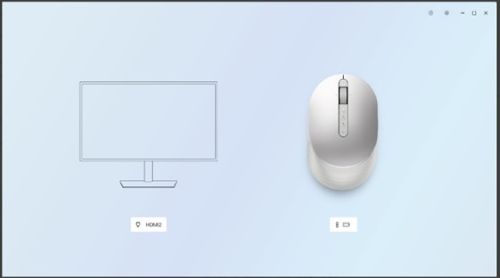
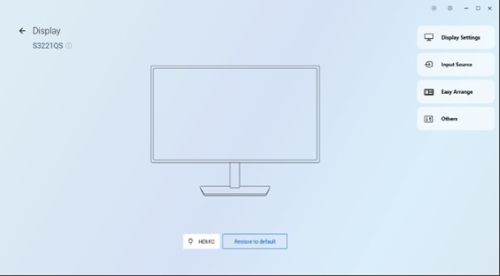
Examples of line art images used for some Dell monitors:
Cause
Working as designed
Resolution
Dell intends to have line art representations in the DDPM for some monitors. If you see either line art or real images of monitors in the DDPM software, it is by design and not an issue.
- Monitors will show line-art images in DDPM in the absence of the Internet.
- Monitors that have been connected to the DDPM prior with the Internet have images locally stored on the personal computer. These devices will show up images even in the absence of the Internet.
- Users must reopen the DDPM app to view actual high-resolution product images once Internet is available.
- Some monitors will always show line art irrespective of Internet connectivity. For reference, see the DDPM_monitor_line_art_image.xlsx attachment.
Επηρεαζόμενα προϊόντα
Alienware and Dell Gaming Monitors, C Series, D Series, E Series, P Series, S Series, SE Series, UltraSharp Premier (UP) Series, UltraSharp (U) SeriesAttachments
Ιδιότητες άρθρου
Article Number: 000350996
Article Type: Solution
Τελευταία τροποποίηση: 24 Σεπ 2025
Version: 5
Βρείτε απαντήσεις στις ερωτήσεις σας από άλλους χρήστες της Dell
Υπηρεσίες υποστήριξης
Ελέγξτε αν η συσκευή σας καλύπτεται από τις Υπηρεσίες υποστήριξης.