Intel Extension 2.1.10105.19 Keeps Reinstalling on a Dell Laptop Through Windows Update
Summary: Learn how to stop Intel Extension 2.1.10105.19 from reinstalling repeatedly on a Dell laptop.
This article applies to
This article does not apply to
This article is not tied to any specific product.
Not all product versions are identified in this article.
Symptoms
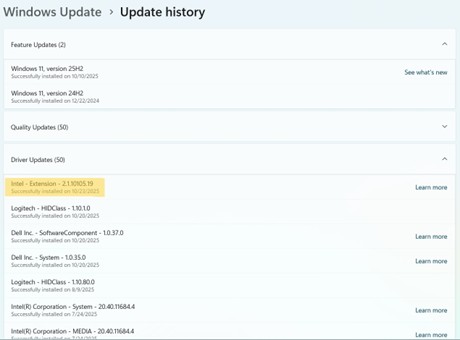
The Intel Extension update (version 2.1.10105.19) may repeatedly reinstall itself through Windows Update or Dell Update. The update may appear multiple times in the update history even after successful installation.

Affected Platform:
- Alienware m16 R2
- Inspiron 16 7640 2-in-1
- Latitude 7350 Detachable
- XPS 13 9340
- XPS 14 9440
- XPS 16 9640
Cause
The issue is related to the old Innovation Platform Framework and Provider Package driver.
Resolution
Note: Before starting the update, perform the following:
- Back up all personal data. For more information, refer to Back Up and Recovery.
- Connect the AC adapter.
Updating the Innovation Platform Framework and Provider Package Driver version 2.2.10205.3621, A07 or later on the computer resolves the issue. To download and install the driver, refer to How to Download and Install Dell Drivers and Firmware.
Affected Products
Alienware m16 R2, Inspiron 16 7640 2-in-1, Latitude 7350 Detachable, XPS 13 9340, XPS 14 9440, XPS 16 9640Article Properties
Article Number: 000387571
Article Type: Solution
Last Modified: 02 Dec 2025
Version: 4
Find answers to your questions from other Dell users
Support Services
Check if your device is covered by Support Services.