デバイス マネージャーでDell Data Vault Control Device (DDV Device)に黄色の感嘆符が表示される
Summary: SupportAssist (SA)のインストール、アンインストール、またはアップグレード中にブルー スクリーンが発生したため、Dell Data Vault Control Device (DDV Device)をアンインストールできません。
This article applies to
This article does not apply to
This article is not tied to any specific product.
Not all product versions are identified in this article.
Symptoms
対象製品:
- SupportAssist
- ビジネスPC用SupportAssist
対象オペレーティング システム:
- Windows 10 20H2、21H2
- Windows 11 22H2
デバイス マネージャーで、Dell Data Vault Control Device (DDV Device)に黄色の感嘆符が表示されます。
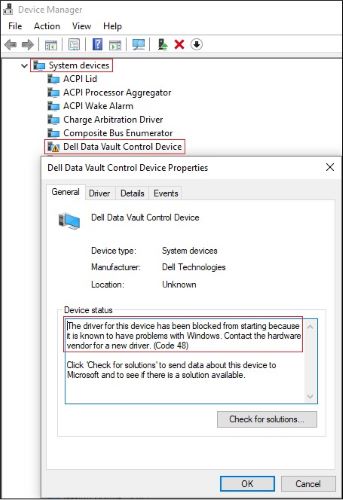
図1: (英語のみ)黄色の感嘆符が付いたDell Data Vault Control Device
Cause
Windowsで問題があることが検出されたため、MicrosoftはDell Data Vault Control Deviceのドライバーの起動をブロックしました。
注:
- DellアプリケーションはDDVをインストールしている可能性があります。これはサポートが終了しているため、削除する必要があります。
- この問題は、Dellアプリケーションのバージョンではなく、Windowsオペレーティング システムのバージョンに固有のものです。
Resolution
ケース1:
黄色の感嘆符が付いた重複するDell Data Vault Control Device
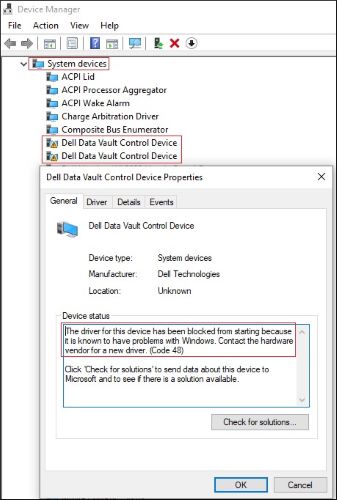
図2:(英語のみ)黄色の感嘆符が付いた重複するDell Data Vault Control Device
- [デバイス マネージャー] > [システム デバイス]を展開します。
- 最初の[Dell Data Vault Control Device]を右クリック > [デバイスのアンインストール]をクリック > [このデバイスのドライバー ソフトウェアを削除する]をオフ > [アンインストール]ボタンをクリックします。
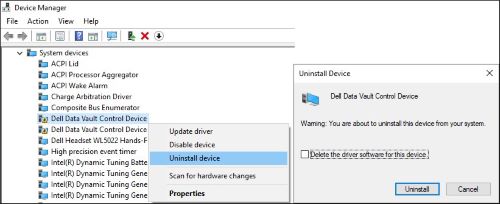
図3:(英語のみ)最初のDell Data Vault Control Deviceをアンインストール
- 別のDell Data Vault Control Deviceに対して手順2を繰り返します。
- 最後の[Dell Data Vault Control Device]を右クリック > [デバイスのアンインストール]をクリック > [このデバイスのドライバー ソフトウェアを削除する]をオフ > [アンインストール]ボタンをクリックします。
![[このデバイスのドライバー ソフトウェアを削除する]をオフにして、最後のDell Data Vault Control Deviceをアンインストール](https://supportkb.dell.com/img/ka06P000000cJGYQA2/ka06P000000cJGYQA2_ja_3.jpeg)
図4:(英語のみ)[このデバイスのドライバー ソフトウェアを削除する]をオフにして、最後のDell Data Vault Control Deviceをアンインストール
ケース2:
黄色の感嘆符が付いた単一のDell Data Vault Control Device
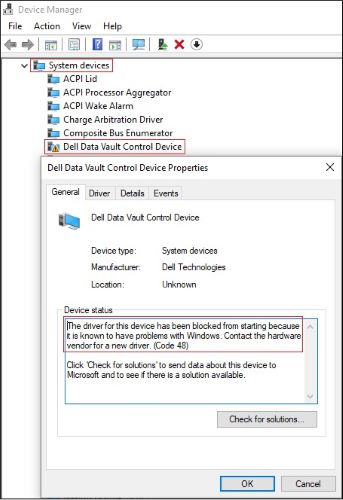
図5:(英語のみ)黄色の感嘆符が付いたDell Data Vault Control Device
- [デバイス マネージャー] > [システム デバイス]を展開します。
- [Dell Data Vault Control Device]を右クリック > [デバイスのアンインストール]をクリック > [このデバイスのドライバー ソフトウェアを削除する]をオン > [アンインストール]ボタンをクリックします。
![[このデバイスのドライバー ソフトウェアを削除する]をオフにして、最後のDell Data Vault Control Deviceをアンインストール](https://supportkb.dell.com/img/ka06P000000cJGYQA2/ka06P000000cJGYQA2_ja_5.jpeg)
図6:(英語のみ)[このデバイスのドライバー ソフトウェアを削除する]をオンにして、最後のDell Data Vault Control Deviceをアンインストール
Affected Products
SupportAssist for Home PCsArticle Properties
Article Number: 000204902
Article Type: Solution
Last Modified: 13 Nov 2023
Version: 6
Find answers to your questions from other Dell users
Support Services
Check if your device is covered by Support Services.