Device Manager의 DDV Device(Dell Data Vault Control Device)에 노란색 느낌표가 표시되어 있음
Summary: SA(SupportAssist) 설치, 제거 또는 업그레이드 중 블루 스크린으로 인해 DDV Device(Dell Data Vault Control Device)를 제거할 수 없습니다.
This article applies to
This article does not apply to
This article is not tied to any specific product.
Not all product versions are identified in this article.
Symptoms
영향을 받는 제품:
- SupportAssist
- 비즈니스 PC용 SupportAssist
영향을 받는 운영 체제:
- Windows 10 20H2, 21H2
- Windows 11 22H2
Device Manager의 DDV Device(Dell Data Vault Control Device)에 노란색 느낌표가 표시되어 있습니다.
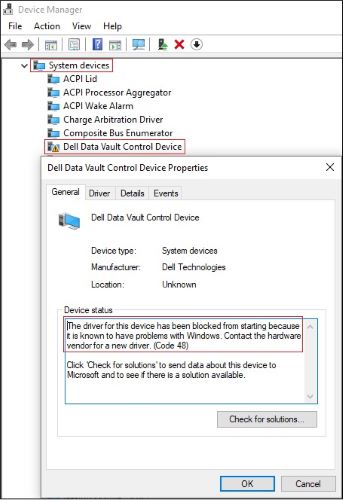
그림 1: (영어로만 제공) Dell Data Vault Control Device에 노란색 느낌표 표시
Cause
Microsoft는 Windows에 문제가 있는 것으로 알려짐에 따라 Dell Data Vault Control Device용 드라이버의 시작을 차단했습니다.
참고:
- Dell 애플리케이션이 DDV를 설치했을 수 있으며, 이 경우 EOL(End of Life)되었으므로 제거해야 합니다.
- 이 문제는 Dell 애플리케이션 버전이 아닌 Windows 운영 체제 버전과 관련이 있습니다.
Resolution
사례 1
노란색 느낌표가 있는 중복 Dell Data Vault Control Device
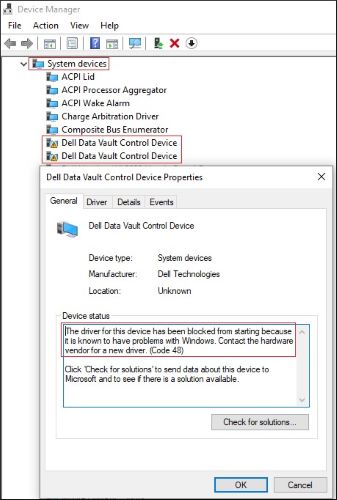
그림 2: (영어로만 제공) 노란색 느낌표가 있는 중복 Dell Data Vault Control Device
- Device Manager를 열고 > System devices를 확장합니다.
- 첫 번째 Dell Data Vault Control Device를 오른쪽 클릭 > Uninstall device 클릭 > Delete the driver software for this device 선택 취소 > Uninstall 버튼을 클릭합니다.
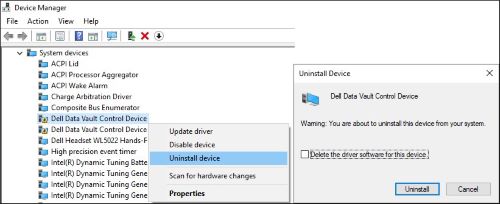
그림 3: (영어로만 제공) 첫 번째 Dell Data Vault Control Device 제거
- 다른 Dell Data Vault Control Device에 대해 2단계를 반복합니다.
- 마지막 Dell Data Vault Control Device를 오른쪽 클릭 > Uninstall device 클릭 > Delete the driver software for this device 선택 > Uninstall 버튼을 클릭합니다.
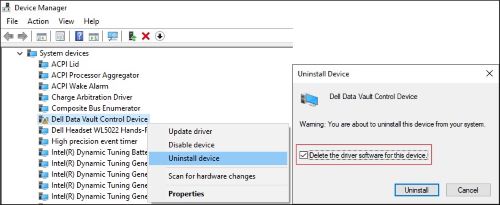
그림 4: (영어로만 제공) Delete the driver software for this device를 선택 취소하고 마지막 Dell Data Vault Control Device 제거
사례 2
노란색 느낌표가 있는 단일 Dell Data Vault Control Device
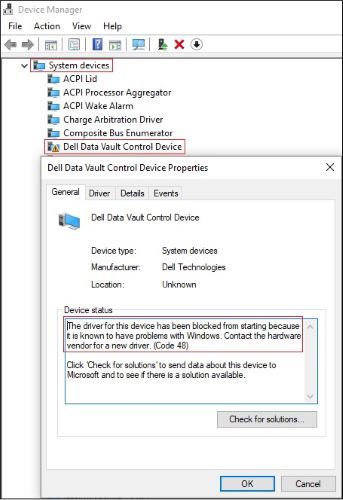
그림 5: (영어로만 제공) 노란색 느낌표가 있는 Dell Data Vault Control Device
- Device Manager를 열고 > System devices를 확장합니다.
- Dell Data Vault Control Device를 오른쪽 클릭 > Uninstall device 클릭 > Delete the driver software for this device 선택 > Uninstall 버튼을 클릭합니다.
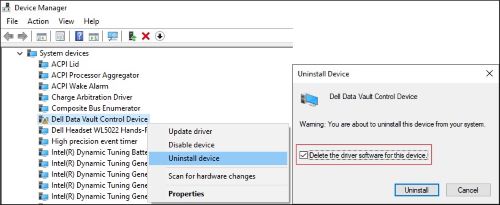
그림 6: (영어로만 제공) Delete the driver software for this device를 선택 취소하고 마지막 Dell Data Vault Control Device 제거
Affected Products
SupportAssist for Home PCsArticle Properties
Article Number: 000204902
Article Type: Solution
Last Modified: 13 Nov 2023
Version: 6
Find answers to your questions from other Dell users
Support Services
Check if your device is covered by Support Services.