PowerProtect Data Manager:ストレージ ユニットの作成に失敗し、エラー コードCFG0001が表示される
Summary: ストレージ ユニットの作成に失敗し、エラー コードCFG0001
This article applies to
This article does not apply to
This article is not tied to any specific product.
Not all product versions are identified in this article.
Symptoms
新しいポリシーを作成すると、ストレージ ユニットの作成に失敗します。
UIから:
UIから:
CFG0001: xxx: Unable to configure the protection policy because of the following error: Failed to connect to PowerProtect DD System. errorNum: 5007 errorMessage: operation is not implementedジョブ・ログから:
ddboost.log: 2023-08-11T23:15:17.931Z ERROR [] [pool-26-thread-1] [00000000-0000-4000-b000-000000000000][][][TRACE_ID:81a3388041e49793;JOB_ID:9ea4884359c07119][plc.id:2eab4e3d,asset.id:,pcs.id:] ddboost.log(52) - severity:1 msg:[D688:7FF690077BA0] ddp_connect_with_config() failed, Hostname: xxx, Err: 5007-nfs ddp getinfo failed (nfs: Operation not supported)ネットワークの問題や証明書の問題がなく、すでにsysadminを使用してData Domainを追加していることを確認しました(検出は正常に動作しています)。
Cause
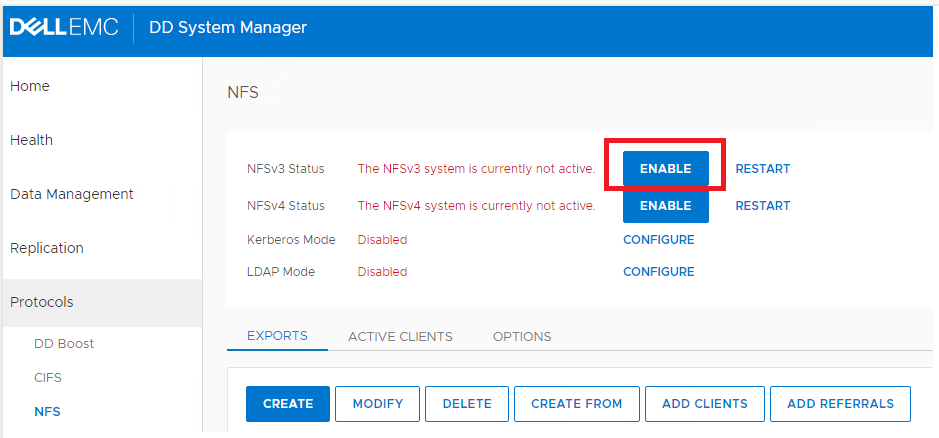
Data Domain NFSサービスが無効になっています。
Resolution
Data DomainのUIで[ENABLE]をクリックしてNFSv3を有効にします。
Affected Products
PowerProtect Data Manager, PowerProtect SoftwareArticle Properties
Article Number: 000216695
Article Type: Solution
Last Modified: 18 May 2026
Version: 6
Find answers to your questions from other Dell users
Support Services
Check if your device is covered by Support Services.