PowerProtect Data Manager: Cómo cambiar el tiempo de espera de la interfaz
Summary: Se agota el tiempo de espera de la interfaz de PowerProtect después de los 1800 segundos (30 minutos) predeterminados.
This article applies to
This article does not apply to
This article is not tied to any specific product.
Not all product versions are identified in this article.
Instructions
Cómo aumentar el tiempo de espera agotado de la interfaz de PowerProtect en 19.22.0.24 y versiones anteriores.
- Abra una sesión SSH en PowerProtect y autentique con la cuenta de administrador.
- Haga una copia del archivo
app-config.jsonarchivo:cp -p /usr/local/brs/lib/ecdm-ui/main/app-config.json /usr/local/brs/lib/ecdm-ui/main/app-config.json.orig - Actualice
idle-timeoutvalor en el atributoapp-config.jsoncon un valor entre 1 y 3600 segundos.- Editor de texto:
vi /usr/local/brs/lib/ecdm-ui/main/app-config.json - La variable
sedUtilidad:sed -i 's/"idle-timeout": 1800/"idle-timeout": 3600/' /usr/local/brs/lib/ecdm-ui/main/app-config.json
- Editor de texto:
- Verifique que la carpeta
app-config.jsonEl archivo se actualizó correctamente:grep 'idle-timeout' /usr/local/brs/lib/ecdm-ui/main/app-config.json
Nota: Se utilizan los 1800 segundos (30 minutos) predeterminados si el valor no está entre 1 y 3600 segundos.
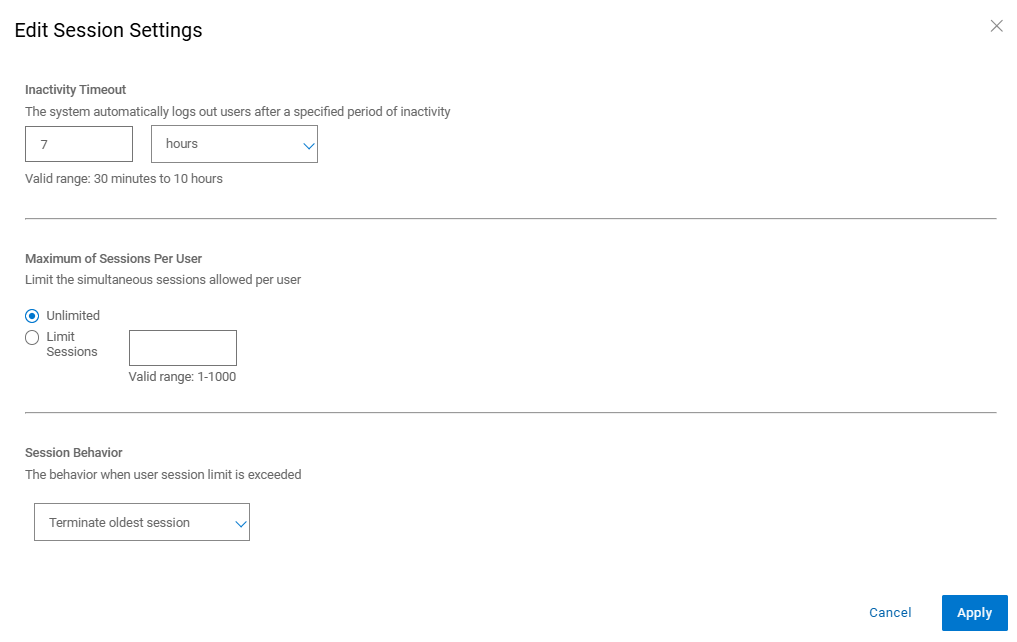
Cómo aumentar el tiempo de espera agotado de la interfaz de PowerProtect en 20.1.0.0-17 y versiones posteriores.
En la interfaz de PowerProtect, vaya a "Administration > Access Control > Session Settings".
Additional Information
El valor predeterminado app-config.json archivo:
admin@ppdm:/> cat /usr/local/brs/lib/ecdm-ui/main/app-config.json
{
    "idle-timeout": 1800
}
admin@ppdm:/>
La variable app-config.json Después de la actualización:
admin@ppdm:/> cat /usr/local/brs/lib/ecdm-ui/main/app-config.json
{
    "idle-timeout": 3600
}
admin@ppdm:/>
Article Properties
Article Number: 000221611
Article Type: How To
Last Modified: 22 May 2026
Version: 3
Find answers to your questions from other Dell users
Support Services
Check if your device is covered by Support Services.