PowerProtect Data Manager: 인터페이스 시간 초과를 변경하는 방법
Summary: PowerProtect 인터페이스는 기본값인 1800초(30분) 후에 시간 초과됩니다.
This article applies to
This article does not apply to
This article is not tied to any specific product.
Not all product versions are identified in this article.
Instructions
19.22.0.24 및 이전 버전에서 PowerProtect 인터페이스 시간 초과를 늘리는 방법
- PowerProtect에 대한 SSH 세션을 열고 관리자 계정으로 인증합니다.
- 의 복사본을 만듭니다.
app-config.json파일에 식별되어 있습니다.cp -p /usr/local/brs/lib/ecdm-ui/main/app-config.json /usr/local/brs/lib/ecdm-ui/main/app-config.json.orig - 업데이트
idle-timeout의 값app-config.json1초에서 3600초 사이의 값을 가진 파일입니다.- 텍스트 편집기:
vi /usr/local/brs/lib/ecdm-ui/main/app-config.json - 이
sed유틸리티:sed -i 's/"idle-timeout": 1800/"idle-timeout": 3600/' /usr/local/brs/lib/ecdm-ui/main/app-config.json
- 텍스트 편집기:
- 폴더
app-config.json파일이 올바르게 업데이트되었습니다.grep 'idle-timeout' /usr/local/brs/lib/ecdm-ui/main/app-config.json
참고: 값이 1초에서 3600초 사이가 아닌 경우 기본값 1800초(30분)가 사용됩니다.
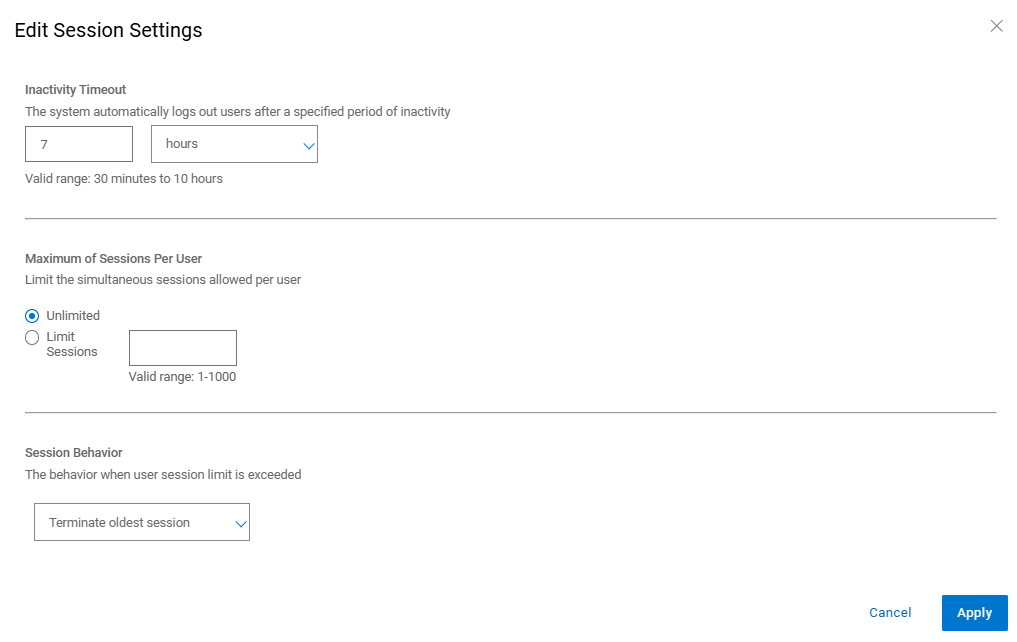
20.1.0.0-17 이상에서 PowerProtect 인터페이스 시간 초과를 늘리는 방법
PowerProtect 인터페이스에서 "AdministrationAccess >> ControlSession Settings"로 이동합니다.
Additional Information
기본값 app-config.json 파일에 식별되어 있습니다.
admin@ppdm:/> cat /usr/local/brs/lib/ecdm-ui/main/app-config.json
{
    "idle-timeout": 1800
}
admin@ppdm:/>
이 app-config.json 업데이트 후 파일:
admin@ppdm:/> cat /usr/local/brs/lib/ecdm-ui/main/app-config.json
{
    "idle-timeout": 3600
}
admin@ppdm:/>
Article Properties
Article Number: 000221611
Article Type: How To
Last Modified: 22 May 2026
Version: 3
Find answers to your questions from other Dell users
Support Services
Check if your device is covered by Support Services.