PowerProtect Data Manager: Arayüz zaman aşımı nasıl değiştirilir
Summary: PowerProtect Arayüzü, varsayılan 1800 saniyeden (30 dakika) sonra zaman aşımına uğrar.
This article applies to
This article does not apply to
This article is not tied to any specific product.
Not all product versions are identified in this article.
Instructions
19.22.0.24 ve önceki sürümlerde PowerProtect Arabirimi zaman aşımını artırma.
- PowerProtect'te bir SSH oturumu açın ve yönetici hesabıyla kimliğinizi doğrulayın.
- Aşağıdaki dizinin bir kopyasını oluşturun:
app-config.json:cp -p /usr/local/brs/lib/ecdm-ui/main/app-config.json /usr/local/brs/lib/ecdm-ui/main/app-config.json.orig - Şunu güncelleştirin:
idle-timeoutiçindeki değerapp-config.json1 ile 3600 saniye arasında bir değere sahip dosya.- Metin editörü:
vi /usr/local/brs/lib/ecdm-ui/main/app-config.json - Komutta
sedYardımcı programı:sed -i 's/"idle-timeout": 1800/"idle-timeout": 3600/' /usr/local/brs/lib/ecdm-ui/main/app-config.json
- Metin editörü:
- Şunu doğrulayın:
app-config.jsonDosya düzgün bir şekilde güncellendi:grep 'idle-timeout' /usr/local/brs/lib/ecdm-ui/main/app-config.json
Not: Varsayılan 1800 saniye (30 dakika), değer 1 ile 3600 saniye arasında değilse kullanılır.
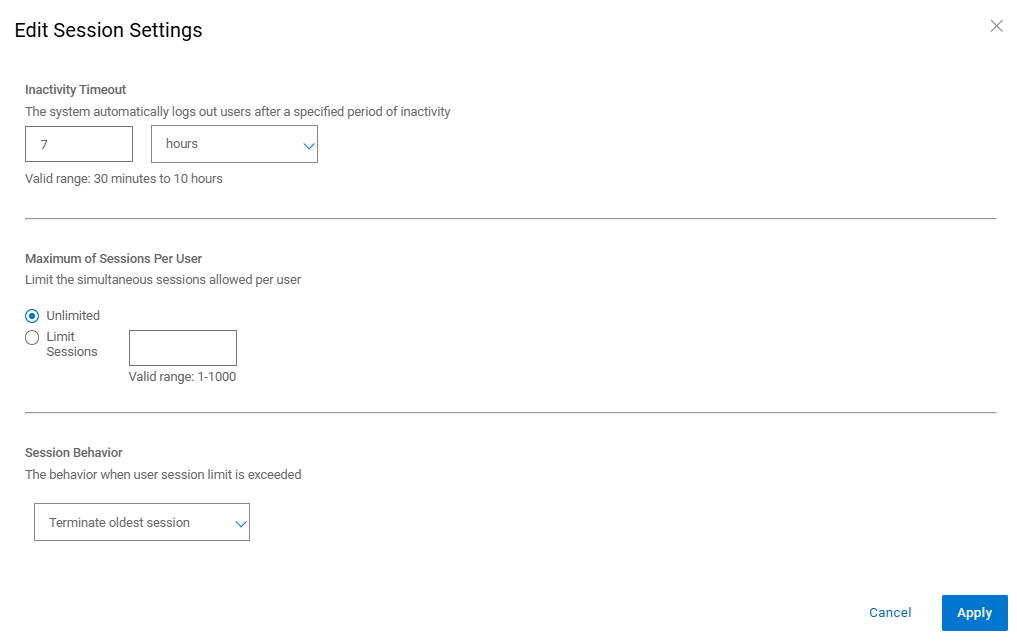
20.1.0.0-17 ve daha yeni sürümlerde PowerProtect Arayüzü zaman aşımını artırma.
PowerProtect Arayüzünde "Administration Access > Control > Session Settings" öğesine gidin.
Additional Information
Varsayılan app-config.json :
admin@ppdm:/> cat /usr/local/brs/lib/ecdm-ui/main/app-config.json
{
    "idle-timeout": 1800
}
admin@ppdm:/>
Komutta app-config.json Güncellemeden sonra dosya:
admin@ppdm:/> cat /usr/local/brs/lib/ecdm-ui/main/app-config.json
{
    "idle-timeout": 3600
}
admin@ppdm:/>
Article Properties
Article Number: 000221611
Article Type: How To
Last Modified: 22 May 2026
Version: 3
Find answers to your questions from other Dell users
Support Services
Check if your device is covered by Support Services.