PowerProtect Data Manager:如何更改接口超时
Summary: PowerProtect 接口在默认的 1800 秒(30 分钟)后超时。
This article applies to
This article does not apply to
This article is not tied to any specific product.
Not all product versions are identified in this article.
Instructions
如何在 19.22.0.24 及更低版本中增加 PowerProtect 接口超时。
- 打开与 PowerProtect 的 SSH 会话,并使用管理员帐户进行身份验证。
- 复制
app-config.json文件中标识的:cp -p /usr/local/brs/lib/ecdm-ui/main/app-config.json /usr/local/brs/lib/ecdm-ui/main/app-config.json.orig - 更新
idle-timeout值在app-config.json值介于 1 到 3600 秒之间的文件。- 文本编辑器:
vi /usr/local/brs/lib/ecdm-ui/main/app-config.json - 而
sed实用:sed -i 's/"idle-timeout": 1800/"idle-timeout": 3600/' /usr/local/brs/lib/ecdm-ui/main/app-config.json
- 文本编辑器:
- 请验证
app-config.json文件已正确更新:grep 'idle-timeout' /usr/local/brs/lib/ecdm-ui/main/app-config.json
提醒:如果值不在 1 到 3600 秒之间,则使用默认值 1800 秒(30 分钟)。
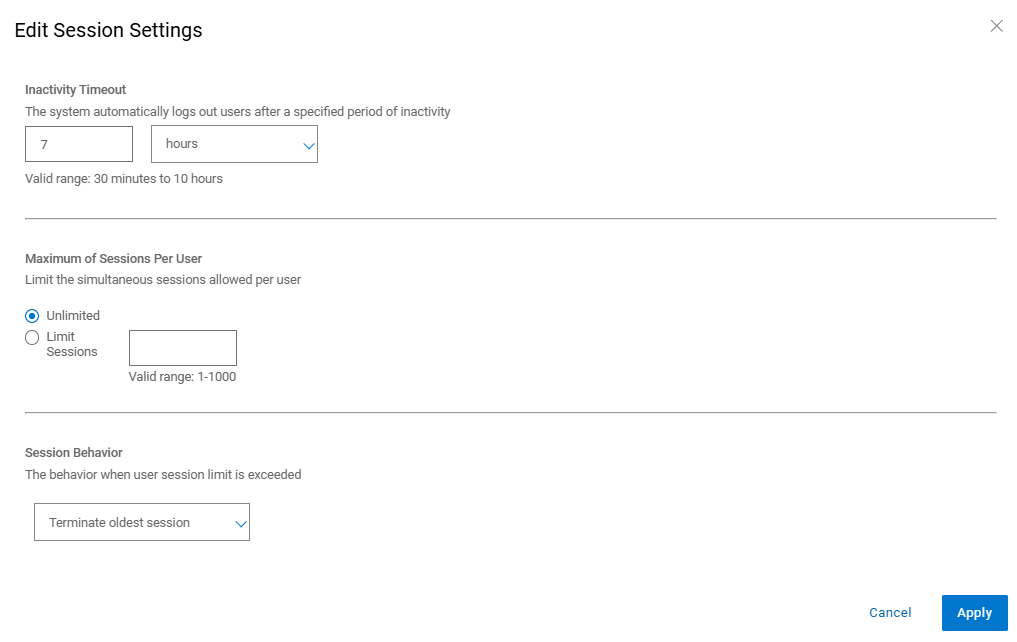
如何在 20.1.0.0-17 及更高版本中增加 PowerProtect 接口超时。
在 PowerProtect 界面中,导航到“AdministrationAccess > ControlSession > Settings”。
Additional Information
默认 app-config.json 文件中标识的:
admin@ppdm:/> cat /usr/local/brs/lib/ecdm-ui/main/app-config.json
{
    "idle-timeout": 1800
}
admin@ppdm:/>
而 app-config.json 更新后的文件:
admin@ppdm:/> cat /usr/local/brs/lib/ecdm-ui/main/app-config.json
{
    "idle-timeout": 3600
}
admin@ppdm:/>
Article Properties
Article Number: 000221611
Article Type: How To
Last Modified: 22 May 2026
Version: 3
Find answers to your questions from other Dell users
Support Services
Check if your device is covered by Support Services.