PowerFlex: Chyba INVALID_POSTGRES_INSTANCE_ROLE po upgradu PFMP 4.8
Summary: Tento článek vysvětluje postup vymazání INVALID_POSTGRES_INSTANCE_ROLE kosmetických výstrah po upgradu z verze 4.6 na 4.8
This article applies to
This article does not apply to
This article is not tied to any specific product.
Not all product versions are identified in this article.
Symptoms
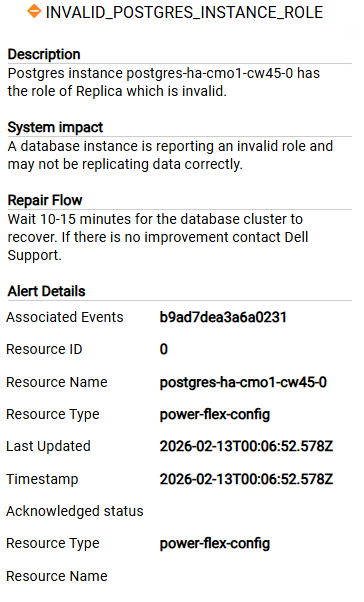
Po upgradu z verze 4.6 na 4.8 se spustí níže uvedené výstrahy, které se neodstraní potvrzením výstrahy
Cause
Jedná se o zastaralé výstrahy ze starých instancí databáze CrunchyData PGO (postgres-ha-cmo1-*), které byly během upgradu na verzi 4.8 nahrazeny CloudNativePG (postgres-ha-cnpg-*).
Staré pody a PVC jsou pryč, nový cluster CNPG je v pořádku, ale konfigurační mapa monitorování stavu stále odkazuje na staré instance, což je důvod, proč se výstrahy znovu aktivují.
Resolution
- Kontrola stavu databáze
delladmin@mvm1:~>kubectl get pods -n powerflex | grep post configure-postgres-prerequirements-0-hw95r 0/1 Completed 0 47d postgres-ha-cnpg-1 1/1 Running 0 47d postgres-ha-cnpg-2 1/1 Running 0 47d postgres-ha-cnpg-3 1/1 Running 0 86m postgres-ha-cnpg-pooler-556778f6fd-2tmd9 1/1 Running 0 21d postgres-ha-cnpg-pooler-556778f6fd-qnp8k 1/1 Running 0 21d postgres-monitor-7fd88546c7-h6tjn 1/1 Running 0 21d postgres-monitor-7fd88546c7-l2wk7 1/1 Running 0 21d - Pokud jsou spuštěny všechny instance databáze, ručně vymažte výstrahy podle tohoto článku PowerFlex 4.X: Jak ručně vymazat výstrahy z uživatelského rozhraní nástroje PowerFlex Manager 4.X
- Restartováním nebo odstraněním podu presentation-service vyprázdněte stav uložený v mezipaměti.
kubectl delete pod -n powerflex $(kubectl get pods -n powerflex | grep presentation | awk '{print $1}')Affected Products
PowerFlex rack, ScaleIOArticle Properties
Article Number: 000453497
Article Type: Solution
Last Modified: 16 Apr 2026
Version: 1
Find answers to your questions from other Dell users
Support Services
Check if your device is covered by Support Services.