PowerFlex:4.8 PFMP 升級後出現錯誤INVALID_POSTGRES_INSTANCE_ROLE
Summary: 本文說明從 4.6 升級到 4.8 後清除外觀警示INVALID_POSTGRES_INSTANCE_ROLE的步驟
This article applies to
This article does not apply to
This article is not tied to any specific product.
Not all product versions are identified in this article.
Symptoms
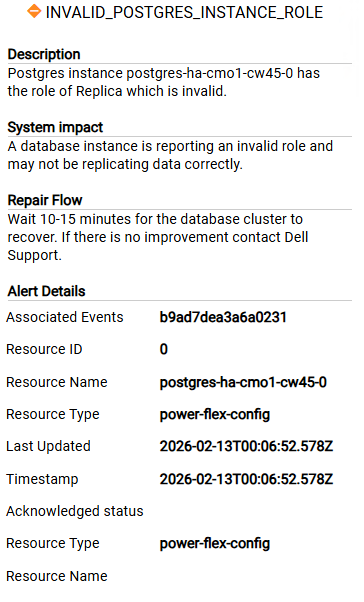
從 4.6 升級到 4.8 後,系統會觸發以下警示,且不會透過確認警示清除
Cause
這些是來自舊版 CrunchyData PGO 資料庫例項 (postgres-ha-cmo1-*) 的過時警示,在 4.8 版升級期間已由 CloudNativePG (postgres-ha-cnpg-*) 取代。
舊的 Pod 和 PVC 已消失,新的 CNPG 群集運行狀況良好,但運行狀況監控配置映射仍引用舊實例,這就是警報不斷重新觸發的原因。
Resolution
- 檢查資料庫執行狀況狀態
delladmin@mvm1:~>kubectl get pods -n powerflex | grep post configure-postgres-prerequirements-0-hw95r 0/1 Completed 0 47d postgres-ha-cnpg-1 1/1 Running 0 47d postgres-ha-cnpg-2 1/1 Running 0 47d postgres-ha-cnpg-3 1/1 Running 0 86m postgres-ha-cnpg-pooler-556778f6fd-2tmd9 1/1 Running 0 21d postgres-ha-cnpg-pooler-556778f6fd-qnp8k 1/1 Running 0 21d postgres-monitor-7fd88546c7-h6tjn 1/1 Running 0 21d postgres-monitor-7fd88546c7-l2wk7 1/1 Running 0 21d - 如果所有 DB 實例都在執行中,請使用本文 PowerFlex 4.X 手動清除警示:如何從 PowerFlex Manager UI 4.X 手動清除警示
- 重新啟動/刪除 簡報服務 Pod 以排清快取狀態
kubectl delete pod -n powerflex $(kubectl get pods -n powerflex | grep presentation | awk '{print $1}')Affected Products
PowerFlex rack, ScaleIOArticle Properties
Article Number: 000453497
Article Type: Solution
Last Modified: 16 Apr 2026
Version: 1
Find answers to your questions from other Dell users
Support Services
Check if your device is covered by Support Services.