Data Domain: Diagnosing Active Directory Users and Joining to an Active Directory with the DD System Manager Interface
Summary: DDOS can diagnose authentication issues for Active Directory from within the DD System Manager interface.
This article applies to
This article does not apply to
This article is not tied to any specific product.
Not all product versions are identified in this article.
Instructions
Steps
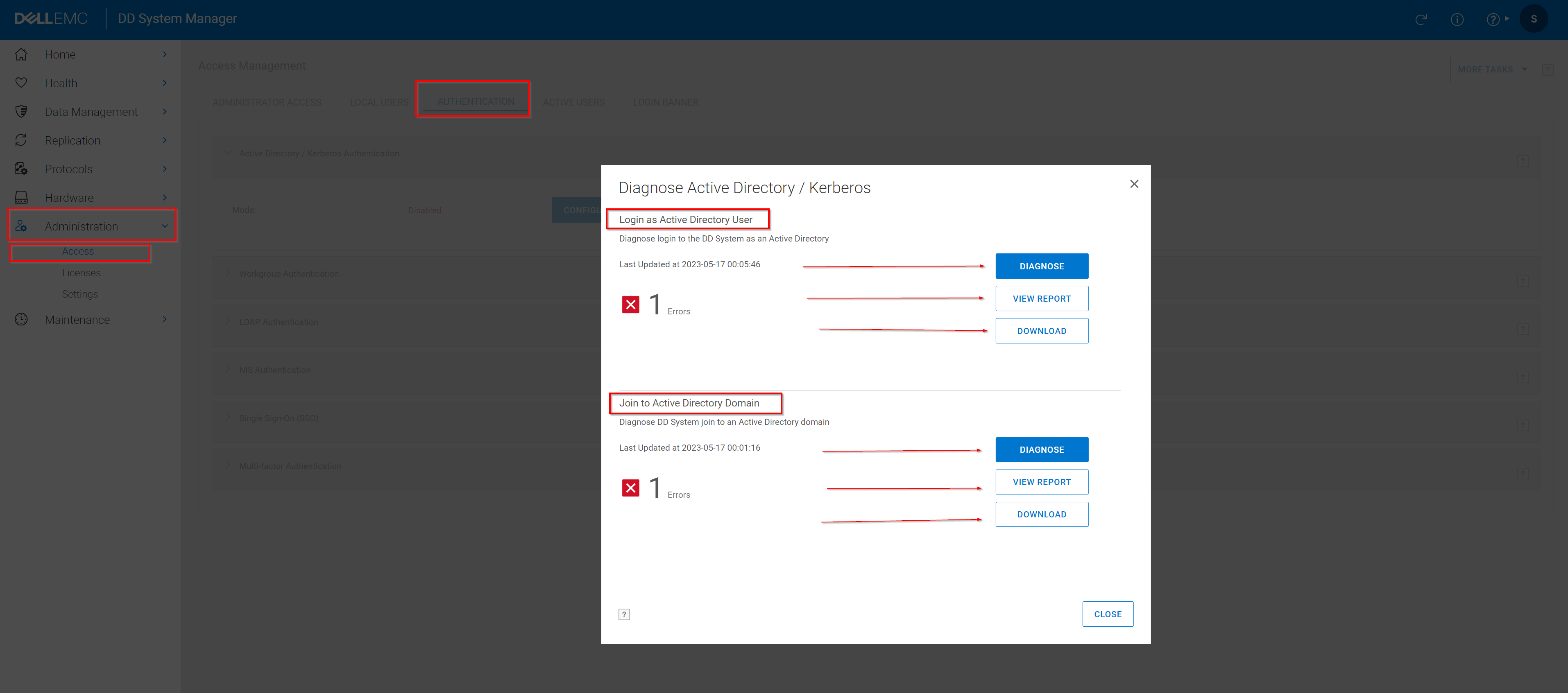
- Select Administration > Access > Authentication
- Expand the Active Directory/Kerberos Authentication panel.
- Click Diagnose.
- Select an issue to investigate and click Diagnose.
- Provide the requested information.
To diagnose issues logging in as an Active Directory user, provide:- Active Directory server IP address
- Active Directory server FQDN
- Active Directory service username
NOTE: The Active Directory user account specified here requires the following privileges:- Read-only access to the base DN identified by the domain name
- Read-only access to query attributes of all users in the base DN.
- Read-only access to query attributes of the machine accounts for the protection system.
- Active Directory service password
- Username experiencing login failure to diagnose issues joining the system to an Active Directory Domain, provide:
- Active Directory server IP address
- Active Directory server FQDN
- Active Directory service username
- Active Directory service password
- Click Diagnose.
- View the report.
- Click View Report to view the report online. Each item in the Action Items table can be clicked for additional details.
- Click Download to download a copy of the report.
- Review and implement the suggested fixes for the issue and retry the operation.
Affected Products
Data DomainArticle Properties
Article Number: 000204197
Article Type: How To
Last Modified: 16 Sept 2025
Version: 7
Find answers to your questions from other Dell users
Support Services
Check if your device is covered by Support Services.