「Data Domain:DD System Managerインターフェイスを使用したActive Directoryユーザーの診断とActive Directoryへの参加
Summary: DDOSでは、DD System Managerインターフェイス内からActive Directoryの認証の問題を診断できます。
This article applies to
This article does not apply to
This article is not tied to any specific product.
Not all product versions are identified in this article.
Instructions
手順
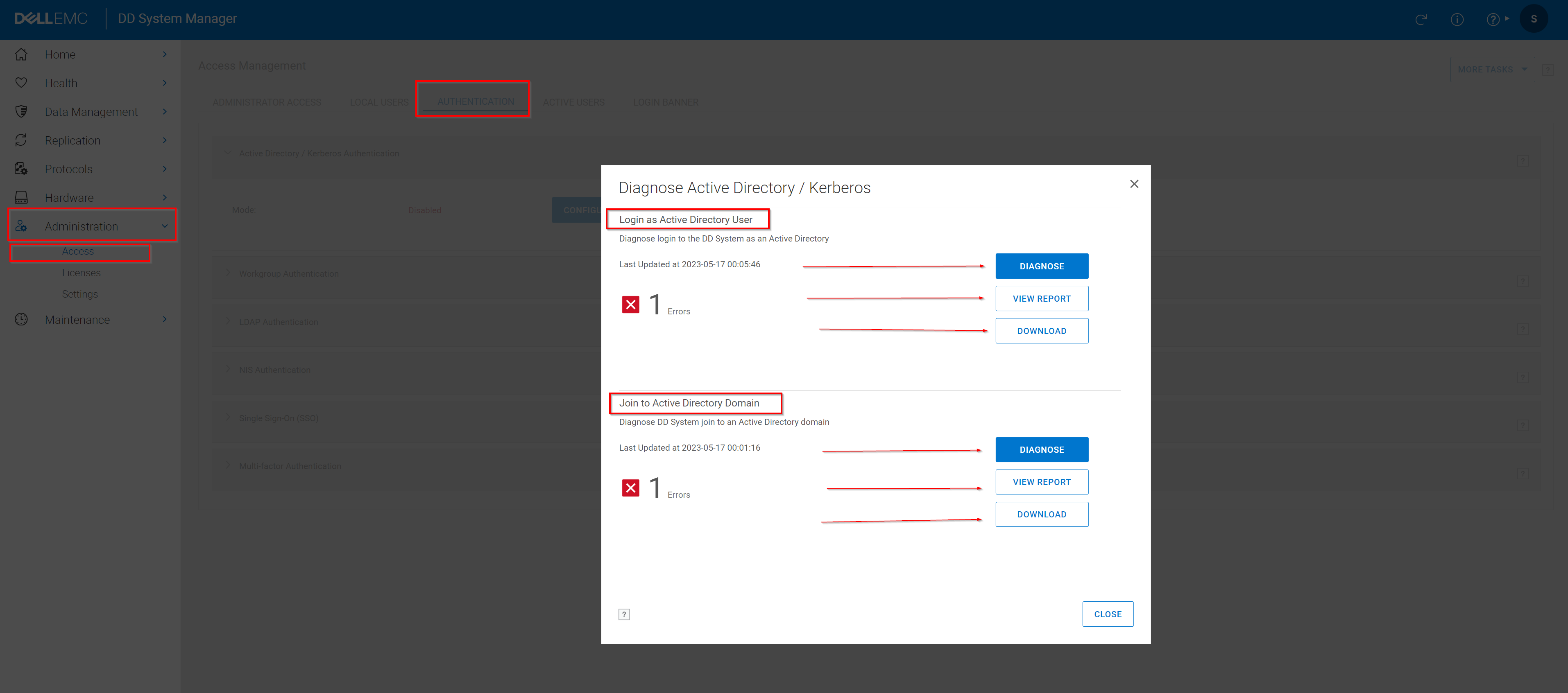
- Administration>Access > Authenticationを選択します
- [Active Directory/Kerberos認証]パネルを展開します。
- [診断]をクリックします。
- 調査する問題を選択し、 診断をクリックします。
- 要求された情報を入力します。
Active Directoryユーザーとしてのログインに関する 問題を 診断するには、次の情報を入力します。- Active DirectoryサーバーのIPアドレス
- Active DirectoryサーバーのFQDN
- Active Directoryサービスのユーザー名
メモ: ここで指定するActive Directoryユーザー アカウントには、次の権限が必要です。- ドメイン名で識別されるベースDNへの読み取り専用アクセス
- ベースDN内のすべてのユーザーのクエリー属性への読み取り専用アクセス。
- 保護システムのマシン アカウントのクエリー属性への読み取り専用アクセス。
- Active Directoryサービスのパスワード
- ログインに失敗したユーザー名 Active Directoryドメインにシステムを配置する際の問題を診断するには、次の情報を入力します。
- Active DirectoryサーバーのIPアドレス
- Active DirectoryサーバーのFQDN
- Active Directoryサービスのユーザー名
- Active Directoryサービスのパスワード
- [診断]をクリックします。
- レポートを表示します。
- レポートの表示をクリックして、レポートをオンラインで表示します。[Action Items]テーブルの各アイテムをクリックすると、詳細が表示されます。
- [ダウンロード]をクリックして、レポートのコピーをダウンロードします。
- 問題に対して 推奨される修正 を確認して実装し、操作を再試行してください。
Affected Products
Data DomainArticle Properties
Article Number: 000204197
Article Type: How To
Last Modified: 16 Sept 2025
Version: 7
Find answers to your questions from other Dell users
Support Services
Check if your device is covered by Support Services.