AW2723DF显示器在屏上显示 (OSD) 菜单中不显示刷新率 280 Hz
Summary: 本文讨论如何在 Alienware 27 游戏显示器AW2723DF启用超频功能,以使用高达 280 Hz 的高刷新率。
This article applies to
This article does not apply to
This article is not tied to any specific product.
Not all product versions are identified in this article.
Symptoms
AW2723DF显示器用户可能会注意到,在使用 DisplayPort 1.4 或 HDMI 2.0 时,显示器不显示 280 Hz 的高刷新率。
受影响的显示器:
- Alienware 27 游戏显示器 AW2723DF
Cause
使用 DisplayPort 1.4 超频时,AW2723DF 显示器仅支持 280 Hz 刷新率。超频的默认设置为关闭。
支持的刷新率为:
- 48 Hz 至 144 Hz — HDMI 2.0(默认设置)
- 48 Hz 至 240 Hz — DisplayPort 1.4(默认设置)
- 48 Hz 至 280 Hz — DisplayPort 1.4 端口,在屏上显示 (OSD) 菜单中启用超频功能
Resolution
使用 DisplayPort 1.4 线缆并在 OSD 菜单中开启超频。
提醒:启用超频功能可能会导致屏幕闪烁或显示异常。要减少此类影响,请将该功能设置为关闭。
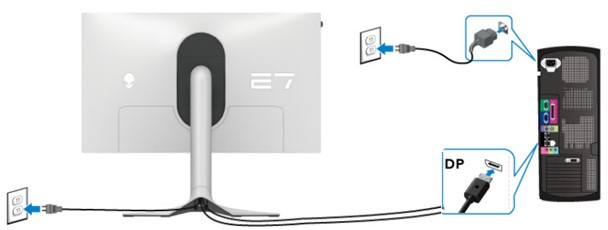
- 确保显示器和计算机之间的 DisplayPort 线缆已牢固连接。
- 使用显示器底部的操纵杆打开屏上显示。
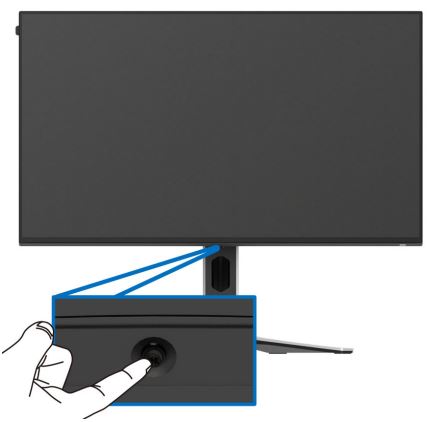
- 使用操纵杆选择 Menu ,或
 ,然后按操纵杆打开 OSD 菜单。
 - 确保输入源设置为 DP。

- 进入 游戏,将超 频 设置为 280 Hz。
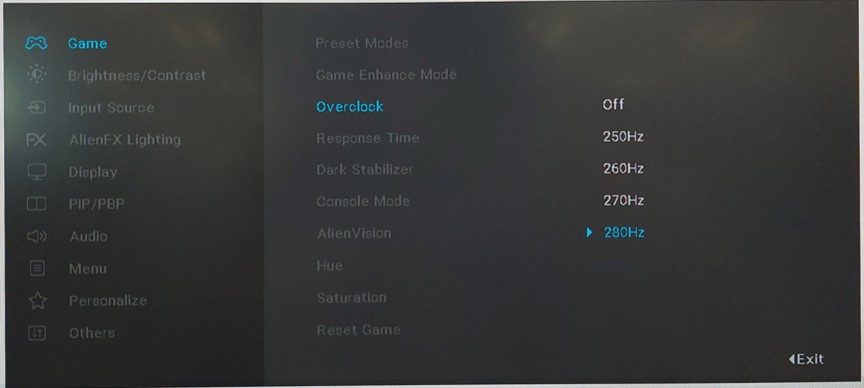
- 再次按操纵杆以确认。
Affected Products
Alienware 27 Gaming Monitor AW2723DFArticle Properties
Article Number: 000202700
Article Type: Solution
Last Modified: 24 Apr 2025
Version: 4
Find answers to your questions from other Dell users
Support Services
Check if your device is covered by Support Services.