NVP-vProxy:Windows 虚拟机 FLR 失败,并显示“Error while browsing: 200: Error received from vProxy ”could not get directory contents:”
Summary: 由于虚拟机操作系统上的管理员审批模式(或增强的 UAC)设置,通过 NetWorker VMware Protection (NVP) vProxy 设备执行的 Microsoft Windows 虚拟机 (VM) FLR 无法浏览目录内容
This article applies to
This article does not apply to
This article is not tied to any specific product.
Not all product versions are identified in this article.
Symptoms
Microsoft Windows 虚拟机的 vProxy 文件级恢复 (FLR) 失败,并显示以下错误:
Error while browsing: 200: Error received from vProxy "could not get directory contents: Unable to retrieve file list from 'host' (vm-moref) path 'path'"
Windows 虚拟机不包含 Windows 分布式文件系统 (DFS): NVP vProxy:虚拟机 FLR 持续失败,并显示“无法获取目录内容...”
Cause
如果在操作系统上启用了管理员审批模式 (AAM),则可能会出现此错误。这可防止管理用户对终端用户配置文件执行 FLR。对于任何用户帐户控制 (UAC) 交互,管理员必须等待装载操作完成,然后访问目标计算机上的装载点。
Resolution
有三个可用的端点选项。
第一种方法:
从 NetWorker Web 用户界面 (NWUI) 执行 FLR。FLR 流程中有一个名为“run with elevated privileges”的选项。执行 FLR 时选中此选项。
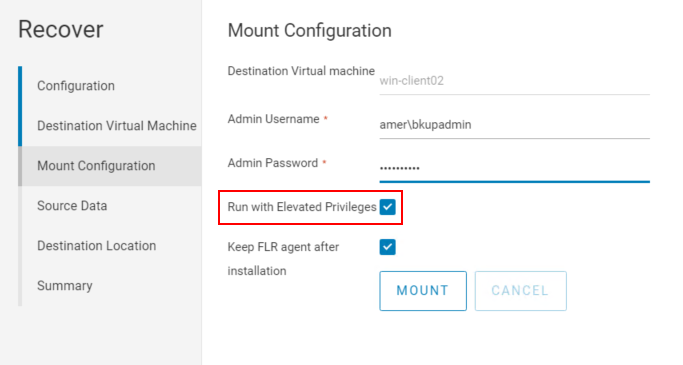
注意: 此选项在 NetWorker Management Console (NMC) 中不可用。
第二种方法:
1.从 NetWorker 管理控制台 (NMC) 启动 FLR 装载:
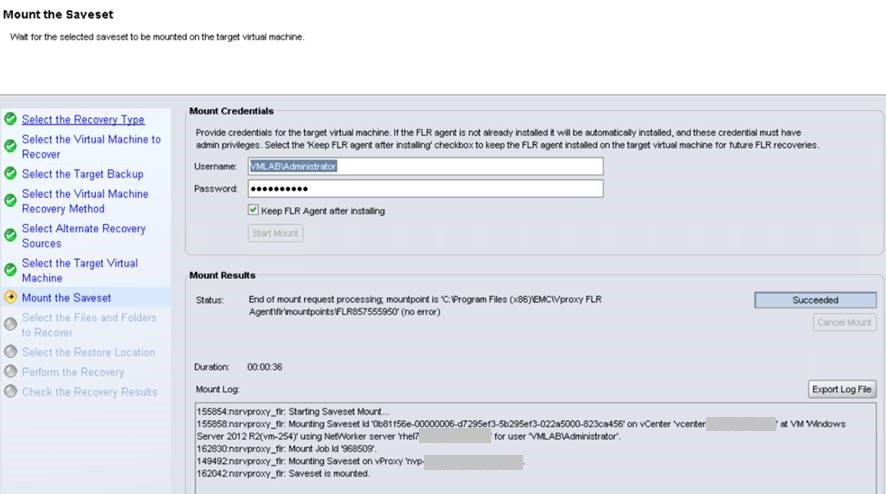
2.请勿从 NMC 继续执行还原。登录到目标还原虚拟机,然后使用 Windows 文件资源管理器访问“C:\Program Files (x86)\EMC\vProxy FLR Agent\flr\mountpoints”。打开从 NMC 启动的装载的装载点,例如:
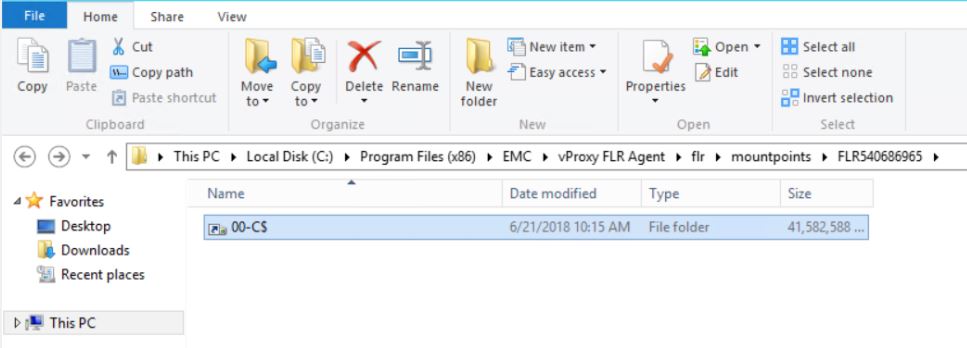
您可以浏览到所需的文件夹/文件并将其复制到虚拟机。也可以使用 xcopy  复制文件:
复制文件:
3.完成后,关闭 NMC 中的恢复向导以断开装载点的连接。
复制文件: xcopy mountpoint_folder/file recover_destination /EH
3.完成后,关闭 NMC 中的恢复向导以断开装载点的连接。
选项 3:
即时访问恢复也可以用作 FLR 解决方法。此过程记录在以下位置:
NVP vProxy:在没有 vProxy FLR 代理的情况下执行虚拟机 FLR
Additional Information
如果您在使用“使用提升权限运行”选项时也发现此问题,请参阅以下内容:
- 《 NetWorker VMware 集成指南》的“FLR 限制”部分。虚拟机操作系统或文件系统配置可能不支持 FLR。可通过以下方法获得 NetWorker 文档: 对 NetWorker 的支持 |手册和文档 (您必须使用您的戴尔支持帐户登录)。
- 已启用 Windows DFS: NVP vProxy:虚拟机 FLR 持续失败,并显示“无法获取目录内容”
- 已启用 Windows 重复数据消除: NVP-vProxy:FLR 无法浏览压缩文件夹 - 无法在虚拟机上执行 FLR 代理程序操作“browse_files”:访问被拒绝
- Linux LVM 配置限制: NVP vProxy:FLR LVM 限制
Affected Products
NetWorkerProducts
NetWorkerArticle Properties
Article Number: 000044625
Article Type: Solution
Last Modified: 28 Jul 2026
Version: 7
Find answers to your questions from other Dell users
Support Services
Check if your device is covered by Support Services.