NVP vProxy: NetWorker vProxyがネットワーク構成に失敗する
Summary: vProxyアプライアンスは、VMに表示されず、応答しない静的IPv4アドレスを使用して導入されます。wickeddは、アドレスがネットワーク上で使用されているため、重複IPエラーを報告します。
This article applies to
This article does not apply to
This article is not tied to any specific product.
Not all product versions are identified in this article.
Symptoms
vProxy OVFは指定されたIPv4アドレスを使用して導入されますが、導入されたVMにはアドレスが表示されず、ネットワーク上でそのアドレスに応答しません。
![図1:ステータスと構成を表示するvSphereの[Virtual Machine Details]インターフェイス](https://supportkb.dell.com/img/ka0Do000000e95tIAA/ka0Do000000e95tIAA_ja_1.jpeg)
ip a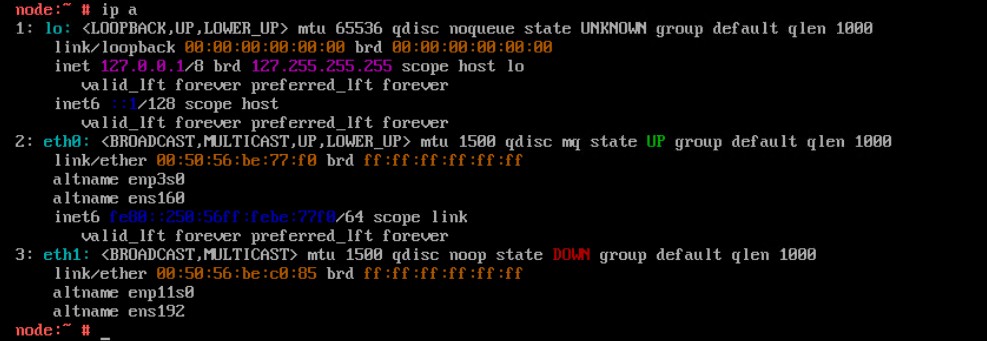
config_network.shスクリプトを使用してネットワーク パラメーターを再構成すると、固定IPv4アドレスの適用に失敗する
/opt/emc/vproxy/bin/config_network.sh <Interface> <FQDN> <IP Address> <Netmask> <Gateway> <DNS List (comma separated)>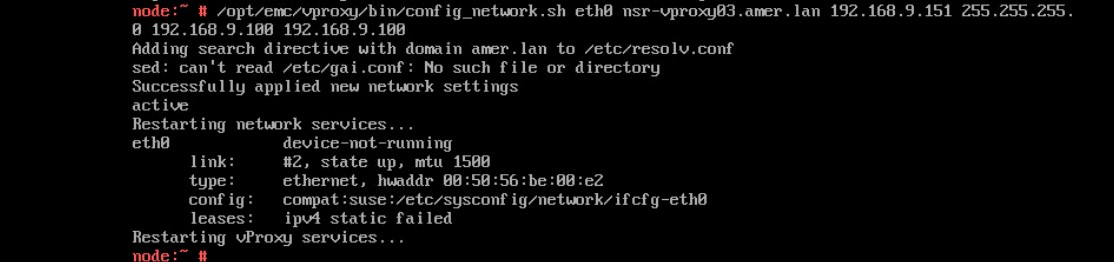
wickeddサービスのステータスに、重複IPアドレス エラーが表示されます。
systemctl status wickedd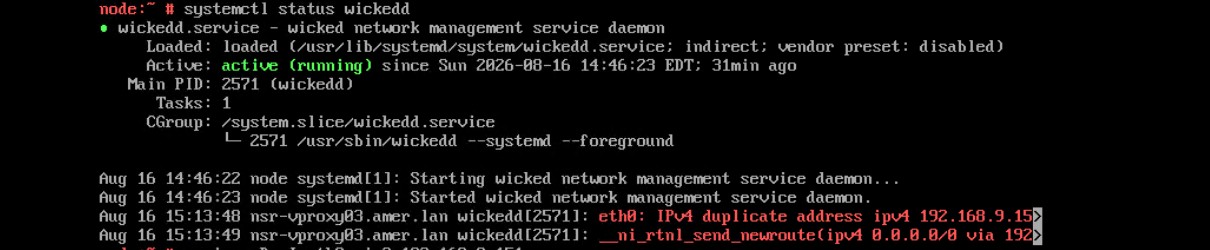
Cause
Resolution
新しい一意のアドレスを検索し、次のコマンドを使用して新しいIPアドレスを割り当てます。
- 関連するアプライアンスにサービスとしてログインし、rootに昇格します。
- 次のコマンドを実行します。
/opt/emc/vproxy/bin/config_network.sh <Interface> <FQDN> <IP Address> <Netmask> <Gateway> <DNS List (comma separated)>*詳細については、「NVP vProxy:vProxyアプライアンスのネットワーク インターフェイス設定を手動で変更する方法」を参照してください。
Affected Products
NetWorkerArticle Properties
Article Number: 000499204
Article Type: Solution
Last Modified: 17 Aug 2026
Version: 1
Find answers to your questions from other Dell users
Support Services
Check if your device is covered by Support Services.