PowerFlex: iDRAC 13G 및 14G 소프트 리셋 방법
Summary: PowerFlex: iDRAC 13G 및 14G 소프트 리셋 방법
This article applies to
This article does not apply to
This article is not tied to any specific product.
Not all product versions are identified in this article.
Instructions
iDRAC UI를 사용한 재설정(13G)
iDRAC의 그래픽 UI(User Interface)는 소프트 리셋을 수행할 수 있는 옵션을 제공합니다.
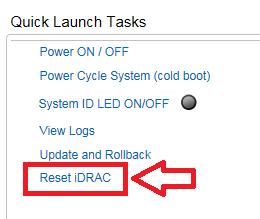
- iDRAC에 연결합니다.
- 사용자 이름과 비밀번호를 입력하여 인터페이스에 로그인합니다.
- 개요 화면의 오른쪽 하단에 Quick Launch Tasks가 표시됩니다
- Reset iDRAC를 클릭합니다.
- 작업을 확인합니다.
- 시스템 성능에 영향을 미치지 않는 한 몇 분 동안 iDRAC에 연결할 수 없습니다
iDRAC UI를 사용한 재설정(14G)
iDRAC의 그래픽 UI(User Interface)는 소프트 리셋을 수행할 수 있는 옵션을 제공합니다.
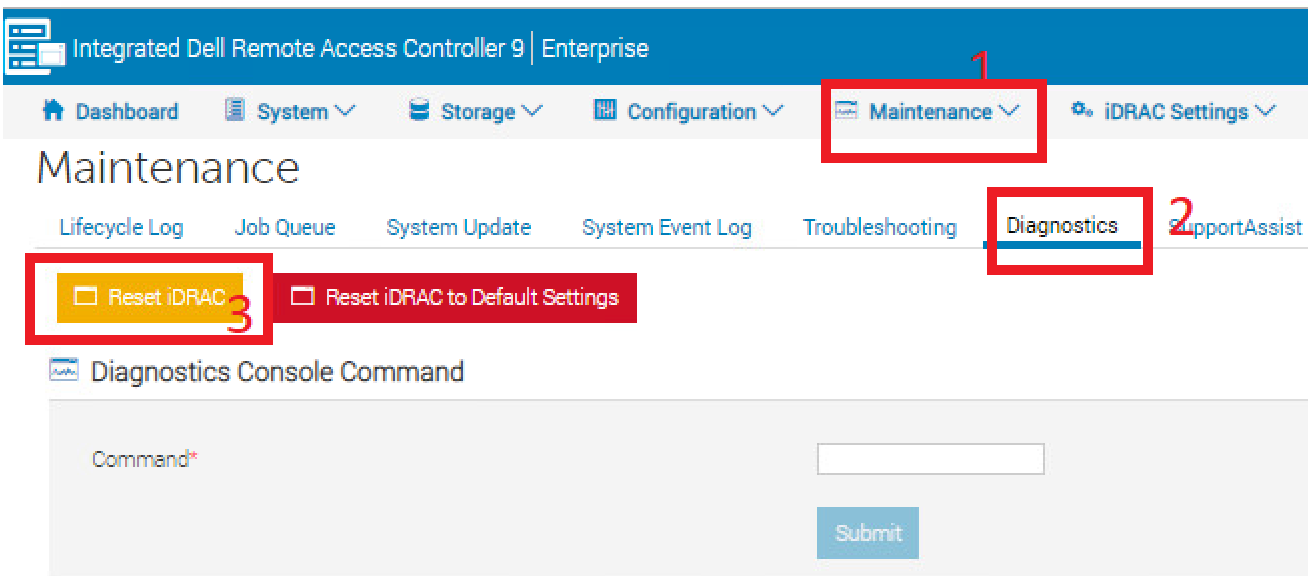
- iDRAC에 연결합니다.
- 사용자 이름과 비밀번호를 입력하여 인터페이스에 로그인합니다.
- 상단의 "Maintenance" 탭을 클릭합니다.
- "Diagnostics" 하위 탭을 클릭합니다.
- Reset iDRAC를 클릭합니다.
- 작업을 확인합니다.
- 시스템 성능에 영향을 미치지 않는 한 몇 분 동안 iDRAC에 연결할 수 없습니다
Affected Products
PowerFlex rack, VxFlex Ready Nodes, PowerFlex appliance Intelligent Catalog Software, PowerFlex Software, PowerFlex appliance R640, PowerFlex appliance R740XD, PowerFlex appliance R840Article Properties
Article Number: 000019789
Article Type: How To
Last Modified: 09 Jan 2026
Version: 5
Find answers to your questions from other Dell users
Support Services
Check if your device is covered by Support Services.