SourceOne Eメール管理:非標準のSQL Serverポートを使用するとSourceOneデータベースのアップグレードが失敗する
Summary: 非標準のSQL Serverポートを使用するとSourceOneデータベースのアップグレードが失敗する
This article applies to
This article does not apply to
This article is not tied to any specific product.
Not all product versions are identified in this article.
Symptoms
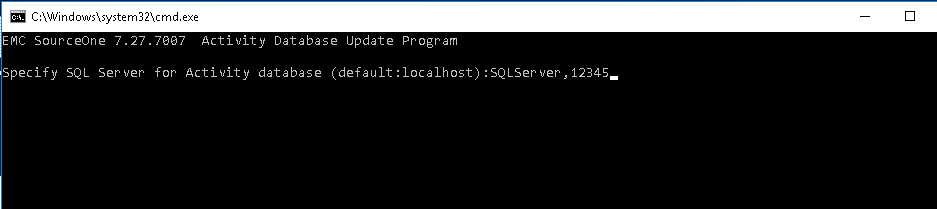
SourceOneデータベースのアップグレード中に、コマンド ウィンドウでコンマ(,)を使用して非標準SQLポートを指定すると、コマンド ウィンドウがただちに閉じます。
Cause
コマンド バッチでは、スペース、コンマ、セミコロン、タブ、区切りパラメーターと等しいを任意に組み合わせて使用します。
Resolution
この問題を解決するには、SQLServer,PortNumber を二重引用符で囲みます。
例:
「SQLServerName、12345」

Affected Products
SourceOne Email ManagementProducts
SourceOne, SourceOne Discovery Manager, SourceOne Email ManagementArticle Properties
Article Number: 000055978
Article Type: Solution
Last Modified: 17 Apr 2026
Version: 6
Find answers to your questions from other Dell users
Support Services
Check if your device is covered by Support Services.