Dell Unity: Centralized ESRS Güvenli Uzak Hizmetler Kaydı Sırasında Hata Kodu 0x6400b76 Edilmesinin Başka Bir Nedeni
Summary: Unity Secure Remote Services (ESRS) Kaydı, Hata Kodu 0x6400b76 vererek başarısız olabilir. (Kullanıcı Tarafından Düzeltilebilir)
Symptoms
Müşteri kutunun yerini değiştirdi. Site kimliği değiştirilmiştir.
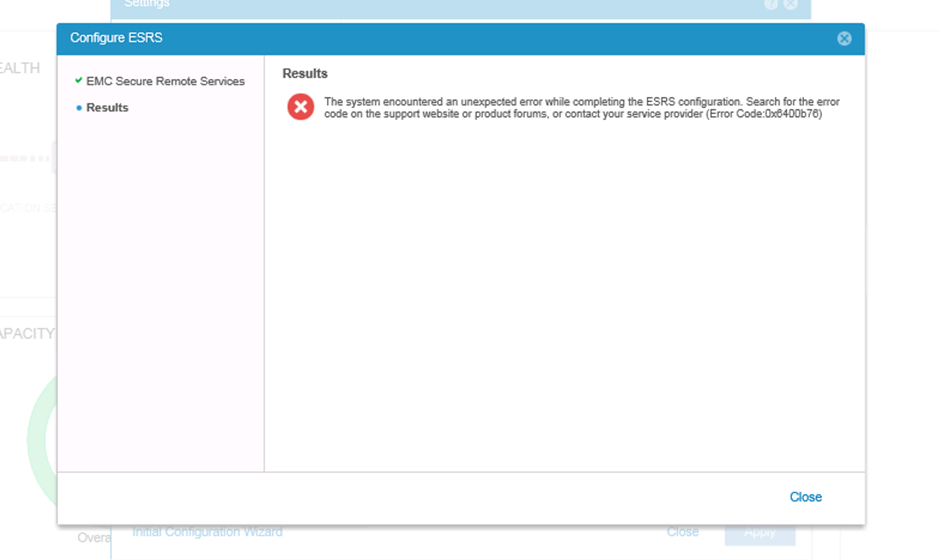
Unity'de Centralized ESRS'yi yapılandırdığınızda aşağıdaki hata kodunu 0x6400b76 hata koduyla başarısız oluyor:
From the Unity ESES log, we could found the ESRS gateway replied 500 error 'An error has occurred while adding device with SN CKMuuuuuuuuuuu Product Type UNITY',
Tue Jun 25 03:27:48 2019 ESRS_VE.pl:31458: REST client constructor host: https://g.g.g.g:9443/
Tue Jun 25 03:27:48 2019 ESRS_VE.pl:31458: About to enter pre action eVE state.
Tue Jun 25 03:27:48 2019 ESRS_VE.pl:31458: Skip the pre action state check since it's not a integrated only action.
Tue Jun 25 03:27:48 2019 ESRS_VE.pl:31458: Creating ESRS VE REST request for ACTION_ADD
Tue Jun 25 03:27:49 2019 ESRS_VE.pl:31458: Base url for ACTION_ADD is: esrs/v1/devices/UNITY/CKMuuuuuuuuuuu
Tue Jun 25 03:27:52 2019 ESRS_VE.pl:31458: Add/Modify Device Request: esrs/v1/devices/UNITY/CKMuuuuuuuuuuu
Tue Jun 25 03:27:52 2019 ESRS_VE.pl:31458: Headers: $VAR1 = {
'Accept-Charset' => 'UTF-8',
'Content-Type' => 'application/json',
'Accept' => 'application/json; charset=UTF-8',
'Authorization' => 'account@cccc.com:****************'
};

Tue Jun 25 03:27:52 2019 ESRS_VE.pl:31458: Content: { "ipAddress" : "u.u.u.u" }
Tue Jun 25 03:27:56 2019 ESRS_VE.pl:31458: Response code: $VAR1 = '201';

Tue Jun 25 03:27:56 2019 ESRS_VE.pl:31458: Response content: $VAR1 = '{"message":"An error has occurred while adding device with SN CKMuuuuuuuuuuu Product Type UNITY","serialNumber":"CKMuuuuuuuuuuu","gatewaySerialNumber":"ELMESRggggggRF","veType":"Connected","model":"UNITY","responseCode":500}';

Tue Jun 25 03:27:56 2019 ESRS_VE.pl:31458: Saving ADD metadata
Tue Jun 25 03:27:56 2019 ESRS_VE.pl:31458: Decoded response: $VAR1 = {
'veType' => 'Connected',
'responseCode' => 500,
'message' => 'An error has occurred while adding device with SN CKMuuuuuuuuuuu Product Type UNITY',
'model' => 'UNITY',
'gatewaySerialNumber' => 'ELMESRggggggRF',
'serialNumber' => 'CKMuuuuuuuuuuu'
};
Dell Unity: Centralized ESRS kayıt hatası Aynı Hata Kodu 0x6400b76 için Hata Kodu 0x6400b76 (Ancak farklı sorunlar için) adlı KB makalesine bakın. (Bu makaleyi görüntülemek için Dell Destek ekibinde oturum açılması gerekebilir)
Servicelink web sitesini kullanarak Unity'yi eklemeye çalışırken bir hata gösteriliyor: "Error occurred while attempting to validate the site id." (Servicelink'e Unity ekleme işlemi yalnızca test içindir).
Cause
Bunun nedeni site kimliği ayar sorunudur.
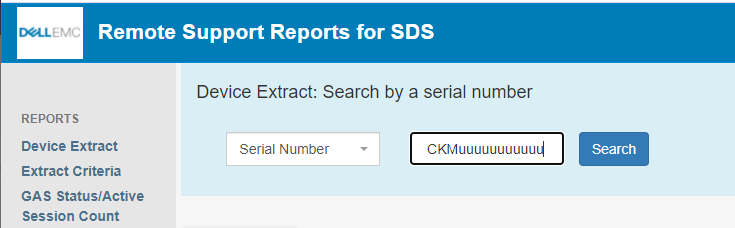
Aşağıdaki bağlantıya göre "CKMuuuu" seri numarasına göre ESRS site kimliği bilgilerini kontrol edin.
https://srssdsreports.cfcd.isus.emc.com/
| Parti # | Seri # | Bölüm # | Ürün Tipi | Model | Parça Türü | Servis Duns | Durum | Son Güncelleştirme | Oluşturma Tarihi |
|---|---|---|---|---|---|---|---|---|---|
100nnnnnnn |
CKMuuuuuuuuuuu |
900-xxx-xxx |
UNITY |
T34xxxxxxxxxxxx |
SERIAL NUMBER TAG |
INSTALL - T&M |
xx/xx/xxxx |
xx/xx/xxxx |
|
85ooooo |
CKMuuuuuuuuuuu |
900-xxx-xxx |
UNITY |
T34xxxxxxxxxxxx |
SERIAL NUMBER TAG |
SHIPPED |
xx/xx/xxxx |
xx/xx/xxxx |
Bağlı iki site kimliği olduğunu tespit ettik ve durum "YÜKLEME" DEĞİLDİR.
Resolution
Bunu düzeltmek için hesap ekibini veya Kurulum Tabanı ekibini devreye sokmalıyız.
Unity'ye bağlı yalnızca bir site kimliği tutmak gerekir ve durum "INSTALL" olmalıdır.