NetWorker:啟用合成備份時,NMC 報告不會反映備份的「總數量」值。
Summary: 在監控畫面上,顯示的總數量是上次完整備份和增量備份的總和,而 NMC 僅報告增量備份。
This article applies to
This article does not apply to
This article is not tied to any specific product.
Not all product versions are identified in this article.
Symptoms
從 NetWorker Management Console (NMC) 檢閱合成完整備份詳細資料,會顯示上次完整備份和增量備份的總和。
備份詳細資料顯示總數量之和值代表 合成完整備份 大小。在下方的視窗中,它會顯示實際的增量備份大小和以前 的完整備份大小,總和的結果就是總量 大小。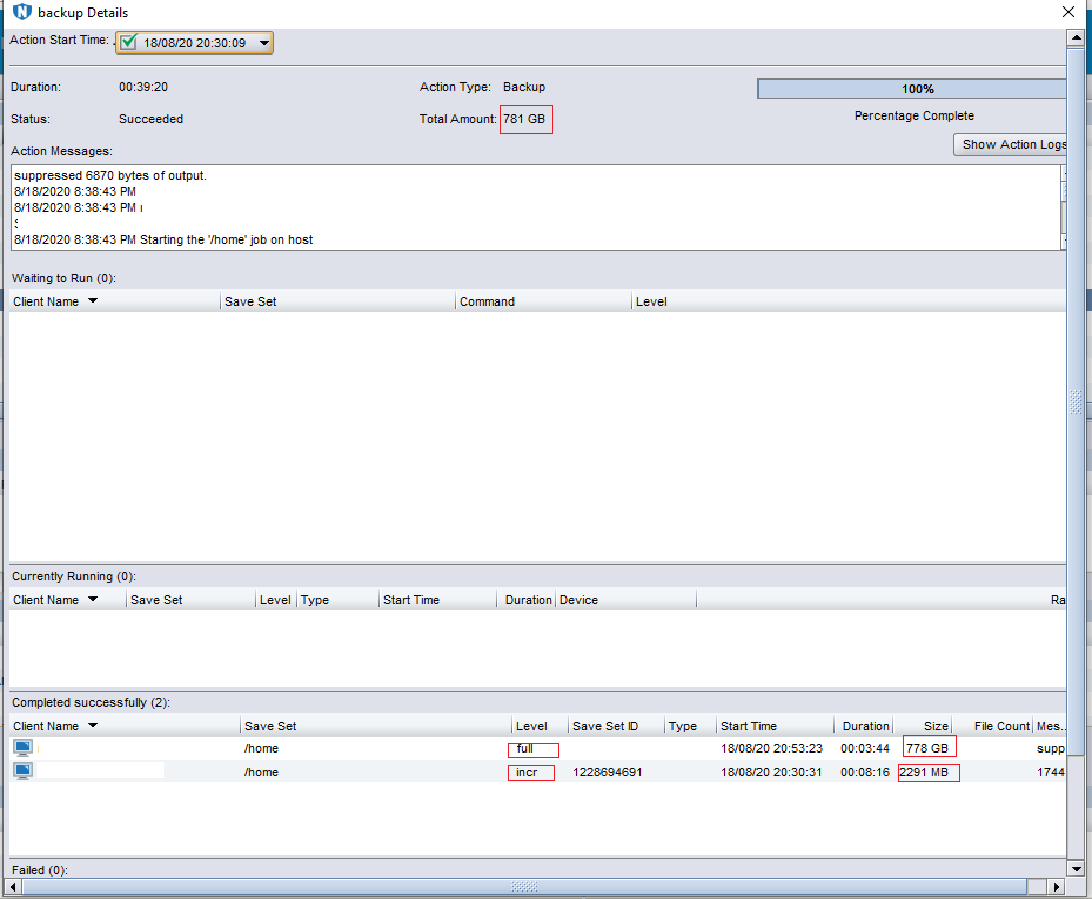
但是,檢閱「每日摘要」NMC 報告, 資料量僅代表增量或完整備份大小 (不考慮合成資料)。
Cause
NetWorker 是依設計運作。
Resolution
為了取得完整的資料量,您必須執行 NMC 報告,新增原始的完整備份和下列增量,並將它們加總。
命令 mminfo -q syntheticfull -c client -N save_set 也僅提供合成完整備份及其大小。
Affected Products
NetWorkerProducts
NetWorker, NetWorker Management ConsoleArticle Properties
Article Number: 000080678
Article Type: Solution
Last Modified: 20 Mar 2026
Version: 4
Find answers to your questions from other Dell users
Support Services
Check if your device is covered by Support Services.