Windows-gebeurtenislogboeken exporteren
Summary: Meer informatie over het exporteren van logboeken van Logboeken in Windows 11 of Windows 10. In deze handleiding wordt uitgelegd hoe u logboeken kunt opslaan met Logboeken.
This article applies to
This article does not apply to
This article is not tied to any specific product.
Not all product versions are identified in this article.
Instructions
- Druk op de toets met het Windows-logo.
- Typ
Event Vieweren selecteer vervolgens Logboeken in de lijst. - Selecteer in het linkerdeelvenster het type logboek dat u wilt exporteren.
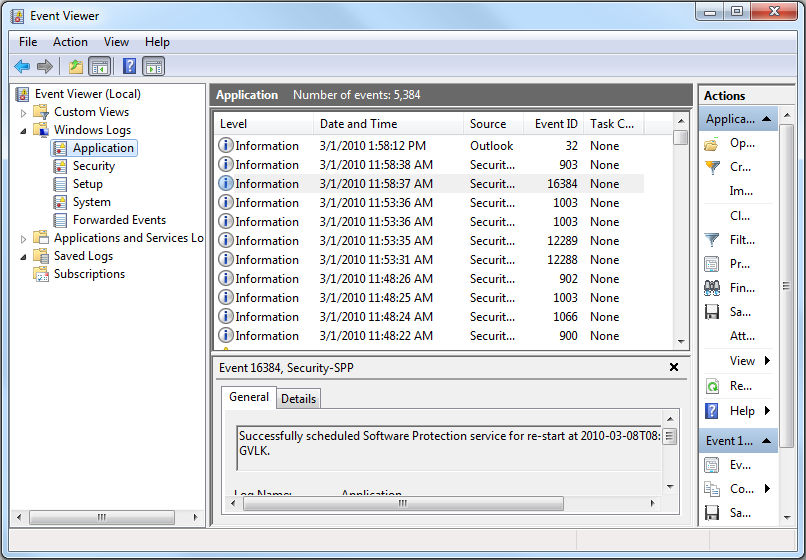
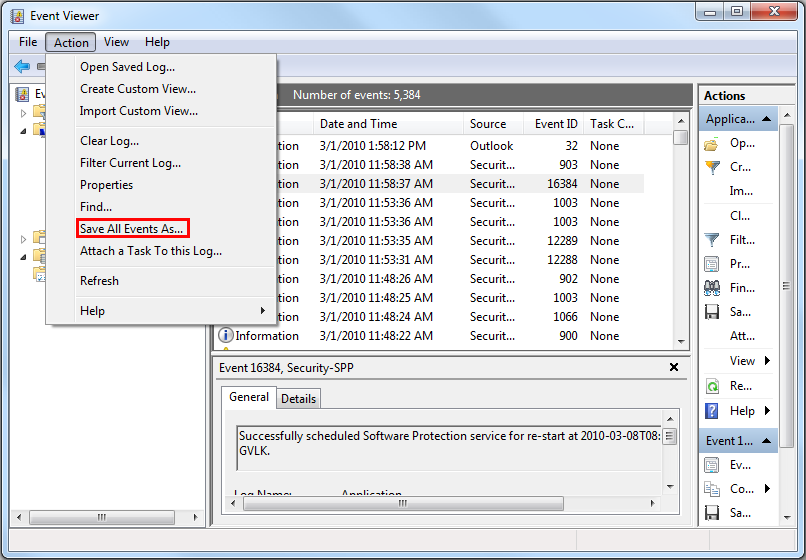
- Sla het logboek op door op Actie te klikken en vervolgens op Alle gebeurtenissen opslaan als.
Meer informatie vindt u op Gebeurtenislogboeken
Voor informatie over BIOS-gebeurtenislogboeken voor Dell laptops, raadpleegt u BIOS-gebeurtenislogboeken en Diagnostische logboekregistratie op Dell laptops.
Additional Information
Aanbevolen artikelen
Hier zijn enkele aanbevolen artikelen met betrekking tot dit onderwerp die voor u interessant kunnen zijn.
Affected Products
Alienware, Dell All-in-One, Dell Pro All-in-One, Dell Pro Max Micro, Dell Pro Max Slim, Dell Pro Max Tower, Dell Pro Micro, Dell Pro Slim, Dell Pro Tower, Dell Slim, Dell Tower, Inspiron, Legacy Desktop Models, OptiPlex, Vostro, XPS, G Series
, G Series, Alienware, Dell Plus, Dell Pro, Dell Pro Max, Dell Pro Plus, Dell Pro Premium, Inspiron, Latitude, Dell Pro Rugged, Vostro, XPS, Legacy Laptop Models, Fixed Workstations, Mobile Workstations, Dell Pro Max Micro XE FCM2250, Dell Pro Max Slim XE FCS1250, Dell Pro Max Tower T2 XE FCT2250, Dell Pro Max 16 XE MC16250, Dell Pro Micro Plus XE QBM1250, Dell Pro Slim Plus XE5 QBS1250, Dell Pro Tower Plus XE5 QBT1250
...
Article Properties
Article Number: 000124382
Article Type: How To
Last Modified: 12 Jan 2026
Version: 8
Find answers to your questions from other Dell users
Support Services
Check if your device is covered by Support Services.