Experiencing slow performance on Secured-core Latitude or Precision laptops
Summary: This article provides information, and guidance on slow performance reported on Secured-core PC enabled Latitude or Precision laptops.
Symptoms
Table of Contents:
- Do you see a slow performance from your Secured-core PC enabled Latitude or Precision laptop?
- Working as designed?
- Which Latitude and Precision laptop models are Dell Secured-core PCs?
Do you see a slow performance from your Secured-core PC enabled Latitude or Precision laptop?
Secured-core PC: Devices with Hypervisor Enforced Code Integrity (HVCI)/Virtualization Based Security (VBS) enabled.
Your Secured-core PC may show reduced performance as compared to the same device without HVCI/VBS enabled. Devices with HVCI/VBS enabled have been shown to have increased boot times, shutdown times, app launch times, and entering/exiting sleep/suspend.
You can confirm whether Hypervisor Enforced Code Integrity (HVCI)/Virtualization Based Security (VBS) is enabled on your computer by checking either of the following methods:
-
Windows 10 System Information App => System Summary => virtualization-based security Services Configured & virtualization-based security Services Running (MSINFO32.exe)

(Figure.1 HVCI/VBS enabled shown in Windows 10 System information)
-
Windows 10 Settings => Update & Security => Windows Security => Device Security => Core Isolation Details
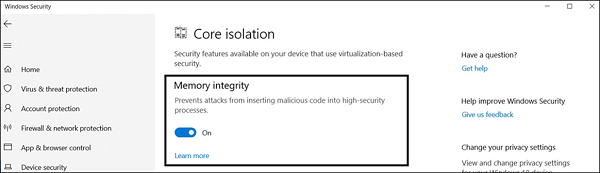
(Figure.2 HVCI/VBS enabled shown in Windows 10 Windows Security settings)
Cause
Not Applicable
Resolution
Working as designed?
There is no failure occurring in these computers. The reduction in performance is inherent to the behavior of HVCI/VBS, while working within the design limitations of Windows 10 and the system design. If the performance impact is too large, HVCI/VBS can be disabled using one of the methods in the following Microsoft document:

Which Latitude and Precision laptop models are Dell Secured-core PCs?
The following Latitude and Precision computers are Secured-core PC capable computers as of October 2019:
| Dell Secured-core PC Models | |
|---|---|
| Latitude | Precision |
| 13" 5300 | 15" 3540 |
| 13" 5300 2-in-1 | |
| 14" 5400 | |
| 15" 5500 | |
| 14" 5401 | |
| 15" 5501 | |
| 12" 7200 2-in-1 | |
| 13" 7300 | |
| 14" 7400 | |
| 14" 7400 2-in-1 | |