Microsoft Lync 2013 May Not Detect Audio Devices on Intel WiDi Enabled Systems
Summary: Steps for resolving Microsoft Lync 2013 audio issues with Intel WiDi systems.
This article applies to
This article does not apply to
This article is not tied to any specific product.
Not all product versions are identified in this article.
Symptoms
This article provides the information on "Microsoft Lync 2013 may not detect audio devices on Intel WiDi enabled systems".
Microsoft Lync 2013 No Audio Device Detected
Systems that are equipped with a WiDi USB Intel Wireless card may find that the Audio Device in the system is not detected by Microsoft Lync 2013 (Figure 1):

Figure 1
The issue is caused by the WiDi USB driver that acts as an audio gateway.
Solution
If you are not actively using WiDi, the WiDi USB interface can be disabled in device manager until it is needed.
Open Device Manager then disable the Intel UoIP Bus and Host Controller by right clicking on Intel UoIP Bus and clicking Disable (Figure 2).
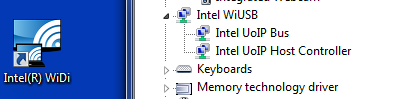
Figure 2
Exit and Restart Microsoft Lync 2013 and the Audio Device should be detected (Figure 3):

Figure 3
Affected Products
Latitude 3330 (End of Life), Latitude 3340 (End of Life), Latitude 3440 (End of Life), Latitude 3540 (End of Life), Latitude 6430u, Latitude 7204 Rugged, Latitude 7404 Rugged, Latitude E5440, Latitude E5530, Latitude E5540, Latitude E6230
, Latitude E6320, Latitude E6330, Latitude E6430 ATG, Latitude E6430s, Latitude E6440, Latitude E6530, Latitude E6540, Latitude E7240 Ultrabook, Latitude E7440
...
Article Properties
Article Number: 000140566
Article Type: Solution
Last Modified: 21 Feb 2021
Version: 3
Find answers to your questions from other Dell users
Support Services
Check if your device is covered by Support Services.