Dell VxRail:升級體驗在執行 VMware vCenter Server Platform Services Controller 升級時執行預先檢查失敗
Summary: 升級失敗,執行 VMware vCenter Server Platform Services Controller 升級時執行預先檢查失敗,錯誤訊息為:請確認修補程式 iso 有效。
This article applies to
This article does not apply to
This article is not tied to any specific product.
Not all product versions are identified in this article.
Symptoms
VxRail 升級失敗,並出現錯誤「VMware vCenter Server Platform Services Controller 升級在執行時發生空運行預先檢查失敗,發生錯誤。」
lcm.log:
2019-05-12T09:22:20.198+0000 ERROR [pool-9-thread-1] com.vce.lcm.service.checker.upgrade.PSCDryRunPrechecker PSCDryRunPrechecker.performDryRun:118 - Dry run pre-check failure in execution for VMware vCenter Server Platform Services Controller upgrade with error: ..
2019-05-12T09:22:20.199+0000 INFO  [pool-9-thread-1] com.vce.lcm.service.LCMServiceImpl LCMServiceImpl.handleUpgradeException:1541 - handling upgrade exception.
2019-05-12T09:22:20.201+0000 INFO  [pool-9-thread-1] com.vce.lcm.service.LCMServiceImpl LCMServiceImpl.setStatusToUpgradeFailed:1531 - set bundle VMware vCenter Server Appliance status to upgrade failed
2019-05-12T09:22:20.201+0000 ERROR [pool-9-thread-1] com.vce.lcm.service.LCMServiceImpl LCMServiceImpl.handleUpgradeException:1569 - failed to upgrade: VXRAIL_COMPOSITE-4.7.200-13531219_for_4.7.x.zip, with exception:
com.vce.lcm.exception.LCMInternalException: Failure running upgrade script.
        at com.vce.lcm.service.checker.upgrade.PSCDryRunPrechecker.performDryRun(PSCDryRunPrechecker.java:120) ~[lcm_module-4.7.200.jar:?]
        at com.vce.lcm.service.checker.upgrade.AbstractApplianceDryRunPrechecker.performCheck(AbstractApplianceDryRunPrechecker.java:62) ~[lcm_module-4.7.200.jar:?]
        at com.vce.lcm.helper.LCMUtilService.executeIndividualCheck(LCMUtilService.java:758) ~[lcm_module-4.7.200.jar:?]
Cause
發生這種情況的原因如下:
- VxRail 複合.zip檔案損毀,或在下載期間發生錯誤。
Resolution
請按照以下步驟驗證複合是否已損壞。
-
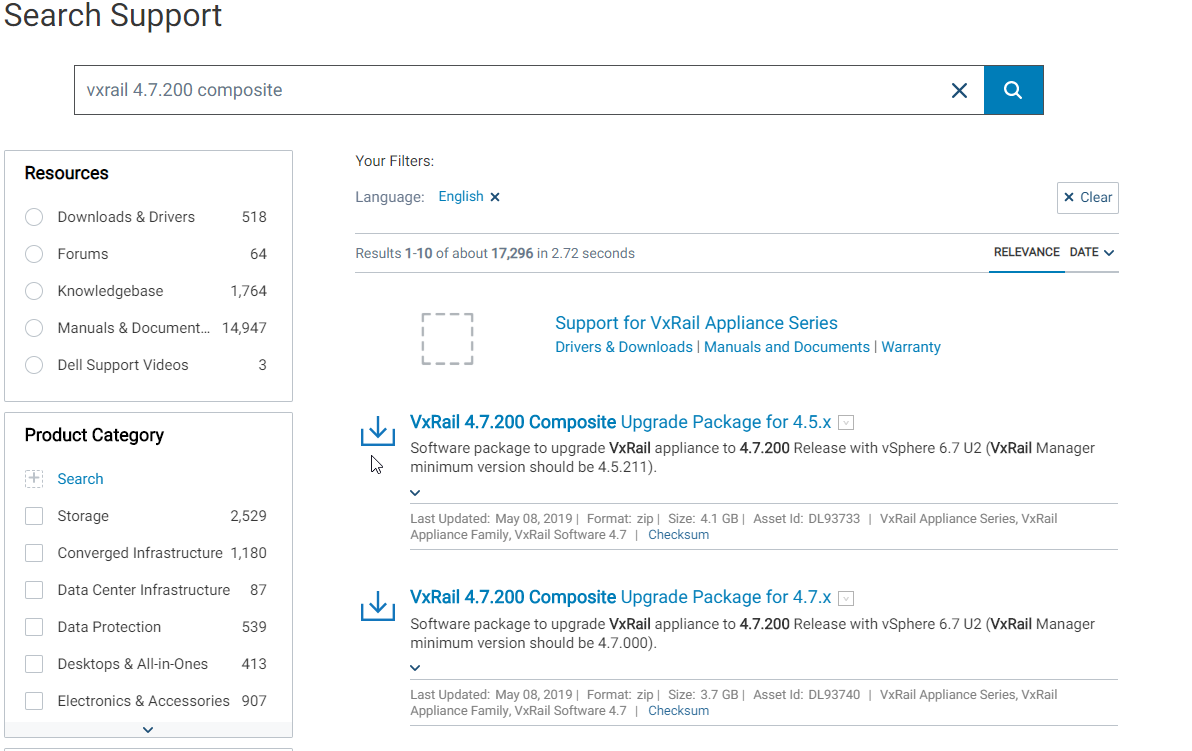
搜尋目標複合升級,例如:適用於 4.7.x 的 VxRail 4.7.200 複合升級套件
-
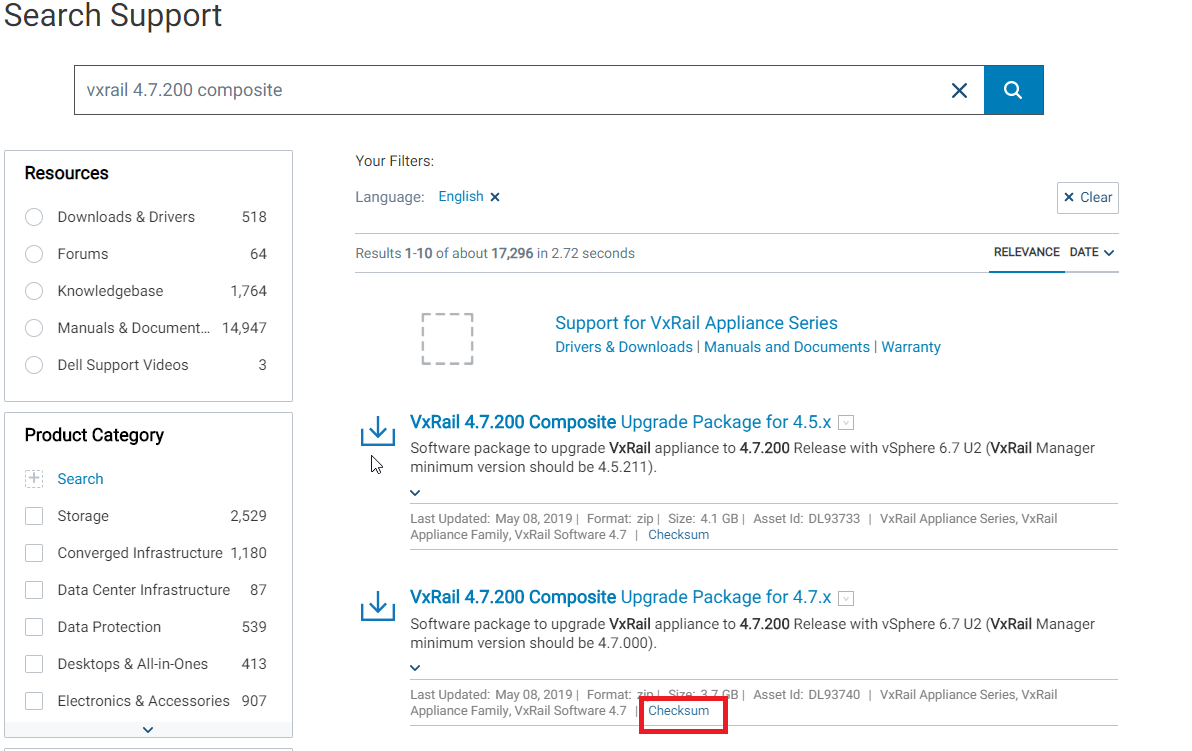
在找到的結果下,按下檢查總和
-
它顯示了哈希鍵,其中使用了哈希演演演算法,如下所示

-
在升級複合元件損毀的本機機器上,開啟 cmd 並執行下列命令:
certUtil -hashfile pathToFileToCheck [HashAlgorithm]
例如:
certUtil -hashfile C:\Downloads\VXRAIL_COMPOSITE-4.7.200-13531219_for_4.7.x.zip SHA256
HashAlgorithm 選項包括:MD2 MD4 MD5 SHA1 SHA256 SHA384 SHA512

-
將從cmd生成的哈希密鑰與 support.emc.com 上找到的哈希密鑰進行比較,如果它們不匹配,則意味著下載的複合體已損壞
-
再次重新下載複合並重複前兩個步驟,以確保正確下載新的複合。
-
如果快照是從 VxRail Manager 擷取,而且在開始上一個升級之前,請還原至該快照,並使用新下載的升級複合體再試一次升級。
-
如果沒有拍攝快照,請拍攝快照並執行以下三個步驟:
- 使用以下命令在 VxRail Manager VM 上開啟 mystic DB:
psql -U postgres mysticmanager;
- 執行下列命令,將升級狀態重設為 HAS_NEWER:
update virtual_appliance set upgrade_status='HAS_NEWER'where component_id='VXRAIL_SYSTEM';
- 使用以下命令重新啟動 runjars 和 vmware-marvin 服務
systemctl restart vmware-marvin
systemctl restart runjars
- 使用以下命令在 VxRail Manager VM 上開啟 mystic DB:
Affected Products
VxRail Appliance Family, VxRail D560Products
Pivotal Ready Architecture, VxRail 460 and 470 Nodes, VxRail Appliance Family, VxRail Appliance Series, VxRail G410, VxRail G Series Nodes, VxRail D560F, VxRail E460, VxRail E560, VxRail E560F, VxRail E560N, VxRail E660F, VxRail E660N, VxRail E665
, VxRail E665F, VxRail E665N, VxRail G560, VxRail G560F, VxRail Gen2 Hardware, VxRail P Series Nodes, VxRail P470, VxRail P570, VxRail P570F, VxRail P580N, VxRail P670N, VxRail P675F, VxRail P675N, VxRail S470, VxRail S570, VxRail S670, VxRail Software, VxRail V Series Nodes, VxRail V470, VxRail V570, VxRail V570F
...
Article Properties
Article Number: 000168419
Article Type: Solution
Last Modified: 20 Mar 2025
Version: 8
Find answers to your questions from other Dell users
Support Services
Check if your device is covered by Support Services.