VxRail: Disk replacement failed due to new disk not found
Summary: Disk replacement might fail as new disk was not discovered.
This article applies to
This article does not apply to
This article is not tied to any specific product.
Not all product versions are identified in this article.
Symptoms
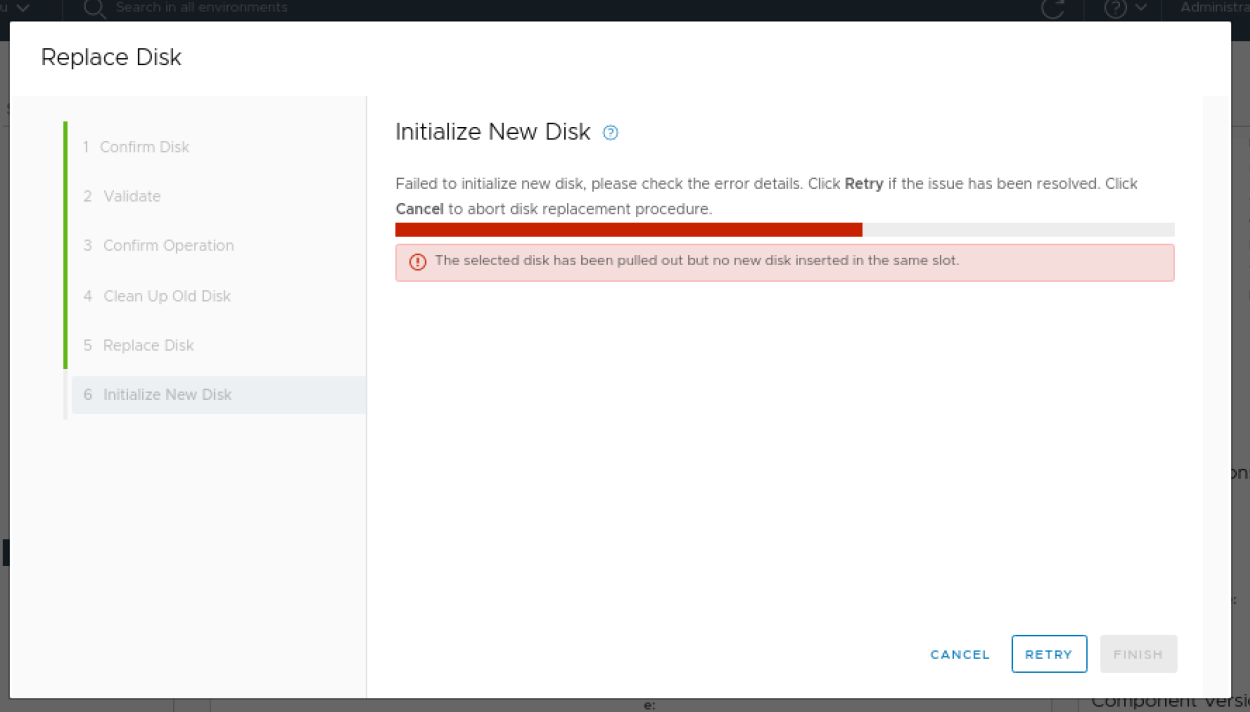
During disk replacement, the error message "The selected disk has been pulled out but no new disk inserted in the same slot." This may occur in the "Initialize New Disk" stage:
web.log:
2021-01-08T02:29:17.925+0000 ERROR [ForkJoinPool.commonPool-worker-3] com.emc.mystic.manager.web.service.DiskReplacementServiceImpl DiskReplacementServiceImpl.postReplacement:258 - Post Disk replace error: null
com.emc.mystic.manager.web.exception.DiskReplacement.DiskreplacementException: null
at com.emc.mystic.manager.web.service.DiskReplacementServiceImpl.callMQ(DiskReplacementServiceImpl.java:401) ~[classes/:?]
at com.emc.mystic.manager.web.service.DiskReplacementServiceImpl.postReplacement(DiskReplacementServiceImpl.java:235) ~[classes/:?]
at com.emc.mystic.manager.web.controller.DiskReplacementControllerImpl.lambda$shiftDisk$5(DiskReplacementControllerImpl.java:123) ~[classes/:?]
at com.emc.mystic.manager.web.util.CustomizedCompletableFuture.lambda$runAsync$0(CustomizedCompletableFuture.java:15) ~[classes/:?]
at java.util.concurrent.CompletableFuture$AsyncRun.run(CompletableFuture.java:1736) [?:?]
at java.util.concurrent.CompletableFuture$AsyncRun.exec(CompletableFuture.java:1728) [?:?]
at java.util.concurrent.ForkJoinTask.doExec(ForkJoinTask.java:290) [?:?]
at java.util.concurrent.ForkJoinPool$WorkQueue.topLevelExec(ForkJoinPool.java:1020) [?:?]
at java.util.concurrent.ForkJoinPool.scan(ForkJoinPool.java:1656) [?:?]
at java.util.concurrent.ForkJoinPool.runWorker(ForkJoinPool.java:1594) [?:?]
at java.util.concurrent.ForkJoinWorkerThread.run(ForkJoinWorkerThread.java:183) [?:?]
2021-01-08T02:29:17.925+0000 INFO [ForkJoinPool.commonPool-worker-3] com.emc.mystic.manager.web.service.DiskReplacementServiceImpl DiskReplacementServiceImpl.postReplacement:260 - Finish disk replacement with diskSn as <disk sn>
cluster-connectors.log:
2021-01-08T02:29:17.910+0000 ERROR [org.springframework.amqp.rabbit.RabbitListenerEndpointContainer#4-2] com.emc.mystic.manager.connectors.cluster.enclosure.diskOps.DiskReplacementServiceImpl DiskReplacementServiceImpl.postDiskReplacement:554 - Validation failed for adding <disk sn>into host c2-esx03.rackPTY.local(DELL_R630)
Cause
It may take VxRail Manager about 10 minutes to load the newly replaced disk drive once it is inserted into the slot.
This issue may happen in Dell PowerEdge models and the affected version ranges from 7.0.010 to 7.0.130.
This issue may happen in Dell PowerEdge models and the affected version ranges from 7.0.010 to 7.0.130.
Resolution
To resolve this issue, wait for 10 minutes and click the "RETRY" button.
Affected Products
VxRail Appliance Family, VxRail Appliance SeriesArticle Properties
Article Number: 000182264
Article Type: Solution
Last Modified: 08 May 2026
Version: 11
Find answers to your questions from other Dell users
Support Services
Check if your device is covered by Support Services.