Dell Pro 키보드 및 마우스 KM5221W가 작동하지 않음
Summary: 다음 문서에서는 Dell Pro 키보드 및 마우스(KM5221W)의 문제에 대한 정보를 제공합니다. 키보드와 마우스가 작동하지 않고 동글 불일치를 보고합니다.
This article applies to
This article does not apply to
This article is not tied to any specific product.
Not all product versions are identified in this article.
Symptoms
Dell Pro 키보드 및 마우스(KM5221W)에서 동글 불일치 보고
Dell Pro 키보드 및 마우스(KM5221W) 사용 시 다음과 같은 증상이 나타날 수 있습니다.
- 키보드와 마우스가 작동하지 않습니다
- 동글이 불일치 오류를 보고합니다.
Cause
이는 동기화 오류 때문입니다.
Resolution
다음 지침은 무선 키보드와 마우스를 재동기화 또는 드롭하고 페어링하는 단계입니다. (Dell Peripheral Manager 유틸리티 사용):
-
Dell Peripheral Manager가 컴퓨터에 설치되어 있습니까?
-
아직 설치되지 않은 경우 최신 Dell Peripheral Manager 유틸리티를 컴퓨터에 설치합니다. 유틸리티를 다운로드하고 설치하려면 다음을 참조하십시오. Dell 드라이버 및 펌웨어를 다운로드하고 설치하는 방법
-
유틸리티가 컴퓨터에 이미 설치되어 있는 경우 다음 단계로 이동합니다.
-
-
유틸리티를 엽니다.
-
무선 동글을 컴퓨터에 다시 장착합니다.
-
디바이스를 찾을 수 없음 또는 디바이스 페이지가 표시되는 경우 다음 지침을 따르십시오.
-
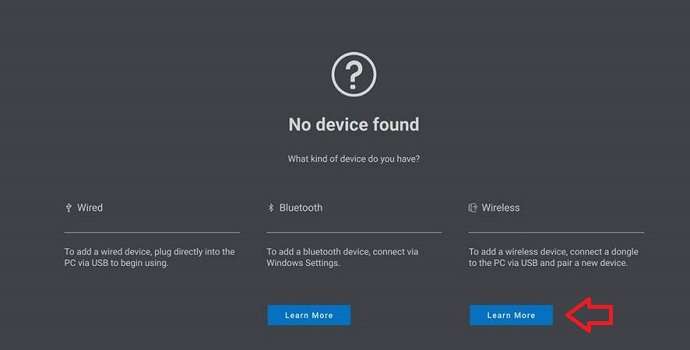
디바이스를 찾을 수 없는 경우 Wireless 제목 아래에서 Learn More를 클릭합니다.
-
Device에 대해 Add a new device를 클릭합니다.

-
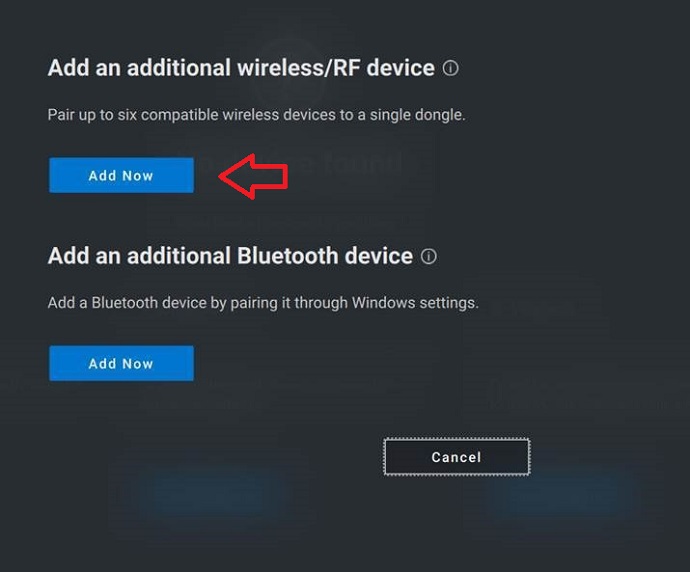
Add Now를 클릭하여 무선 및/또는 RF(Radio Frequency) 디바이스를 더 추가합니다.
-
화면의 지시에 따라 장치를 페어링합니다.

-
Dell Peripheral Manager 유틸리티에 대한 자세한 내용은 다음 문서에서 확인할 수 있습니다.
Affected Products
Alienware, Dell All-in-One, Dell Pro All-in-One, Dell Pro Max Micro, Dell Pro Max Slim, Dell Pro Max Tower, Dell Pro Micro, Dell Pro Slim, Dell Pro Tower, Dell Slim, Dell Tower, Inspiron, OptiPlex, Vostro, XPS, G Series, Chromebook, G Series
, Alienware, Dell Plus, Dell Pro, Dell Pro Max, Dell Pro Plus, Dell Pro Premium, Inspiron, Latitude, Dell Pro Rugged, Vostro, XPS, Fixed Workstations, Mobile Workstations, Dell Pro Max Micro XE FCM2250, Dell Pro Keyboard and Mouse KM5221W
...
Article Properties
Article Number: 000194959
Article Type: Solution
Last Modified: 07 Nov 2025
Version: 7
Find answers to your questions from other Dell users
Support Services
Check if your device is covered by Support Services.