戴尔 Pro 键盘及鼠标 KM5221W 无法正常工作
Summary: 以下文章提供有关戴尔 Pro 键盘及鼠标 (KM5221W) 问题的信息。键盘和鼠标无法正常工作,并报告转换器不匹配。
This article applies to
This article does not apply to
This article is not tied to any specific product.
Not all product versions are identified in this article.
Symptoms
Cause
这是由于同步错误造成的。
Resolution
以下说明是重新同步或删除无线键盘和鼠标并进行配对的步骤。(使用 Dell Peripheral Manager 实用程序):
-
计算机上是否安装了 Dell Peripheral Manager?
-
在计算机上安装最新的 Dell Peripheral Manager 实用程序(如果尚未安装)。要下载并安装该实用程序,请参阅:如何下载和安装戴尔驱动程序和固件
-
如果您的计算机上已安装该实用程序,请转至下一步。
-
-
打开实用程序。
-
将无线转换器重新插入计算机。
-
如果显示 未找到设备 或 设备 页面,请按照以下说明作:
-
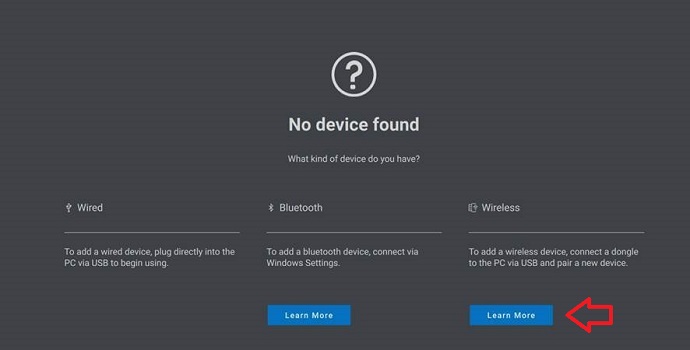
对于未找到设备,请单击“无线”标题下的“了解更多”:
-
对于Device,单击 Add a new device:

-
单击 立即添加 以添加其他无线和/或射频 (RF) 设备:

-
按照屏幕上的说明 配对设备:

-
有关 Dell Peripheral Manager 实用程序的更多信息,请参阅以下文章:
Affected Products
Alienware, Dell All-in-One, Dell Pro All-in-One, Dell Pro Max Micro, Dell Pro Max Slim, Dell Pro Max Tower, Dell Pro Micro, Dell Pro Slim, Dell Pro Tower, Dell Slim, Dell Tower, Inspiron, OptiPlex, Vostro, XPS, G Series, Chromebook, G Series
, Alienware, Dell Plus, Dell Pro, Dell Pro Max, Dell Pro Plus, Dell Pro Premium, Inspiron, Latitude, Dell Pro Rugged, Vostro, XPS, Fixed Workstations, Mobile Workstations, Dell Pro Max Micro XE FCM2250, Dell Pro Keyboard and Mouse KM5221W
...
Article Properties
Article Number: 000194959
Article Type: Solution
Last Modified: 07 Nov 2025
Version: 7
Find answers to your questions from other Dell users
Support Services
Check if your device is covered by Support Services.