服务器保护策略工作流运行时 NetWorker 消息 “工作流服务器备份丢失”
Summary: 当服务器保护策略工作流运行时,daemon.log会记录消息“workflow Server backup missed”(工作流服务器备份缺失)。
This article applies to
This article does not apply to
This article is not tied to any specific product.
Not all product versions are identified in this article.
Symptoms
- 而
daemon.raw在服务器保护策略工作流运行时,记录消息“工作流服务器备份丢失”。- Linux:
/nsr/logs/daemon.raw - Windows(默认值):
C:\Program Files\EMC NetWorker\nsr\logs\daemon.raw - NetWorker:如何使用nsr_render_log呈现.raw日志文件
- Linux:
- 服务器备份工作流完成,没有错误。
- 服务器保护策略下的其余工作流完成,没有错误。
- 以下项中没有损坏的策略资源
nsrdb\dbg文件夹中。- Linux:
/nsr/res/nsrdb/dbg - Windows(默认值):
C:\Program Files\EMC NetWorker\nsr\res\nsrdb\dbg
- Linux:
- 服务器保护策略工作流一天启动两次。
Cause
有两个相同(重复)的服务器保护策略。该重复项在 NetWorker Management Console (NMC) 中不可见,但可以使用 nsradmin 查询。
Resolution
删除重复策略 nsrdb 使用 nsradmin 命令(离线模式下)。
- 在进行任何更改之前,请创建
nsrdb文件夹中:
Linux: /nsr/res/nsrdb
Windows: C\Program Files\EMC NetWorker\nsr\res\nsrdb
- 停止 NetWorker 服务器上的 NetWorker 服务。
Linux:
Windows:
systemctl stop networker
Windows:
net stop nsrd
- 在命令行中运行:
nsradmin -d <full path to>nsrdb
- 在
nsradmin提示符处,键入”visual”的输出。选择“select”命令。按 Enter 键。
按箭头键,直到NSR Protection Policy突出显示。按 Enter 键。
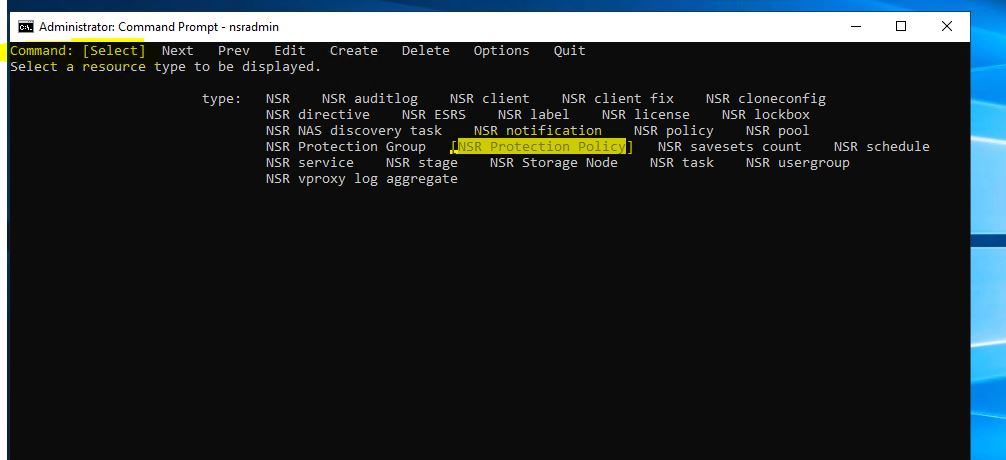
- 使用下一步选项标识重复的 服务器保护资源。

- 使用键盘箭头键选中 Delete,然后按 Enter 键。
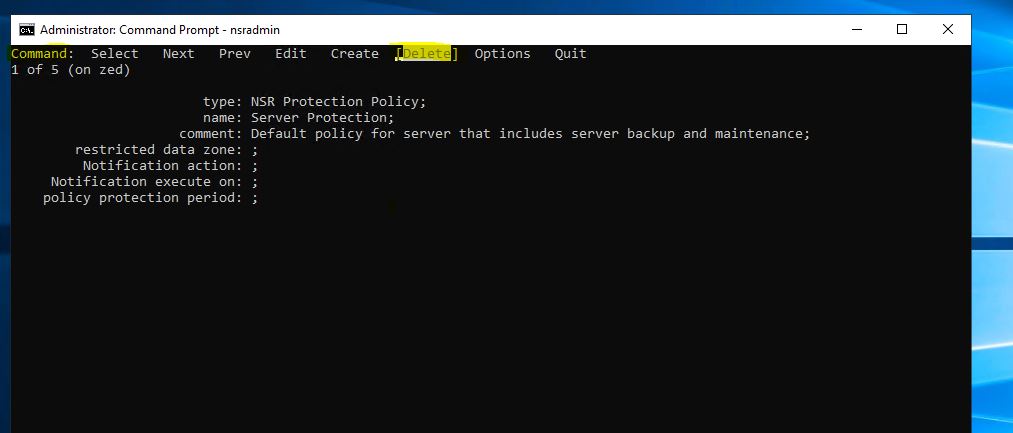
- 按箭头键高亮显示 Quit ,然后按 Enter 键退出
nsradmin提示。 - 启动 NetWorker 服务。
Linux:
Windows:
systemctl start networker
Windows:
net start nsrd
提醒:如果发现任何问题,请停止 NetWorker 服务并恢复到
nsrdb 在步骤 1 中创建的拷贝。然后再次启动服务。
Affected Products
NetWorkerProducts
NetWorker FamilyArticle Properties
Article Number: 000219404
Article Type: Solution
Last Modified: 10 Mar 2026
Version: 3
Find answers to your questions from other Dell users
Support Services
Check if your device is covered by Support Services.