Laptop LCDs and Desktop Monitors Have Different Tint when Placed Next to Each Other
Summary: This article provides information about latitude 7340 displays having different tint (for example, one may have more of a yellow tint than the other).
Symptoms
Affected Platforms:
- Latitude 7340
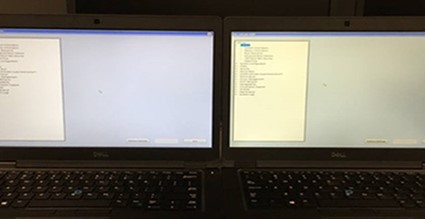
- Dell Technologies does not guarantee uniformity and color accuracy on our displays.
- The U and UP series monitors are pre-calibrated.
When booted to the operating system, the LCD color depends on the color profile. The user can modify the colors within the color profile using Intel Command Center.
Each panel can have different colors depending on the process that the vendor used in manufacturing.
Cause
LCD panels used for our computers are often sourced from different vendors. Dell uses a multi-vendor strategy. Different materials and technology used by different vendors produce different results.
Even if the same vendor uses the same material, the color temperature and chromatic aberration would be slightly different. Manufacturing line production wise, same line and same batch, or different batch also produces different results.
All computers were inspected in the factory before qualified and shipped to the customer. For LCD panels, display RGB results tested by specified optical coloring test machine. The computer will be returned to replace the LCD if it fails.
Resolution
What the customer can do? Use the windows calibration tool, reference How to Calibrate LCD Panel Color Temperature in Windows 11 and Windows 10 to match the color as close as possible or use a third-party spectrometer (for example x-rite, Datacolor, or Spyder) to calibrate both screens to a similar color level.