Intune kan Dell Optimizer versie 4.2.2 niet implementeren wanneer het is gedownload van de Microsoft Store
Summary: Informatie over Intune die Dell Optimizer versie 4.2.2 niet implementeert als deze is gedownload uit de Microsoft Store.
This article applies to
This article does not apply to
This article is not tied to any specific product.
Not all product versions are identified in this article.
Symptoms
Fout bij app-versie heeft geen geldige nieuwste pakketversie
Intune geeft een foutmelding weer: 'De geselecteerde app heeft geen geldige nieuwste pakketversie' (Afbeelding 1).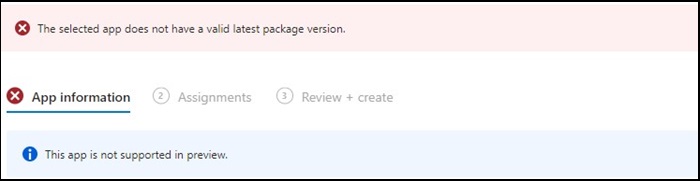
Figuur 1
Opmerking: Exclusief beschikbaar op bepaalde Dell Latitude, Precision, OptiPlex en Rugged pc's.
Cause
Dell Optimizer heeft de Intune-verificatie niet doorstaan die vereist dat apps op alle hardware (Dell en niet-Dell) geïnstalleerd moeten worden.
Resolution
Dell Optimizer handmatig implementeren
Als tijdelijke oplossing kan de IT-beheerder het volgende proberen om Dell Optimizer handmatig te implementeren via Intune.
- Download het Dell Optimizer-installatieprogramma van Dell.com
- Volg de onderstaande instructies:
- Installeer de software met deze opdracht:
Install command: Dell-Optimizer-Application_xxxxx_WIN_x.x.x.x_A00.EXE /passthrough /silent /InstallDotNet=true /FACTORY=TRUE

Opmerking: Om de installatie ongedaan te maken, gebruikt u de volgende opdracht:
Uninstall command: Dell-Optimizer-Application_xxxxx_WIN_x.x.x.x_A00.EXE /passthrough /silent /remove
Affected Products
Alienware, Inspiron, OptiPlex, Vostro, XPS, G Series, G Series, Alienware, Inspiron, Latitude, Vostro, XPS, Fixed Workstations, Mobile WorkstationsArticle Properties
Article Number: 000224821
Article Type: Solution
Last Modified: 17 Jul 2025
Version: 7
Find answers to your questions from other Dell users
Support Services
Check if your device is covered by Support Services.