MIPIカメラを搭載したDell製コンピューターでWindows Hello顔認識が機能しないことがある
Summary: 次の記事では、Windows Hello顔認識エラーの解決方法について説明します。Windows 10またはWindows 11 22H1以前のオペレーティング システムを実行しているコンピューターでは、Mobile Industry Processor Interface (MIPI)カメラが検出されない場合があります。
This article applies to
This article does not apply to
This article is not tied to any specific product.
Not all product versions are identified in this article.
Symptoms
Windows 10およびWindows 11オペレーティング システム バージョン 22H1 以前では、MIPI カメラ検出の問題が発生する場合があります
Windows 10またはWindows 11 22H1(またはそれ以前)のオペレーティング システムを実行しているコンピューターを所有しているユーザーは、Windows Hello顔認識が機能していないことに気付くかもしれません。MIPIカメラを使用している場合は、[ サインイン オプション ]の設定に次のエラー メッセージが表示されます。
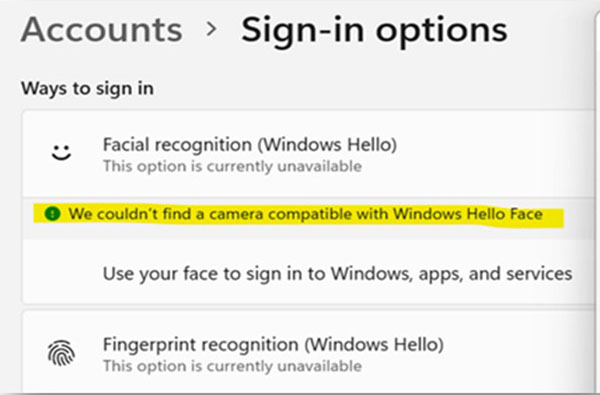
We couldn't find a camera compatible with Windows Hello Face
Cause
これらのバージョンのWindowsオペレーティング システムは、MIPIカメラのESS(拡張サインイン セキュリティ)をサポートしていません。これらのバージョンのWindowsのESSは、USB接続された赤外線(IR)カメラのみをサポートします。
詳細については、次のMicrosoftの記事を参照してください。

Resolution
このエラーは、コンピューターのオペレーティング システムをWindows 11 (22H2)以降にアップデートすることで解決できます。Windows Hello顔認識はMIPIカメラで動作します。最新バージョンのWindowsではESSがデフォルトで有効になっているためです。
お使いのWindowsのバージョンを最新バージョンのWindows 11にアップデートする方法の詳細については、次のMicrosoft記事を参照してください。
Affected Products
Latitude 7350, Latitude 7350 Detachable, Latitude 7450, Latitude 9450 2-in-1, Latitude 7650, Precision 5490, Mobile Precision 5690, XPS 13 9340, XPS 14 9440, XPS 16 9640Article Properties
Article Number: 000225822
Article Type: Solution
Last Modified: 21 Aug 2024
Version: 2
Find answers to your questions from other Dell users
Support Services
Check if your device is covered by Support Services.