DAP: Orchestrator Returns "HTTP 500" Due to Full PostgreSQL PVC
Summary: Dell Automation Platform Orchestrator (DAPO) may fail to load and return HTTP 500 when the PostgreSQL PVC fills with orphan large objects created by repeated FIDO TO0/Global Rendezvous retries in the est_owner_db database. ...
Symptoms
- Orchestrator UI does not load and displays HTTP 500 – Internal Server Error.
- PostgreSQL PVC data-postgres-0 in <orchestrator-namespace> is at 100 % capacity.
- PostgreSQL logs may show invalid WAL record-length errors.
- Multiple pods may be in CrashLoopBackOff, Error, NotReady, or Unknown states.
- FIDO/FDO onboarding workflows (for example, NativeEdge gateway deployment) fail
The PostgreSQL persistent volume claim (PVC) is full. For example, the PVC data-postgres-0 in namespace dapo shows 50Gi capacity and the mounted Longhorn volume shows 100% used.
Check the PVC status:
#kubectl get pvc -n <orchestrator-namespace> data-postgres-0Check disk usage on the mounted volume:
sudo df -h | grep -i <pvc-..> | awk 'BEGIN {printf "%-12s %-12s %-12s %-10s\n","Capacity","Utilized","Available","Usage"} {printf "%-12s %-12s %-12s %-10s\n",$2,$3,$4,$5}'
The cluster may show multiple pods in states such as CrashLoopBackOff, Error, NotReady, or Unknown because the database is unavailable or unstable.
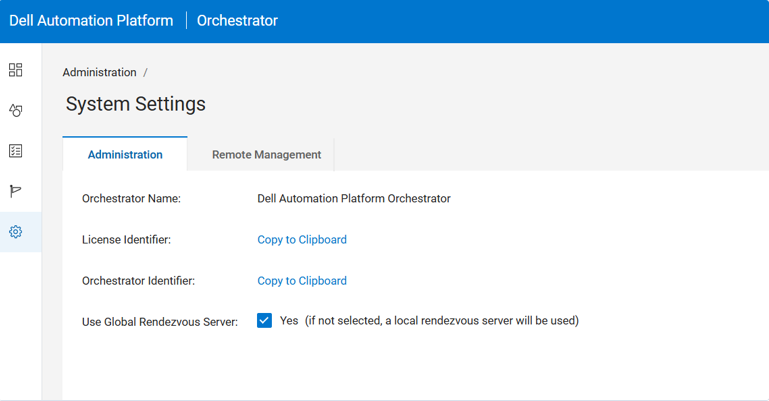
Check the Orchestrator user interface to determine whether Global Rendezvous is enabled.
Cause
When Global Rendezvous is enabled and the cluster cannot reach <global_rendezvous_server>, FIDO or FDO onboarding voucher retries may continue. In this condition, repeated updates to voucher large object data can leave orphan PostgreSQL large objects in pg_largeobject.
The orphan large objects can grow until the PostgreSQL PVC is full. When PostgreSQL cannot write to the volume, the Orchestrator application may return HTTP 500 – Internal Server Error.
This risk applies to environments that use FDO voucher onboarding with Global Rendezvous enabled and do not have working connectivity to <global_rendezvous_server>. Air-gapped environments should keep Global Rendezvous disabled.
Resolution
Permanent Solution:
The permanent solution will be included in the next Dell Automation Platform release.
Temporary Workaround:
Increase the PostgreSQL PVC, disable Global Rendezvous immediately, and remove orphaned PostgreSQL Large Objects (LOBs) by running the cleanup script.
1. Take a VM snapshot before making any changes.
2. Increase the PostgreSQL PVC
#kubectl get pod postgres-0 -n <orchestrator-namespace>

#kubectl get pvc data-postgres-0 -n <orchestrator-namespace> -o custom-columns='NAME:.metadata.name,REQUESTED:.spec.resources.requests.storage,ACTUAL:.status.capacity.storage,STATUS:.status.phase'

#kubectl patch pvc data-postgres-0 -n <orchestrator-namespace> -p '{"spec":{"resources":{"requests":{"storage":"100Gi"}}}}'

#kubectl delete pod postgres-0 -n <orchestrator-namespace>

Wait for the PostgreSQL pod to come up.

#kubectl get pvc data-postgres-0 -n <orchestrator-namespace> -o custom-columns='NAME:.metadata.name,REQUESTED:.spec.resources.requests.storage,ACTUAL:.status.capacity.storage,STATUS:.status.phase'
3. Disable Global Rendezvous immediately
In the Orchestrator UI, go to Settings > Global RV and disable Global Rendezvous.

For air-gapped installations, keep Global Rendezvous disabled.
4. Run the cleanup script
1. Dry run - checks what will be cleaned without deleting anything
#./fdo-lob-cleanup.sh --dry-run

2. Background run - runs the cleanup even if the SSH session disconnects
#nohup ./fdo-lob-cleanup.sh > ./fdo-lob-cleanup-$(date +%F-%H%M%S).log 2>&1 &

3. Save PID - saves the background process ID for later status checks
#echo $! > ./fdo-lob-cleanup.pid

4. Monitor - shows the latest cleanup log in real time
#tail -f $(ls -1t ./fdo-lob-cleanup-*.log | head -1)

5. Check process - confirms whether the cleanup is still running
#ps -fp $(cat ./fdo-lob-cleanup.pid)

6. If the process is still running - continue monitoring the latest log
#tail -f $(ls -1t ./fdo-lob-cleanup-*.log | head -1)

7. Re-run the dry run after cleanup completes - verifies whether orphan LOBs still remain
#./fdo-lob-cleanup.sh --dry-run
Additional Information