CloudBoost:自訂非對稱加密金鑰
Summary: 如何產生和設定自訂的非對稱加密金鑰,以加密 CloudBoost 裝置上的資料。
This article applies to
This article does not apply to
This article is not tied to any specific product.
Not all product versions are identified in this article.
Instructions
可使用 CloudBoost 裝置可設定為使用者產生的自訂非對稱加密金鑰,以加密裝置備份。
只有在提供正確的私鑰時,使用非對稱金鑰加密的備份才能恢復。
若要設定 CloudBoost 要使用非對稱加密金鑰,
這是裝置組態頁面上的最後一個選項。
勾選方塊以啟用:

若要產生 Rivest-Sharmir-Adleman (RSA) 金鑰對:
1.執行下列命令:
ssh-keygen -t rsa -f private_key_name
2.輸入密碼片語。
3.執行下列命令:
openssl rsa -in private_key_name -pubout -out public_key_name
4.輸入步驟 2 中的密碼片語。
5.檢索公鑰的內容:
cat public_key_name
6.複製檔案的內容。
-
開頭為 -----BEGIN OPEN KEY----- (第一行)
-
以 -----END CONNECT KEY-----結束 (最後一行)
7.將公開金鑰貼至組態頁面上的方塊。
範例:
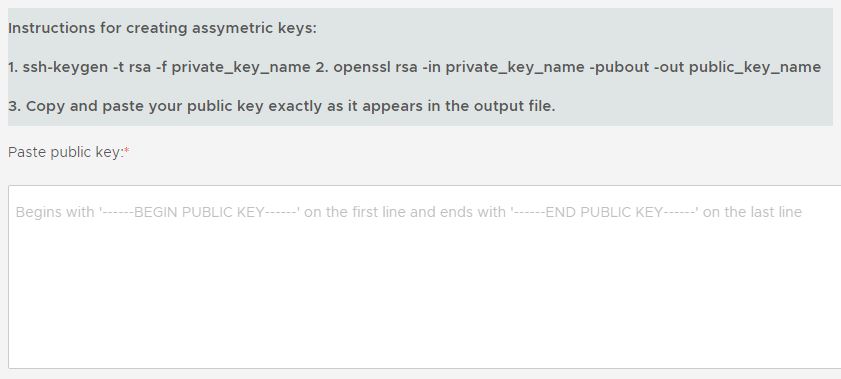
組態完成後,請下載 recovery.metadata key 根據 UI 的提示:
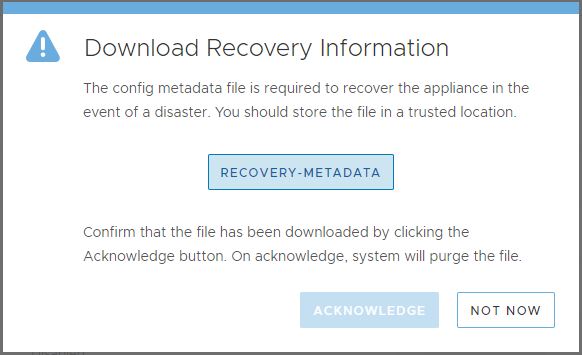
警示:請確定此檔案儲存在安全的位置。
Additional Information
警示:裝置災難回復需要這些金鑰。
將這些金鑰保存在安全的位置。
否則會導致資料無法使用 (DU) 或資料遺失 (DL) 的情況。
將這些金鑰保存在安全的位置。
否則會導致資料無法使用 (DU) 或資料遺失 (DL) 的情況。
Affected Products
CloudBoost Virtual ApplianceProducts
CloudBoost, CloudBoost Virtual ApplianceArticle Properties
Article Number: 000008943
Article Type: How To
Last Modified: 16 Mar 2026
Version: 4
Find answers to your questions from other Dell users
Support Services
Check if your device is covered by Support Services.