NMM:SQL 备份失败,并显示错误“0x80070005 received on CreateVssBackupComponents”
Summary: NetWorker Module for Microsoft (NMM) SQL 备份失败,并显示错误“0x80070005 received on CreateVssBackupComponents”
This article applies to
This article does not apply to
This article is not tied to any specific product.
Not all product versions are identified in this article.
Symptoms
数据库、实例或可用性组的 SQL 备份无法抛出以下错误:
savefs: Error 0x80070005 received on CreateVssBackupComponents.
savefs: Failed to determine if volume is a mounted snapshot
Cause
错误代码0x80070005表示访问被拒绝。因此,根据上述错误,在用于备份客户端的客户端资源的“远程用户”和“密码”属性中指定的用户没有足够的权限来备份指定的存储集。
Resolution
在执行备份和恢复之前,请确保拥有以下权限:
授予 NMM 备份进程用于连接到 SQL Server 的 Windows 登录帐户以下角色:
- 用于发出 T-SQL BACKUP 查询的 SQL Server 系统管理员 (sysadmin) 角色。
- SQL Server sysadmin 角色,用于在初始化 VDI 时打开共享内存句柄。
确保 NMM 管理员是以下项目的成员:
- 本地备份操作员组
- 本地管理员组
为这些用户帐户禁用用户帐户控制 (UAC),请执行以下步骤:
- 打开本地安全策略 (
secpol.msc) 在客户端上。 - 转至本地策略 -> 安全选项。
- 更改用户帐户控制:提升行为会提示管理员批准模式下的管理员在不提示的情况下提升权限。
- 禁用用户帐户控制:在管理员批准模式下运行所有管理员。
- 重新启动计算机。
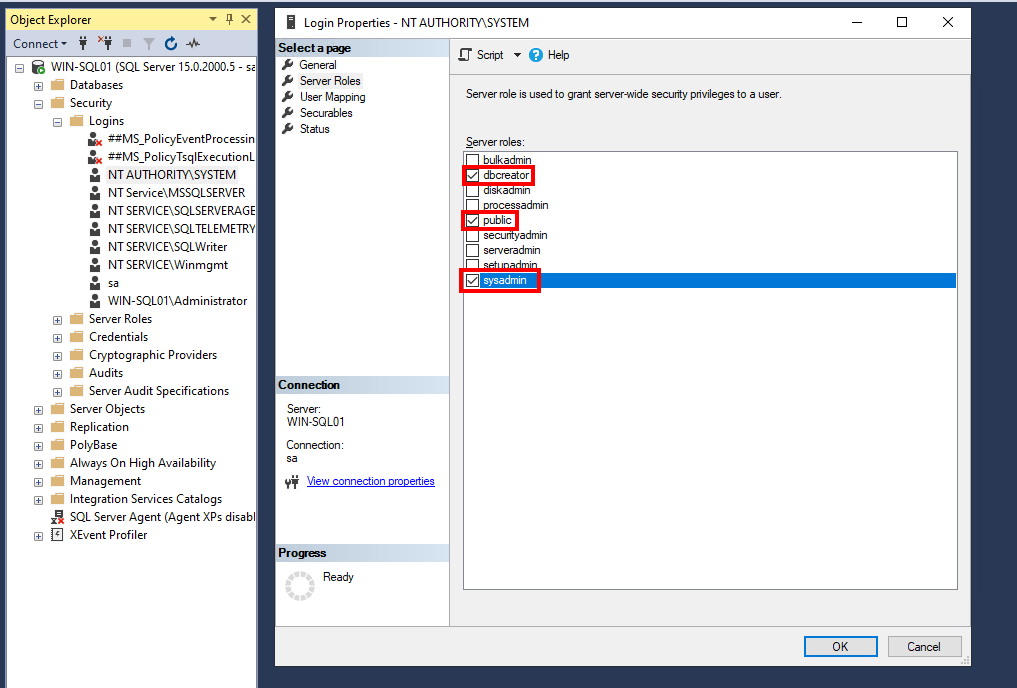
在“SQL Management Studio -> 安全性 -> 登录 -> 登录属性”页中,授予 SQL Server 系统 dbcreator开始, public以及 sysadmin Windows 登录账号的权限,如下图所示。向 NTAUTHORITY\SYSTEM 用户身份登录。
Additional Information
有关要求的其他信息:请参阅
文章编号 000516598- SQL Server VDI 备份的 NMM 9.x 要求指南
文章编号 000516598- SQL Server VDI 备份的 NMM 9.x 要求指南
Affected Products
NetWorker, NetWorker Module for MicrosoftProducts
NetWorker Series, NetWorker Module, NetWorker Module for MicrosoftArticle Properties
Article Number: 000034997
Article Type: Solution
Last Modified: 01 Apr 2026
Version: 5
Find answers to your questions from other Dell users
Support Services
Check if your device is covered by Support Services.