Precision 7550 计算机可视指南
Summary: 本文是 Precision 7550 移动工作站外部端口和功能的可视指南。
This article applies to
This article does not apply to
This article is not tied to any specific product.
Not all product versions are identified in this article.
Instructions
下文提供 Precision 7550 移动工作站的可视指南,并列出您的笔记本电脑的外部端口和功能。
提醒:有关更详细的说明,请参阅产品指南,网址为 www.dell.com/support
目录:
前视图
带有 RGB 摄像头的显示屏视图

图 1:前视图:带 RGB 摄像头的显示屏
| 1 | 麦克风 | 2 | 摄像头 |
| 3 | 摄像头 LED | 4 | 麦克风 |
| 5 | 显示屏 | 6 | 电池状态 LED |
带有 IR 摄像头的显示屏视图
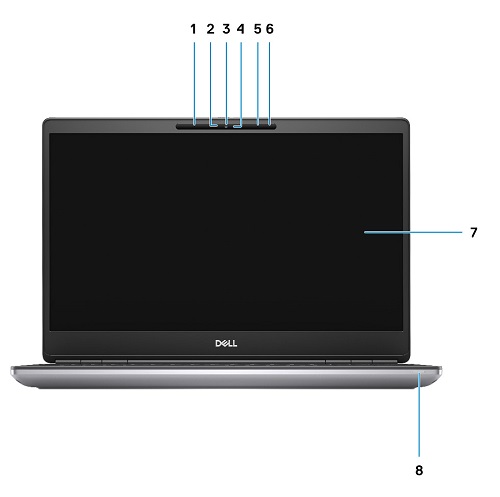
图 2:前视图:带红外摄像头的显示屏
| 1 | 麦克风 | 2 | IR 摄像头传感器 |
| 3 | 摄像头 | 4 | 摄像头 LED |
| 5 | 麦克风 | 6 | 接近传感器 |
| 7 | 显示屏 | 8 | 电池状态 LED 指示灯 |
顶视图
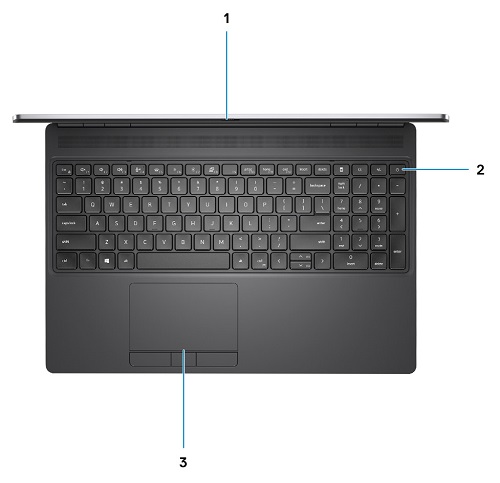
图 3:顶视图
| 1 | 摄像头快门 | 2 | 电源按钮(带可选指纹读取器) |
| 3 | 触控板 |
底部视图

图 4:底部视图
| 1 | 服务编号标签 | 2 | 风扇通风孔 |
后视图
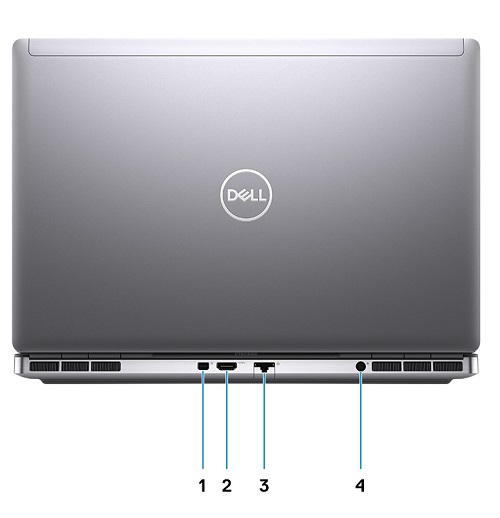
图 5:后视图
| 1 | Mini DisplayPort 1.4 | 2 | HDMI 2.0 端口 |
| 3 | 网络端口 | 4 | 电源适配器端口 |
左侧视图
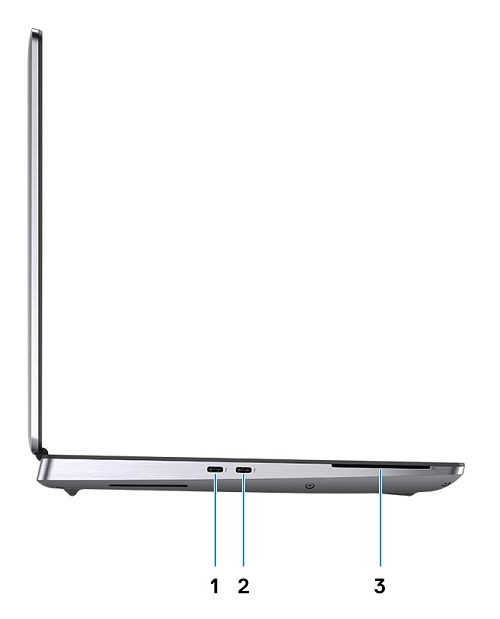
图 6:左侧视图
| 1 | USB 3.2 Gen 2 Type-C Thunderbolt 3 端口 | 2 | USB 3.2 Gen 2 Type-C Thunderbolt 3 端口 |
| 3 | 智能读卡器(可选) |
右侧视图
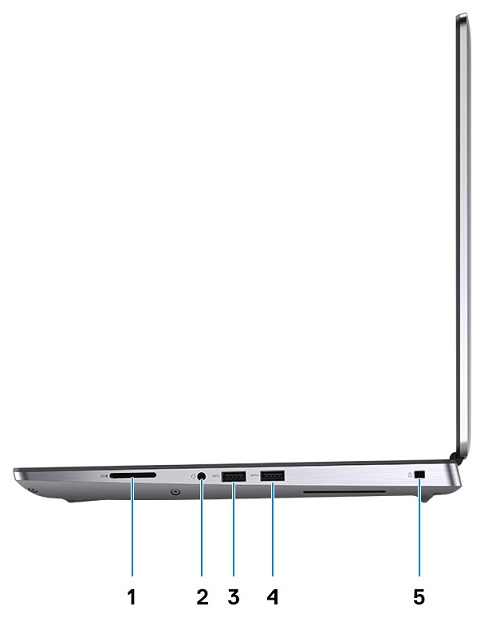
图 7:右侧视图
| 1 | SD 卡插槽 | 2 | 耳机和/或麦克风端口 |
| 3 | USB 3.2 Gen 1 Type-A 端口 | 4 | 具备 PowerShare 功能的第一代 USB 3.2 Type-A 端口 |
| 5 | 楔形防盗锁插槽 |
交流适配器视图

图 8:电源适配器 180 W 套筒类型
| 描述 | 数值 |
| 类型 | 180 W 电源适配器 |
| 输入电压 | 100 VAC至240 VAC |
| 输出电流 | 9.23 A |
| 输出功率 | 180 W |
| 输出电压 | 19.50 VDC |
其它信息:
Affected Products
Precision 7550Article Properties
Article Number: 000130468
Article Type: How To
Last Modified: 04 Jun 2025
Version: 5
Find answers to your questions from other Dell users
Support Services
Check if your device is covered by Support Services.