在断开连接模式下运行的 Dell Security Management Server Virtual 尝试从云中提取更新
Summary: 本文提供有关在 Dell Security Management Server Virtual 尝试从云而不是本地存储库提取更新时如何将 Dell Security Management Server Virtual 定向回本地存储库的说明。
This article applies to
This article does not apply to
This article is not tied to any specific product.
Not all product versions are identified in this article.
Symptoms
受影响的产品:
- Dell Security Management Server Virtual
受影响的版本:
- v9.11 至 10.2.8
Cause
不适用
Resolution
- 登录 方式
dellsupport到 Dell Security Management Server Virtual。
 提醒:
提醒:- Dell Security Management Server Virtual 的默认凭据为:
- Username:
dellsupport - 密码:
dellsupport
- Username:
- 管理员可以更改产品的虚拟设备菜单中的默认密码。
- 如果登录到管理控制台,请按 ALT + Q 退出登录屏幕。
- Dell Security Management Server Virtual 的默认凭据为:
- 键入
sudo nano /etc/opt/dell/console/application.properties然后按 Enter。

- 使用箭头键向下滚动至 disconnected.mode= 。
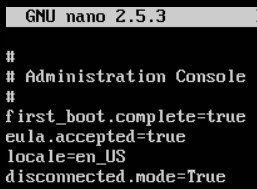
- 在 disconnected.mode=,删除
True和类型true。
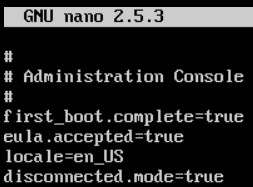
- 按 Type CTRL + X 退出。在提示保存时,按 Y 以继续。

- 按 Enter 键保存文件而不更改名称。

- 键入
sudo nano /opt/dell/server/security-server/conf/application.properties然后按 Enter。

- 使用箭头键向下滚动至 disconnected.mode= 。
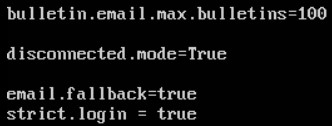
- 在 disconnected.mode=,删除
True和类型true。
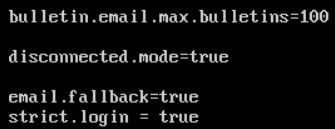
- 按 CTRL + X 退出。在提示保存时,按 Y 以继续。

- 按 Enter 键保存文件而不更改名称。

- 键入
exit然后按 Enter。

要联系支持部门,请参阅 Dell Data Security 国际支持电话号码。
转至 TechDirect,在线生成技术支持请求。
要获得更多见解和资源,请加入戴尔安全社区论坛。
Affected Products
Dell EncryptionArticle Properties
Article Number: 000130886
Article Type: Solution
Last Modified: 23 Jul 2024
Version: 11
Find answers to your questions from other Dell users
Support Services
Check if your device is covered by Support Services.