什麼是 Alienware OSD 應用程式
Summary: Alienware On-Screen Display (OSD) 應用程式可透過 Windows 通知,在筆記型電腦上顯示自訂訊息。
This article applies to
This article does not apply to
This article is not tied to any specific product.
Not all product versions are identified in this article.
Instructions
什麼是 Alienware OSD 應用程式?
Alienware On-Screen Display (OSD) 應用程式可透過 Windows 通知顯示自訂訊息。(它們顯示在螢幕的右下角。
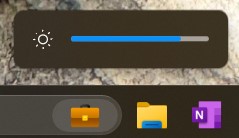
受影響的平台:
- Alienware Area-51m
- Alienware Area-51m R2
- Alienware m15 R2
- Alienware m15 R3
- Alienware m15 R4
- Alienware m15 Ryzen Edition R5
- Alienware m17 R2
- Alienware m17 R3
- Alienware m17 R4
- Alienware m17 R5 AMD
- Alienware x14
- Alienware x15 R1
- Alienware x15 R2
- Alienware x17 R1
- Alienware x17 R2
注意:自 2023 年起發行的 Alienware 筆記型電腦不需要個別的 Alienware OSD 應用程式。
解除安裝 Alienware OSD 應用程式後會發生什麼事?
如果未安裝 Alienware OSD 應用程式,就不會收到其他筆記型電腦專用的通知。這些通知有助於更好地瞭解筆記型電腦的操作。
注意:重要:Alienware OSD 應用程式不會影響筆記型電腦的效能或功能。
是否可下載 Alienware OSD 應用程式?
是,您可以在以下網址下載 Alienware OSD 應用程式:Dell 驅動程式與下載頁面
Affected Products
Alienware Area-51m, Alienware Area-51m R2, Alienware M15 R2, Alienware M15 R3, Alienware m15 R4, Alienware m15 Ryzen Edition R5, Alienware M17 R2, Alienware M17 R3, Alienware m17 R4, Alienware m17 R5 AMDProducts
Alienware x14, Alienware x15 R1, Alienware x15 R2, Alienware x17 R1, Alienware x17 R2Article Properties
Article Number: 000177587
Article Type: How To
Last Modified: 15 Jun 2026
Version: 9
Find answers to your questions from other Dell users
Support Services
Check if your device is covered by Support Services.