Alienware m15 R7 AMD, m17 R5 AMD, and Dell G15 5525 External Video Mode Changes Abnormally when Using a USB Type-C to HDMI Dongle
Summary: Information about the external video mode changing abnormally when using a USB Type-C to HDMI video dongle.
This article applies to
This article does not apply to
This article is not tied to any specific product.
Not all product versions are identified in this article.
Symptoms
When an external monitor is connected with a USB Type-C to HDMI dongle, the video will automatically change to extended mode even if a duplicate or second screen mode is wanted. This behavior happens with BIOS version 1.4.3 installed on the Alienware m15 R7 AMD, m17 R5 AMD, or Dell G15 5525.
Note: This only affects AMD models and non-AMD models DO NOT have this issue.
Cause
Possible issue with Windows Virtualization-Based Security (VBS).
Resolution
Disable VBS
The issue disappears when the VBS feature is disabled. The VBS feature is disabled by default, but the following steps can be used to check and disable the VBS option if its enabled.
- Boot to Windows.
- Press the "Windows" key on your keyboard and type: "Core Isolation"
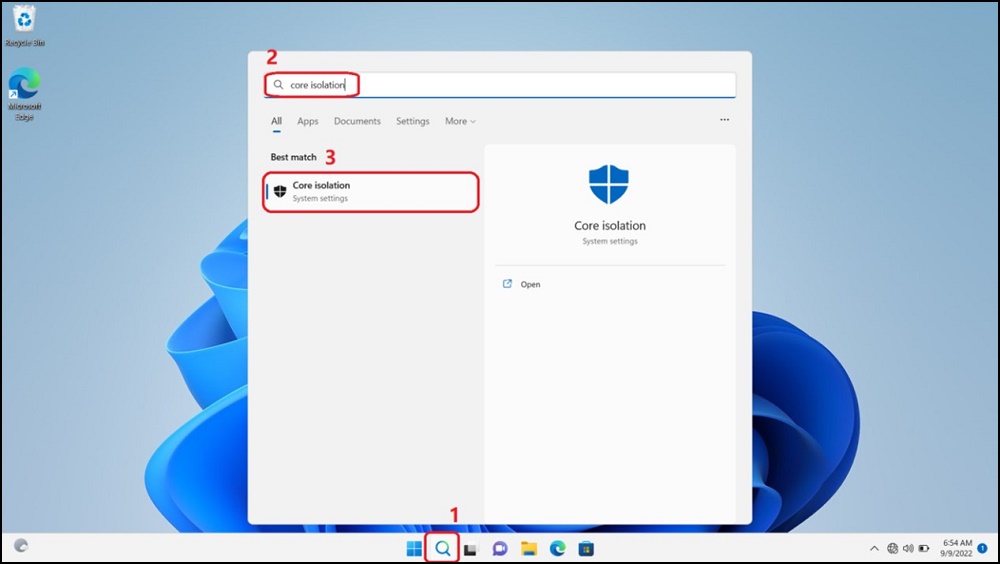
- In the "Core Isolation" window, check if the "Memory integrity (VBS)" option is On.

- If the option is On, switch "Memory integrity (VBS)" to turn it Off. The computer requires a restart.

- Reboot the computer.
- Open "Control Panel," then choose "Uninstall a Program."

- Choose "Turn Windows features on or off."
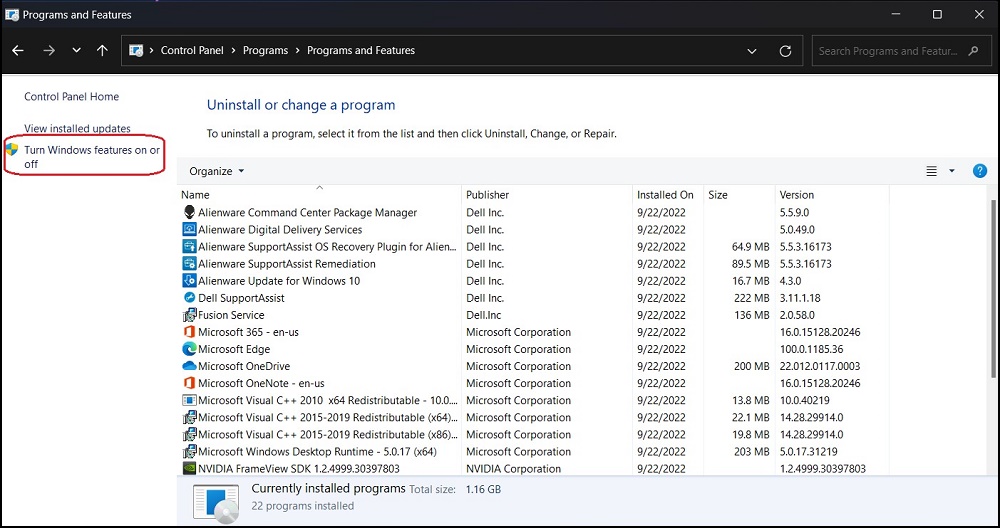
- In "Windows Features," uncheck "Virtual Machine Platform" and click "OK," the computer requires a reboot.

- Reboot the computer and VBS will be turned off.
Affected Products
Alienware m15 R7 AMD, Alienware m17 R5 AMD, Dell G15 5525Article Properties
Article Number: 000204207
Article Type: Solution
Last Modified: 23 Apr 2025
Version: 5
Find answers to your questions from other Dell users
Support Services
Check if your device is covered by Support Services.