Dell Connected Service Delivery BIOS 更新可能需要第二次重新開機
Summary: 在 BIOS 更新後,可能需要第二次系統重新開機的相關資訊,才能啟用 Dell Connected Service Delivery (DCSD) 虛擬裝置,並使用 Windows Update 觸發軟體安裝。
This article applies to
This article does not apply to
This article is not tied to any specific product.
Not all product versions are identified in this article.
Symptoms
使用 DCSD 功能安裝或更新 BIOS 之後:
- 虛擬裝置 ACPI\DELL0033\2&DABA3FF&0 可能不會出現在「裝置管理員」中。
- 該裝置應列為未知 裝置 ,並顯示黃色警告圖示。
- 如果找不到虛擬裝置, SupportAssist 電腦分析 等 DCSD 相關軟體可能不會自動安裝。
預期的行為是在 BIOS 安裝或更新後,虛擬裝置會立即出現在裝置管理員中。顯示後,Windows Update 便會偵測裝置並安裝所需的 DCSD 軟體元件。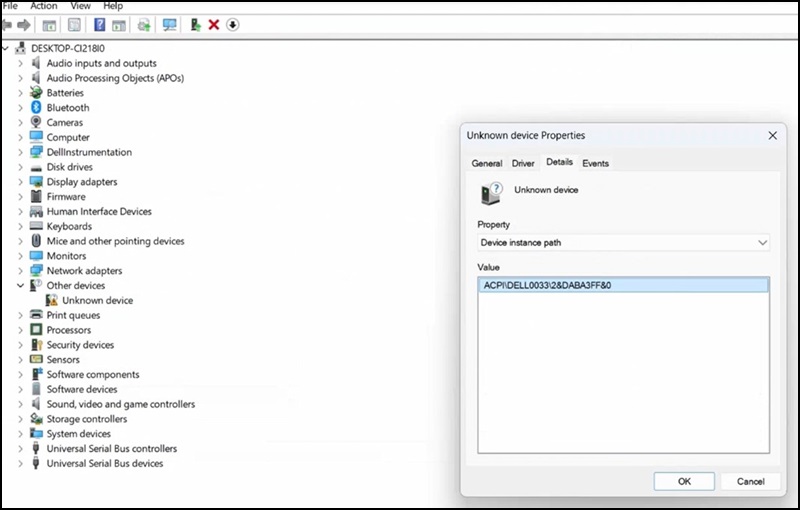
受影響的系統:
- Vostro 3710
- Vostro 3910
針對受影響的 Vostro 平台,測試顯示虛擬裝置直到第二次重新開機後才會出現。此延遲偵測使 Windows Update 無法啟動軟體安裝。
Cause
沒有可用的原因資訊。
Resolution
裝置管理員中的未知裝置
如果 BIOS 安裝或更新後,虛擬裝置未出現在「裝置管理員」中:
- 再次重新啟動系統。
- 重新開機後,請檢查裝置管理員是否有黃色警告圖示的未知裝置 (ACPI\DELL0033\2&DABA3FF&0)。
- 偵測到之後,Windows Update 會自動安裝所需的 DCSD 軟體元件。
注意:此行為已在上面列出的系統上得到確認,並可能適用於支援 DCSD 的其他系統。
Affected Products
Vostro 3710, Vostro 3910Article Properties
Article Number: 000367374
Article Type: Solution
Last Modified: 18 Dec 2025
Version: 2
Find answers to your questions from other Dell users
Support Services
Check if your device is covered by Support Services.