Dell Unity: What is LUN Z
Summary: When a Broadcom (VMware) host is used with a Dell Unity storage system, both Host Logical Unit Number 0 (LUN 0) and Logical Unit Number Zero (LUN Z) may be present. This article explains what LUN Z is, why it appears, and how to remove it. ...
This article applies to
This article does not apply to
This article is not tied to any specific product.
Not all product versions are identified in this article.
Symptoms
What is LUN Z?
LUN Z is a fake logical unit zero presented to the host by the storage system. It provides a path for host software to send configuration commands to the array when no physical logical unit zero is available to the host. LUN Z is a nonusable LUN that represents the initiators of the Dell Unity array and always appears when there are no LUNs configured.
Cause
Why does LUN Z appear?
LUN Z can appear in several scenarios:
- When an unregistered initiator from the host is not connected to a Storage Group.
- When a host initiator is connected to an empty Storage Group.
- When a host initiator is not connected to any Storage Group.
- When there are no LUNs bound on the array
Resolution
How to remove LUN Z from your host.
To remove LUN Z from your host, try the following options:
- Create a LUN 0 in the Dell Unity storage group:
Present a LUN 0 to the host from the Dell Unity storage group. This replaces the LUN Z with the real Host LUN 0.
- Unzone the Unity array initiators:
If the Unity array is not in use with the specific host, unzone the Dell Unity array initiators from the specific host initiators by unzoning in the fabric switches.
- Disable LUN Z from Dell Unity:
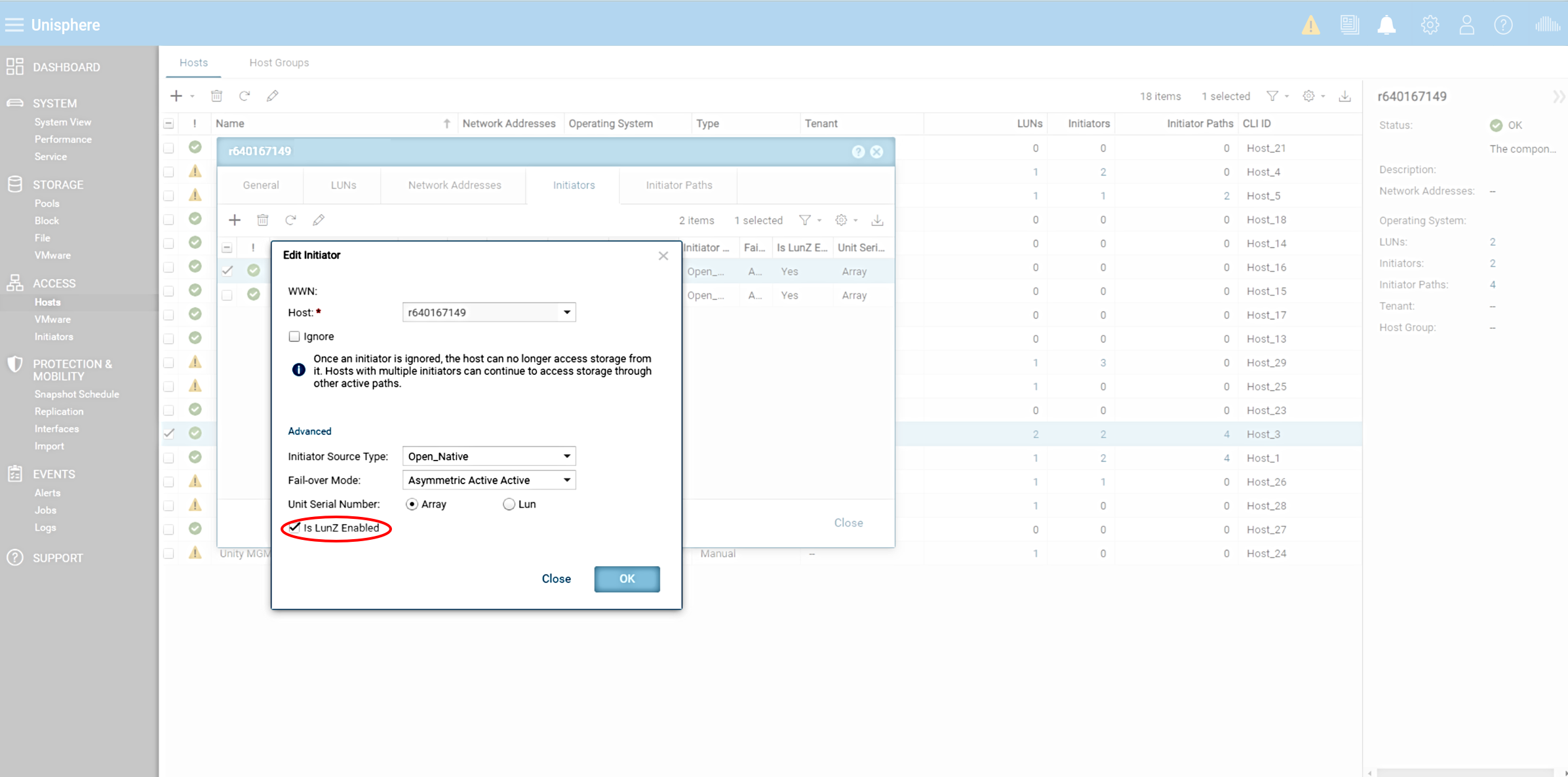
Log in to Unisphere, select the host, go to the initiators tab, double-click the initiator, scroll to the end, click advanced, and clear the LUN Z enabled box.
Additional Information
Important Notes
- Rescanning the host's VMHBAs twice may be necessary to replace LUN Z with the real Host LUN 0.
- An ESXi host reboot automatically changes the LUN Z into real Host LUN 0 if present.
- LUN Z is an initiator property, not a storage group property.
- Disabling LUN Z does not have an impact on the host or array performance.
By following these steps, LUN Z can be removed from the host and the storage system can be configured correctly. If further questions or concerns arise, the Dell Support Portal should be referenced for the latest information and guidance.
Affected Products
Dell EMC Unity 300F, Dell EMC Unity 350F, Dell EMC Unity 400, Dell EMC Unity 400F, Dell EMC Unity 450F, Dell EMC Unity 500, Dell EMC Unity 500F, Dell EMC Unity 550F, Dell EMC Unity 600, Dell EMC Unity 600FProducts
Dell EMC Unity, Dell EMC Unity XT 380, Dell EMC Unity XT 380F, Dell EMC Unity XT 480, Dell EMC Unity XT 480F, Dell EMC Unity 650F, Dell EMC Unity XT 680, Dell EMC Unity XT 680F, Dell EMC Unity XT 880, Dell EMC Unity XT 880F
, Dell EMC Unity Family |Dell EMC Unity All Flash, Dell EMC Unity Hybrid
...
Article Properties
Article Number: 000376258
Article Type: Solution
Last Modified: 01 Oct 2025
Version: 1
Find answers to your questions from other Dell users
Support Services
Check if your device is covered by Support Services.