Dell 노트북에서 Windows Studio 효과 누락
Summary: Dell 노트북에서 누락된 Windows Studio Effects를 복원하는 방법에 대해 알아보십시오.
This article applies to
This article does not apply to
This article is not tied to any specific product.
Not all product versions are identified in this article.
Symptoms
Windows Studio 효과 옵션이 설정의 USB 비디오 디바이스 섹션에서 누락될 수 있습니다.
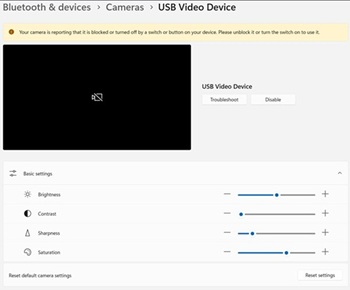
해당되는 플랫폼:
- Dell 14 DC14255
- Dell Pro 14 Essential PV14255
- Dell Pro 14 PC14255
- Dell Pro 16 PC16255
Cause
사용 가능한 원인 정보가 없습니다.
Resolution
- 장치 관리자를 엽니다. Camera AI Effect Opt-out을 마우스 오른쪽 버튼으로 클릭하고 Uninstall device를 선택합니다.
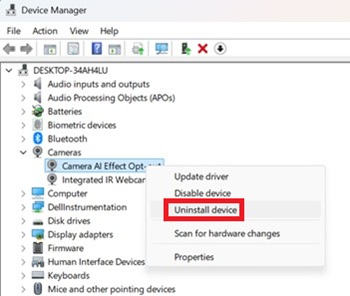
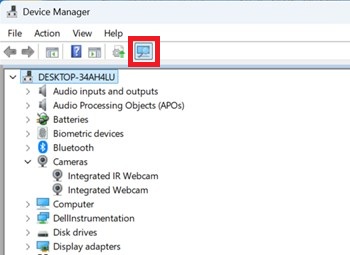
- 스캔 버튼을 눌러 내장형 IR 웹캠 이 있는지 확인합니다.
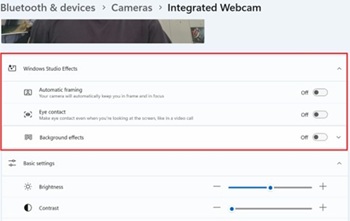
- 설정에서 Windows 스튜디오 효과 옵션을 사용할 수 있는지 확인합니다.
Affected Products
Dell 14 DC14255, Dell Pro 14 PC14255, Dell Pro 16 PC16255, Dell Pro 14 Essential PV14255Article Properties
Article Number: 000407521
Article Type: Solution
Last Modified: 09 Jan 2026
Version: 1
Find answers to your questions from other Dell users
Support Services
Check if your device is covered by Support Services.