Windows Studio-effekter mangler på en bærbar Dell-computer
Summary: Få mere at vide om, hvordan du gendanner Windows Studio-effekter, der mangler på en bærbar Dell-pc.
This article applies to
This article does not apply to
This article is not tied to any specific product.
Not all product versions are identified in this article.
Symptoms
Windows Studio Effects-indstillinger mangler muligvis i afsnittet USB-videoenhed i Indstillinger.
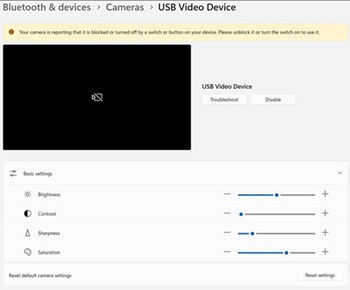
Berørte platforme:
- Dell 14 DC14255
- Vigtige Dell Pro 14-PV14255
- Dell Pro 14 PC14255
- Dell Pro 16 PC16255
Cause
Ingen tilgængelige oplysninger om årsag.
Resolution
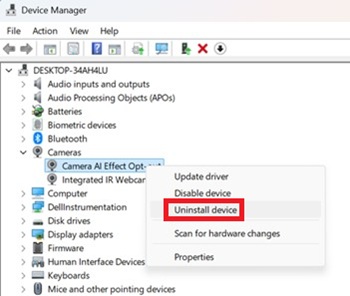
- Åbn Enhedshåndtering. Højreklik på Fravalg af Camera AI Effect, og vælg Afinstaller enhed.
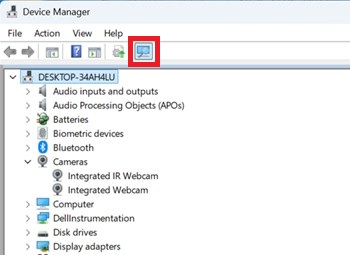
- Tryk på scanningsknappen for at sikre, at der findes et integreret IR-webkamera .
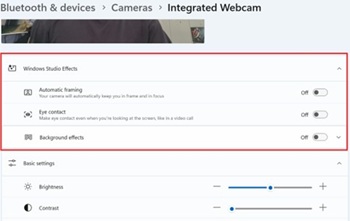
- Bekræft, om indstillingerne for Windows Studio-effekter er tilgængelige under Indstillinger.
Affected Products
Dell 14 DC14255, Dell Pro 14 PC14255, Dell Pro 16 PC16255, Dell Pro 14 Essential PV14255Article Properties
Article Number: 000407521
Article Type: Solution
Last Modified: 09 Jan 2026
Version: 1
Find answers to your questions from other Dell users
Support Services
Check if your device is covered by Support Services.